

The worst version of a forecast anomaly isn't the anomaly itself. It's the hour and a half of Slack threads, screen shares, and "wait, which report are you looking at?" that eats up the time you needed to actually figure out what broke. By the time someone produces an answer, the CRO has already walked into the exec meeting carrying a number they can't defend.
This is a time-boxed SOP for exactly that situation: your committed forecast, pipeline coverage, or ARR roll-up moved in a way nobody expected, and you have roughly two hours to figure out whether it's real, whether it's a data problem, and what you tell leadership. It's built for revenue ops, sales ops, and CS ops people who get pinged first and are expected to produce clarity fast.
What makes this different from a generic incident runbook is the sequencing. You don't start by investigating everything. You start by ruling out the three or four things that cause the vast majority of forecast swings, then widen only if those come up clean. Everything below is ordered the way you'd actually run it under a clock.
The clock starts: what "triage" means in the first 10 minutes
Before any SQL, you need to answer one question: is this a data problem or a business problem? Those two paths look identical in a dashboard and require completely different responses.
A business problem is a deal that actually slipped, a renewal that actually churned, a region that actually underperformed. A data problem is a pipeline job that double-counted, a stage mapping that changed, a currency conversion that broke, or a sync that half-finished. The SOP exists to separate these two as fast as possible — because telling an exec "we lost $400k in commit" when the real answer is "a dedupe job ran twice" is the kind of mistake that costs you credibility for a quarter.
In the first 10 minutes, you're doing three things only:
-
Freeze the comparison. Snapshot the current anomalous number and the last-known-good number. Write down both, with timestamps. You'll reference these constantly and you don't want them shifting under you mid-investigation.
-
Confirm the scope. Is this one segment, one region, one rep, or the whole roll-up? A single-cell anomaly and a global one have very different causes.
-
Assign a single driver. One person runs the triage. Everyone else feeds them. Parallel investigation without a lead is how you end up with four conflicting theories and no memo.
Most teams waste the first 30 minutes because nobody owns the investigation. Three people independently pull the same report, get slightly different numbers because they filtered differently, and suddenly you're debating the debate. Assign the driver first.
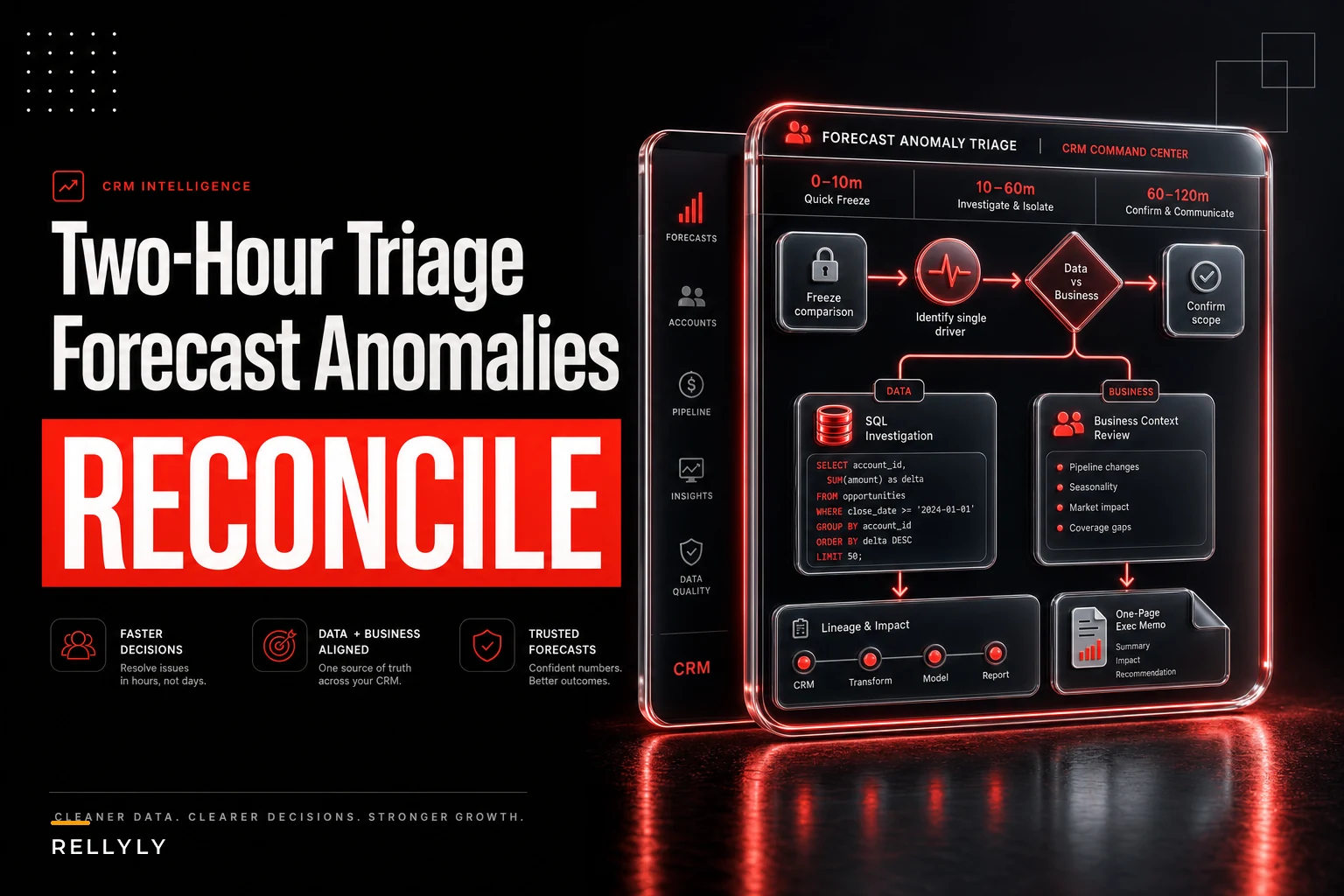
Quick visual of the initial triage workflow:
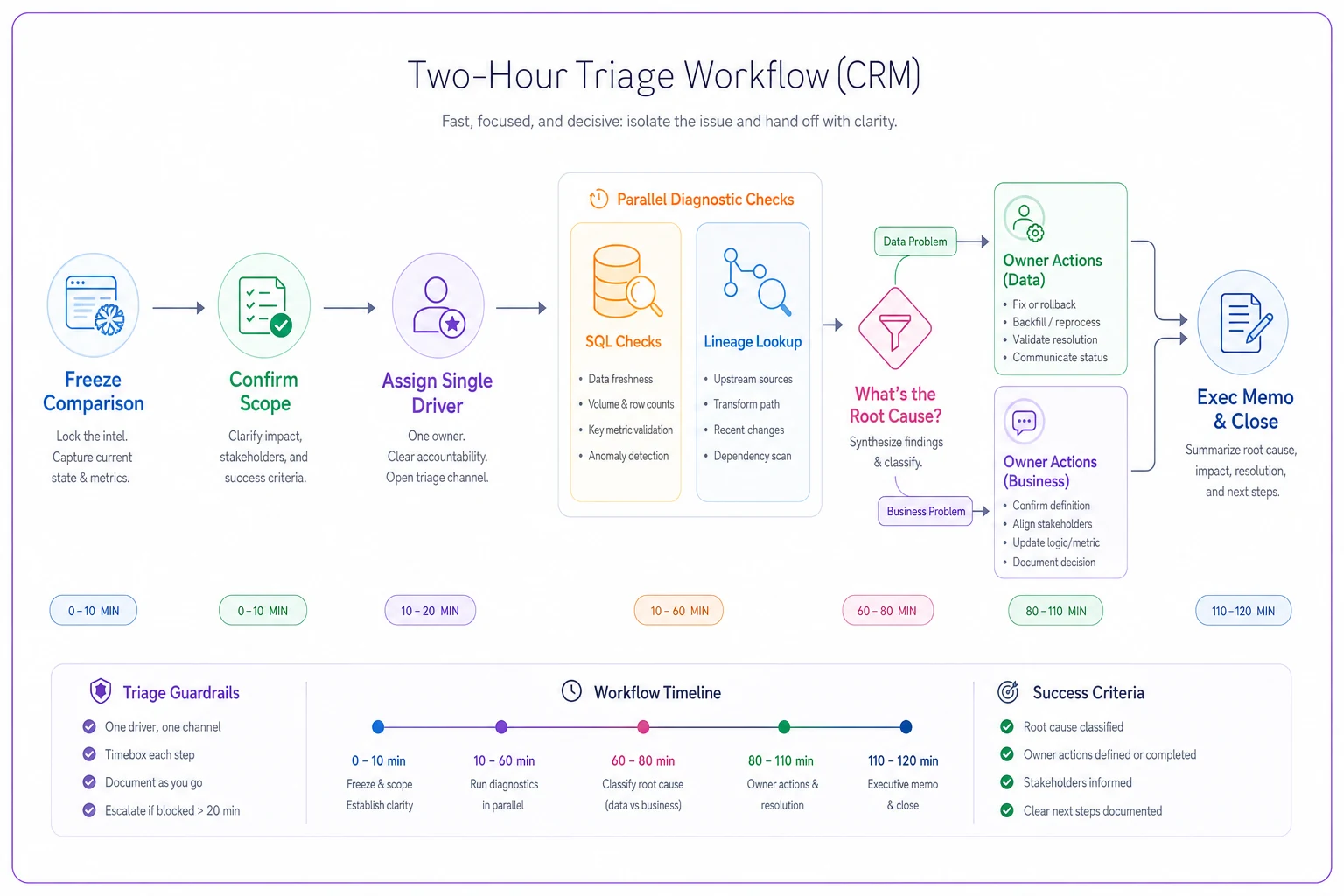
Use this flow as your checklist while the driver runs checks and routes owners.
Top-priority SQL checks (run these before anything else)
These are the queries that catch the most common causes of a forecast swing. Run them in order. The goal is diagnostic triage, not forensics — you're looking for the one that lights up red.
Never miss a customer touchpoint again.
Rellyly helps you manage contacts, tasks, and sales efficiently in one platform.
- Unified customer profiles
- Automated follow-ups
- Sales pipeline tracking
No credit card required
Assume a reasonably standard warehouse model with opportunities, opportunityhistory, and a pipelinesnapshots table. Adjust names to your schema.
Check 1 — Row count delta vs. last snapshot. The fastest way to catch a double-run or a dropped load.
SELECT snapshotdate, COUNT(*) AS oppcount, SUM(amount) AS totalamount FROM pipelinesnapshots WHERE snapshotdate IN (CURRENTDATE, CURRENTDATE - INTERVAL '1 day') GROUP BY snapshotdate ORDER BY snapshot_date;
If opp_count jumped by thousands or doubled cleanly, you almost certainly have a duplication problem, not a sales problem. Stop and check the load job.
Check 2 — Stage distribution shift. Catches stage remapping or a bulk stage update someone ran in the CRM.
SELECT stagename, COUNT(*) AS deals, SUM(amount) AS amount FROM opportunities WHERE isopen = TRUE GROUP BY stage_name ORDER BY amount DESC;
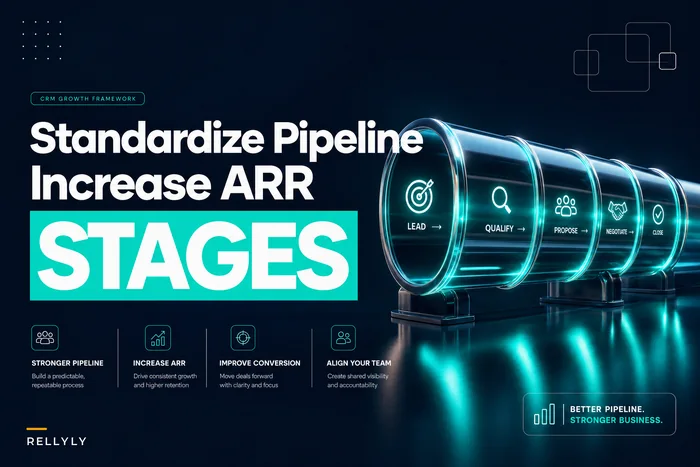
Compare against yesterday. If a whole band of deals moved from "Commit" to "Best Case" — or vanished from open entirely — you've found your swing. This is where unstandardized stages bite hardest. If your definitions drift, your forecast drifts with them. We've written separately about why you have to standardize pipeline stages for ARR accuracy, and this check is exactly where that work pays off.
Check 3 — Large-deal movement. In most mid-market and enterprise forecasts, a handful of deals drive the swing.
SELECT o.oppid, o.accountname, o.amount, o.stagename, o.closedate, o.ownername FROM opportunities o WHERE o.amount > 50000 AND o.lastmodified >= CURRENT_DATE - INTERVAL '1 day' ORDER BY o.amount DESC;
If three deals worth a combined $380k changed close dates or stages yesterday, your anomaly is real and explainable in one sentence. This is often your best-case outcome: the number moved because the business moved, and you can name the accounts.
Check 4 — Null and currency sanity. Catches the silent killers.
SELECT COUNT() FILTER (WHERE amount IS NULL) AS nullamounts, COUNT() FILTER (WHERE currencycode IS NULL) AS nullcurrency, COUNT(DISTINCT currencycode) AS currencycount FROM opportunities WHERE isopen = TRUE;
A spike in null amounts usually means an upstream field got renamed or a mapping broke. A sudden jump in distinct currency codes with no FX conversion applied will inflate or deflate a roll-up in ways that look terrifying and mean nothing.
Check 5 — Owner / segment attribution gaps. Catches territory reassignments that shuffle deals between roll-ups without changing the total.
SELECT segment, region, COUNT(*) AS deals, SUM(amount) AS amount FROM opportunities WHERE is_open = TRUE GROUP BY segment, region ORDER BY amount DESC;
If the global total is stable but one region cratered and another spiked, nobody lost anything — a reassignment moved deals between buckets. That's a reporting note, not an emergency.
Data-lineage pointers: knowing where to look without guessing
Triage usually drags on because nobody knows which upstream system or job fed the number that broke. You end up spelunking through transformations with no map.
Keep a lineage reference next to this SOP — even a plain table that maps each forecast field to its source. It turns "where does commit amount come from?" from a 20-minute Slack hunt into a 20-second lookup.
| Forecast field | Source system | Key transform | Most common failure |
|---|---|---|---|
| Commit amount | CRM opportunity | Stage→category mapping | Mapping table edited without notice |
| ARR roll-up | CRM + billing | Join on account_id | Orphaned accounts after merge |
| Weighted pipeline | CRM | Probability × amount | Probability defaults reset on import |
| Region totals | CRM + territory table | Owner→territory lookup | Mid-quarter territory reassignment |
| Converted amount | CRM | FX rate join | Stale or missing rate for new currency |
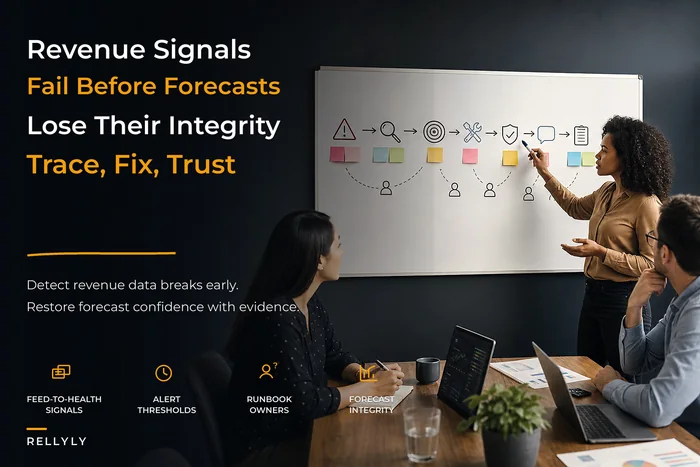
The "most common failure" column tells your driver where to look first for each symptom. If the ARR roll-up is off but commit is fine, you skip straight to the account join. This kind of lineage discipline is the whole premise behind instrumentation, lineage and alerting that protects forecast integrity — triage moves faster when the plumbing was documented before the fire started.
Common pipeline deltas and what each one actually means
The causes cluster into a small, recognizable set once you've been through enough of these. Recognizing the pattern saves you from investigating from scratch every time.
-
Clean doubling of row count → job ran twice. Not a business event. Fix the load, re-snapshot.
-
A band of deals disappearing from "open" → bulk close or bulk stage move, often a rep cleaning up end of month, sometimes an admin script.
-
Total stable, segments shifted → territory or owner reassignment. Reporting note only.
-
Weighted pipeline moved but raw amount didn't → probability fields changed, often reset to stage defaults during an import.
-
Roll-up dropped but opportunity count held → a join broke, usually account-level, after a merge or a billing sync.
-
One region spiked with new currencies → FX conversion didn't apply.
-
Gradual, not sudden → this probably isn't an anomaly at all. Gradual drift is a business trend, and triage is the wrong tool. Hand it to the forecast review rhythm instead.
That last one matters more than people expect. A real chunk of "anomalies" escalated to triage are just trends someone noticed late. If the line has been moving a little each day for two weeks, you don't need a two-hour runbook — you need a better review cadence, which is a separate discipline covered in the revenue reporting operating model.
Blast-radius assessment: how far does this reach?
Once you know what moved, you need to know who's affected before you write anything. The blast radius determines whether this is a quiet fix or a notify-the-CRO event.
Score it quickly on three dimensions:
-
Magnitude — how much of the committed or forecast number is in question? Under roughly 2% and contained, it's a footnote. Over 10% or crossing a board-reported metric, it's an exec event.
-
Audience — has the bad number already left the building? If it's only in an internal dashboard, you have breathing room. If it went into a board deck, an investor update, or a comp calculation, the clock gets tighter and the memo gets more important.
-
Persistence — is this a one-snapshot blip or has the bad data been feeding reports for days? A blip is embarrassing; a week of corrupted snapshots means every downstream report and every conversation built on it needs a correction.
The mistake teams make here is skipping blast radius and jumping straight to the fix. Then they quietly patch the data, and three days later someone asks why last Tuesday's board number doesn't reconcile. Assess the reach first so your memo can get ahead of every place the bad number traveled.
Owner actions: the quick-owner playbook
Each anomaly type has a natural owner. The driver's job is to route, not fix everything personally.
| Anomaly type | Owner | First action | Target time |
|---|---|---|---|
| Duplicate load / job double-run | Data / RevOps eng | Kill job, restore last-good snapshot | 20 min |
| Stage mapping change | RevOps | Diff mapping table, revert if unapproved | 30 min |
| Bulk deal movement | Sales ops + rep | Confirm with rep whether intentional | 15 min |
| Broken account join | Data eng | Identify orphaned accounts, patch key | 45 min |
| FX / currency | Finance ops | Apply correct rate, re-run conversion | 30 min |
| Territory reassignment | Sales ops | Confirm reassignment, add reporting note | 15 min |
This only works if owners are named before the incident. Scrambling to find "who owns the FX join" at minute 70 is how the two-hour window blows past three. Pre-assign these the same way you'd pre-assign an on-call rotation.
Exception triage steps when none of the checks light up
Sometimes you run all five SQL checks, the deltas look normal, and the number is still wrong. This is the uncomfortable case, and discipline matters most here because the temptation is to keep guessing.
-
Re-confirm the anomaly is real. Rebuild the number from raw opportunity data, bypassing every intermediate table. If your hand-built number matches the dashboard, the anomaly is real business. If it doesn't, the problem lives in a transformation layer you haven't checked.
-
Bisect the pipeline. Pick the midpoint transformation and check the number there. Correct at the midpoint means the problem is downstream. Wrong at the midpoint means it's upstream. You'll find the broken stage in two or three jumps instead of ten.
-
Check what changed yesterday. Deploys, schema changes, CRM admin edits, new field additions. The vast majority of "mysterious" anomalies trace back to a change someone made and didn't broadcast.
-
Widen the time window. If the anomaly appeared today but a change landed three days ago, you may be looking at the moment corrupted data finally crossed a threshold that made it visible.
If you've bisected cleanly and still can't localize it inside 90 minutes, that's your signal to escalate and write the memo with an honest "root cause still under investigation" line. A memo that admits uncertainty beats a confident memo that turns out wrong.
The executive reconciliation memo (one-page template)
This is the deliverable. The entire SOP exists to produce this document fast and accurately. The goal is to restore trust, which means leading with the business impact and being blunt about what's resolved versus what isn't.
Keep it to one page. Executives don't want the investigation narrative — they want to know if the number they're carrying into a meeting is safe.
FORECAST RECONCILIATION — [Date]
Summary (2 sentences): > The [metric] showed a [$X / Y%] [increase/decrease] versus the prior snapshot. Root cause: [one line]. Corrected number is [$Z], which is [consistent with / differs from] the originally reported figure.
What happened:
-
Observed anomaly
[number before → number after, with timestamp]
-
Root cause
[data issue / business event — one or two lines]
-
Is it a data problem or a real business change? → [clear answer]
Blast radius:
-
Affected metrics
[list]
-
Where the incorrect number traveled
[dashboards, decks, comp, board]
-
Corrections already pushed
[list]
-
Corrections still pending
[list]
Corrected figures:
| Metric | As reported | Corrected | Delta |
|---|---|---|---|
| Commit | |||
| Weighted pipeline | |||
| ARR roll-up |
Status: [Resolved / Partially resolved / Under investigation]
Owner: [name] — Next update: [time]
The discipline in this template is the "where the number traveled" line. That's what executives care about most, and it's the thing most reconciliation notes forget. If a bad number went into a board deck, the CRO needs to know that far more than they need your root-cause analysis. Lead with exposure, not explanation.
A real scenario: the mid-market SaaS commit that "dropped $300k overnight"
A mid-market SaaS company — roughly 40 reps — walked into a Monday forecast review to find committed revenue down about $300k from Friday's snapshot. The natural assumption was that deals had slipped over the weekend.
Running the SOP, the driver hit it on Check 2. The stage distribution showed around 18 deals that had been in "Commit" on Friday now sitting in "Best Case." Check 3 confirmed none of those deals had actually changed close dates or amounts — only their stage category. A quick diff against the lineage table pointed straight at the stage→category mapping. An admin had "cleaned up" stage names on Saturday, and the mapping table that fed the forecast still referenced the old names, so those 18 deals fell out of the Commit bucket entirely.
Total time from ping to resolved memo: just under 90 minutes. The fix was reverting the mapping and re-snapshotting. The memo's most valuable line wasn't the root cause — it was the note that Friday's number was correct all along and no deals had actually slipped, which meant the team walked into the review without panic-calling 18 account owners over a mapping edit.
The before/after that mattered here wasn't revenue. It was the review itself: instead of an hour of speculation and a cloud over the quarter, the number was re-trusted before the meeting started.
When this SOP fits, and when it doesn't
When it makes sense: single, sharp, unexpected moves in a forecast or pipeline number that an exec has seen or is about to see. That's the sweet spot — a clear deviation, a tight time window, and a real credibility cost if you get the explanation wrong.
When it's the wrong tool: gradual drift. If the number has been sliding a little each day, triage will send you chasing a root cause that doesn't exist, because the "cause" is dozens of small, real changes accumulating. That belongs in your forecast review rhythm, not an incident runbook.
Who should skip it: very small teams with a single source of truth and no transformation layer. If your forecast is one view on one CRM with no joins, snapshots, or FX, most of these checks won't apply — you can confirm or deny an anomaly by eyeballing the deals. The SOP earns its keep once you have multiple sources feeding a roll-up and more than one person able to touch the data.
The technical fix is rarely the hard part of a forecast anomaly. The hard part is speed and trust — producing a clear, accurate explanation before a wrong number does damage, and making sure everyone who saw the bad figure sees the correction. A time-boxed SOP with a pre-built memo template turns a two-hour fire drill into a 90-minute, documented, non-dramatic correction. Build the lineage map and the owner assignments before you need them, and the next anomaly becomes a routine Tuesday instead of a quarter-defining scramble.
Ready to transform your customer relationships?
Join 2,000+ businesses using Rellyly to increase sales, improve client retention, and simplify CRM workflows.