


Most capacity debates in customer success happen backwards. A VP feels the team is drowning, asks for three more heads, finance pushes back, and everyone ends up arguing about gut feelings dressed up as "we're really busy." Six weeks later you've either over-hired into a quiet quarter or under-hired into a renewal cliff.
The teams that get this right treat capacity like a supply chain problem. You have demand (tickets, onboardings, QBRs, expansion motions), you have throughput per person (constrained by handle time, occupancy, and shrinkage), and you have service commitments (SLAs, response windows, coverage hours). Headcount is just the number that balances those three. Once you model it that way, the conversation stops being political and starts being arithmetic.
This is the operating layer that sits under every other CS play. It decides whether your one-to-many motion holds up under load, whether your incident escalation runbooks have anyone free to execute them, and whether a sudden CSM departure turns into a coverage crisis or a controlled handoff.
Why capacity planning quietly breaks in most CS orgs
The common failure isn't bad math. It's that nobody owns the model, so it never exists in a form anyone can actually challenge.
What usually happens: capacity lives in someone's head, or in a one-off spreadsheet that got built during a panic, used once, and never touched again. Demand assumptions were frozen at some point in time. Nobody accounted for the fact that half your "productive" hours disappear into meetings, training, PTO, and context-switching. So when reality drifts, the model doesn't drift with it — it just silently becomes wrong.
-
Handle time gets guessed, not measured. Someone says onboarding "takes about two weeks" when the actual touch-time per account is 9–11 hours spread across three weeks. Those are completely different capacity numbers.
-
Shrinkage gets ignored entirely. Planners calculate as if a full-time person delivers 40 productive hours a week. Nobody does. After meetings, admin, sick days, and ramp, you're often looking at 26–30 usable hours.
-
Demand is treated as flat when it's actually spiky — renewals cluster, product launches spike tickets, enterprise onboardings bunch up at quarter-end.
-
Expansion work has no capacity line at all. Everyone wants CSMs driving upsell, but nobody subtracts the hours that takes from the support and retention load those same people carry.
The result is a team that's technically "staffed to plan" and still missing SLAs, because the plan measured the wrong things.
The three numbers everything else depends on
Occupancy is the share of a person's available time spent on actual productive work versus waiting, idle time, or buffer. For reactive support queues, healthy occupancy sits around 70–85%. Push past 90% sustained and queue times explode — there's no slack to absorb variance, so a small spike cascades. People treat high occupancy as efficiency. It's actually fragility.
Never miss a customer touchpoint again.
Rellyly helps you manage contacts, tasks, and sales efficiently in one platform.
- Unified customer profiles
- Automated follow-ups
- Sales pipeline tracking
No credit card required
Shrinkage is the chunk of paid time that never touches customer work. Add up PTO, holidays, sick time, training, 1:1s, team meetings, internal projects, and general admin. In most CS teams this lands between 25% and 40%. If you don't subtract it, every headcount number you produce is optimistic by roughly a third.
Handle time is the real labor cost of each unit of work — not wall-clock duration, but hands-on minutes. A tier-2 support ticket might be 18 minutes. An onboarding might be 10 hours. A QBR might be 3 hours including prep. You need these per work-type, because mixing them into one average is how you end up badly staffed for the work you actually do.
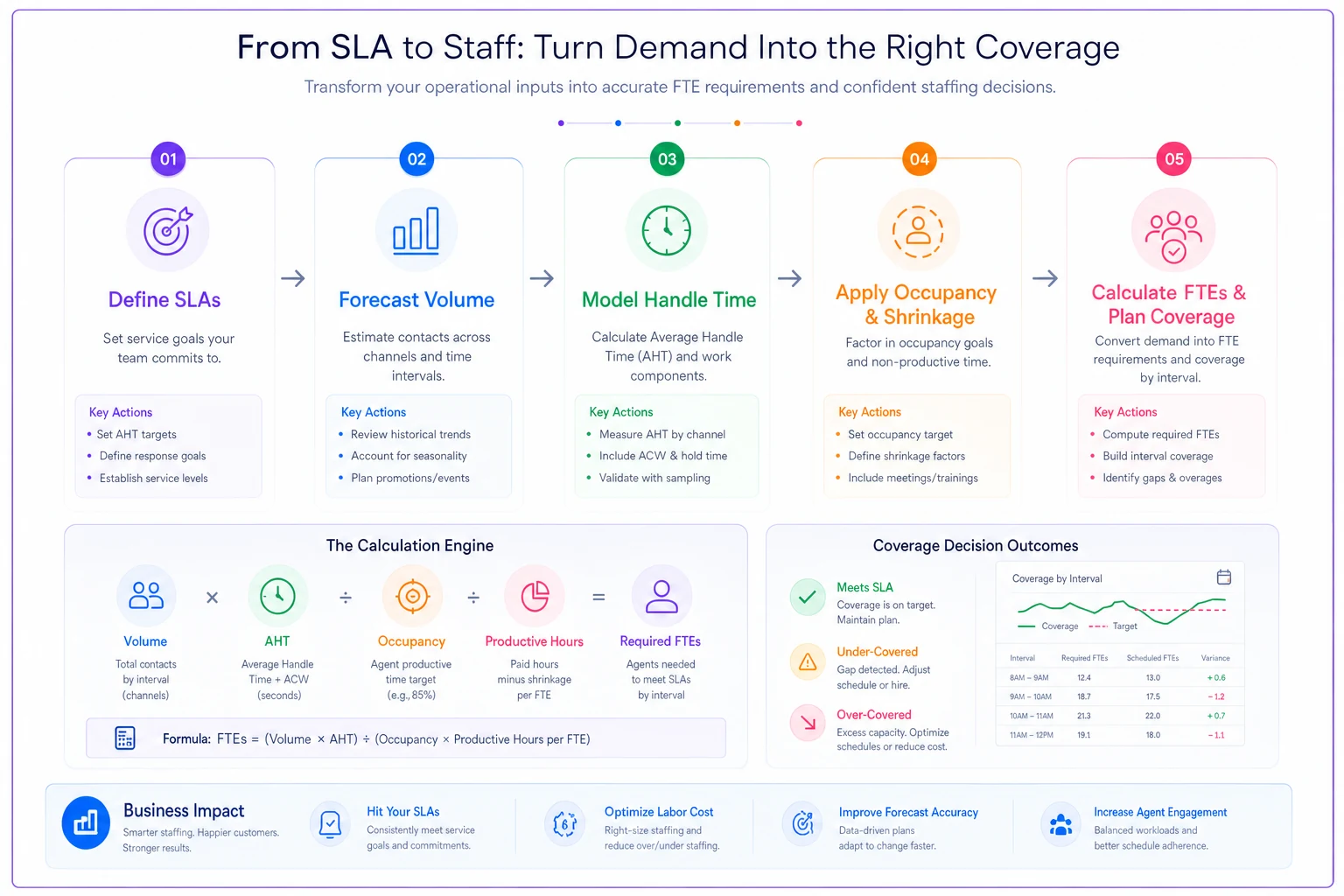
> Required productive hours = Volume × Handle time > Available hours per FTE = Weekly hours × (1 − Shrinkage) × Target occupancy > FTEs needed = Required productive hours ÷ Available hours per FTE If your math stops at "volume times handle time divided by 40," you will under-staff every time.
Pull handle time from your ticketing system for at least a month's worth of data to avoid biased estimates.
If your math stops at "volume times handle time divided by 40," you will under-staff every time.
Translating SLAs into headcount, not just hopes
SLAs are where the capacity planning chain actually closes. An SLA isn't just a promise — it's a constraint on how much queue you can tolerate, which directly sets how much slack you have to staff for.
Take a first-response SLA of under 4 hours on support. That commitment means you can't run the queue hot. Staff to 92% occupancy to "save money" and your variance buffer evaporates — you'll blow the SLA on any above-average day. To hold a 4-hour response reliably, you're usually staffing to somewhere around 75–80% occupancy, which means more heads than the naive math suggests.
-
Define the work-types and their SLAs. Support first-response, support resolution, onboarding completion window, QBR cadence, expansion follow-up. Each has its own clock.
-
Pull real volume per type per week, including the spiky weeks, not just the average.
-
Measure handle time per type from actual data, not estimates.
-
Set target occupancy based on how tight the SLA is — tighter SLA, lower target occupancy, more buffer.
-
Apply shrinkage to convert raw FTEs into actual hires.
-
Layer coverage requirements on top — a team that needs 6 FTE of capacity but must cover 12 hours a day across time zones needs more bodies than one covering 8 hours.
That last point trips people up constantly. Capacity math gives you total hours needed. Coverage math tells you how those hours must be distributed. They're not the same number, and the coverage requirement almost always pushes final headcount higher.
Below is a simple workflow showing SLA → FTE conversion.
Capacity math gives you total hours needed. Coverage math tells you how those hours must be distributed. They're not the same number, and the coverage requirement almost always pushes final headcount higher.
Workload curves: planning for the shape, not the average
Averages lie in CS because the work isn't evenly spread. Renewal-heavy quarters, end-of-quarter onboarding crunches, post-launch ticket spikes — these create a workload curve, and if you staff to the average you're overstaffed in the troughs and underwater at the peaks.
A typical example: a mid-market SaaS team sees support tickets run around 180/week most of the year, then jump to 320+ for the three weeks following each major release. Staff to the 180 average and every launch becomes a fire drill with missed SLAs and burned-out reps. Staff to the 320 peak and you're carrying expensive idle capacity for most of the year.
The better approach is a base + surge structure:
-
Base capacity handles steady-state load at target occupancy.
-
Surge capacity is pre-planned and pre-authorized — overflow routing rules, a tier of cross-trained people who shift in during spikes, documented triage rules that shed low-priority work temporarily.
The key is that surge gets decided before the spike, not improvised during it. When you wait until you're drowning to figure out coverage, you're making staffing decisions under the worst possible conditions.
A coverage template that actually survives contact with reality
Coverage is where the spreadsheet meets the calendar. You can have exactly the right total FTE count and still have a Tuesday-morning queue blow up because everyone scheduled their 1:1s and training in the same window.
A workable coverage model specifies, for each work-type:
| Work type | Coverage window | Min staffed | Target occupancy | Surge trigger |
|---|---|---|---|---|
| Support (first-response SLA) | 7am–7pm, 2 zones | 3 agents | 78% | Queue > 25 open or wait > 3h |
| Onboarding | Business hours | 2 CSMs | 72% | Backlog > 8 accounts waiting |
| Renewals / QBRs | Business hours | 1 per segment | 70% | Renewal-at-risk count rises |
| Expansion follow-up | Business hours | Allocated %, not headcount | 65% | Pipeline > capacity threshold |
Notice expansion is allocated as a percentage of capacity, not as dedicated heads. That's deliberate for teams below a certain size — you can't afford a pure expansion specialist, so you carve out roughly 20% of each CSM's week for expansion motion and protect that time in the model. The mistake is treating expansion as free and layering it on top of a fully-loaded support plan.
The mistake is treating expansion as free and layering it on top of a fully-loaded support plan.
Prioritizing expansion targets by revenue impact
When capacity is tight — and it always is — you need a rule for which expansion opportunities get the limited hours. Chasing everything usually means nothing gets done well.
-
High impact, low effort — do these immediately, they're the best use of scarce hours.
-
High impact, high effort — schedule deliberately, assign your strongest people, don't let them get crowded out by reactive work.
-
Low impact, low effort — batch these or automate the outreach.
-
Low impact, high effort — explicitly deprioritize. These quietly consume capacity with little return.
What separates good teams here is that they actually subtract the hours expansion work consumes from the support and retention pool, then re-balance. If pursuing a cluster of upsells means three CSMs lose 15 hours a week, your base support capacity just dropped and your SLA math changed. Modeling that trade-off explicitly is the whole point — otherwise expansion silently cannibalizes service quality and you don't notice until renewals start slipping.
A short real scenario
A roughly 30-person B2B software company ran CS with 6 CSMs and 4 support agents. They were missing their 4-hour first-response SLA about a quarter of the time and kept losing onboarding momentum during quarter-end crunches. Leadership's instinct was "hire two more people."
When they actually modeled it, the problem wasn't total headcount — it was shrinkage and occupancy that nobody had measured. Real shrinkage was closer to 35% (lots of untracked internal meetings), and they were running support at around 90% occupancy, so every normal variance broke the SLA. Onboarding handle time was also about 40% higher than the "two weeks" everyone assumed.
The fixes weren't glamorous. They cut shrinkage by consolidating meetings and protecting focus blocks, which freed roughly 4–5 productive hours per person per week. They re-staffed support to about 78% target occupancy by shifting one cross-trained CSM into a surge role during launch weeks. Expansion got carved into a protected 20% allocation instead of an unmanaged free-for-all.
Over the next quarter, SLA attainment moved from around 75% to the low 90s, onboarding backlogs stopped stacking at quarter-end, and they ended up hiring one person instead of two — because a chunk of the "missing capacity" was just unmeasured shrinkage and over-hot occupancy. The savings there roughly covered the one hire.
When this level of modeling makes sense (and when it doesn't)
When it's worth building:
-
You're past roughly 5–6 people in CS/support and coverage gaps are becoming real.
-
You carry SLAs you're actually accountable for.
-
Your workload is spiky enough that averages mislead you.
-
Expansion is now part of the CS mandate and competing for the same hours.
When it's overkill:
-
You're a 2–3 person team where everyone does everything. Build the habit of measuring handle time and shrinkage, but a full SLA-to-FTE calculator is more ceremony than you need.
-
Your volume is genuinely stable and your SLAs are loose. A back-of-envelope number is fine.
Who should be careful with it:
Teams that build the model once and never update it are arguably worse off than teams with no model at all — a stale calculator gives false confidence. Handle times change as the product changes. Volume shifts with the customer base. If nobody owns refreshing the numbers quarterly, the spreadsheet becomes a liability masquerading as rigor.
Keeping the model alive as you grow
The hardest part isn't the first build — it's keeping it honest over time. This is where operational software earns its place quietly. If your ticketing, CRM, and time-tracking systems already hold the raw data — volume per work-type, actual handle times, shrinkage from calendars and PTO — then the capacity model can pull live numbers instead of relying on someone's memory from two quarters ago. The value isn't automation for its own sake; it's that the model stays current without a human re-gathering inputs every month, which is exactly the task that gets skipped when things get busy.
The teams that stay ahead of their coverage aren't the ones with the fanciest spreadsheet. They're the ones who measure the unglamorous inputs honestly — real handle time, real shrinkage, real occupancy — and who revisit the model on a schedule instead of only during a crisis. Do that, and "we need more headcount" stops being an argument and becomes a number you can point at, defend, and adjust as the business moves.
Do that, and "we need more headcount" stops being an argument and becomes a number you can point at, defend, and adjust as the business moves.
Ready to transform your customer relationships?
Join 2,000+ businesses using Rellyly to increase sales, improve client retention, and simplify CRM workflows.