

Most CRM migrations get managed like IT projects. Someone builds a field-mapping spreadsheet, the data team runs an export/import, QA checks that record counts match, and everyone signs off on go-live. Two weeks later the VP of Sales opens the forecast and the ARR number is off by $300k with no obvious explanation. Nobody can tell whether that gap is a data problem, a stage-mapping problem, or a reporting-logic problem — and by then the old system has been decommissioned.
That's the core failure. Migrations get validated on record counts when the thing that actually matters is revenue continuity. A record can migrate perfectly and still produce a wrong ARR number because the amount field rounded, the currency conversion ran on a different date, the renewal date shifted a quarter, or the opportunity-to-subscription relationship broke. Counts being equal tells you nothing about whether the money reconciles.
This runbook flips the default. Instead of proving records moved, you prove revenue is identical in both systems before you cut over — using parallel-run validation mapped to your ARR and ACV objects, automated reconciliation queries, named owners with SLAs, and rollback triggers tied to forecast-confidence thresholds rather than gut feel.
Why count-based validation keeps failing
The reason this breaks across so many teams is that the people running the migration and the people who own the revenue number are usually different, and they validate against different definitions of "done."
The migration team's definition of done: source rows = target rows, required fields populated, no import errors. That's a legitimate technical checklist. But it treats a $2M enterprise subscription and a $4k self-serve account as equally weighted — one row each. Revenue doesn't work that way. A handful of broken high-value records can blow a reconciliation that passes every row-count test.
In practice, the damage almost always hides in the relationships, not the fields. The account migrates. The opportunity migrates. But the join between them — the thing your ARR rollup depends on — gets rebuilt during import and silently drops the accounts whose opportunity IDs didn't map cleanly. Object counts look perfect. ARR is wrong. This is exactly why a stable canonical data model with validation rules matters before you migrate — if the source system's revenue definitions are already fuzzy, you're just copying ambiguity into a new box.
The second recurring failure: everyone validates the moment of migration, nobody validates drift. A parallel run that passes on Monday can diverge by Thursday because new deals are still being created in the old system while the new one catches up. Without continuous reconciliation during the parallel window, you're validating a snapshot and hoping nothing moved.
The parallel-run approach: validate money, not rows
A revenue-first cutover runs both systems live for a defined window — usually 5 to 10 business days — and reconciles the financial objects on a schedule, not just once. You're not checking whether contacts came over. You're checking whether total ARR, ACV per segment, renewal-dated revenue, and pipeline-weighted forecast match within a tolerance you've agreed on in advance.
Never miss a customer touchpoint again.
Rellyly helps you manage contacts, tasks, and sales efficiently in one platform.
- Unified customer profiles
- Automated follow-ups
- Sales pipeline tracking
No credit card required
The objects that actually carry revenue are a short list, and those are the ones that get the reconciliation treatment:
-
Active subscriptions / closed-won opportunities → the source of committed ARR
-
Opportunity amount + term → the source of ACV
-
Renewal/contract end dates → the source of renewal-quarter forecasting
-
Open pipeline by stage → the source of weighted forecast
-
Account-to-subscription relationships → the join everything else depends on
Everything else — activities, notes, call logs — can be validated by count. These five can't.
Reconciliation query #1: total ARR by segment
Run this against both systems every day of the parallel window:
-- Run identically against source and target SELECT a.segment, COUNT(DISTINCT s.subscriptionid) AS activesubs, ROUND(SUM(s.mrr * 12), 2) AS arr FROM subscriptions s JOIN accounts a ON a.accountid = s.accountid WHERE s.status = 'active' GROUP BY a.segment ORDER BY arr DESC;
Then diff the two result sets. If segment-level ARR matches but the grand total doesn't, you have orphaned subscriptions whose account relationship broke — the exact failure count-based QA never catches.
Reconciliation query #2: record-level amount drift
Totals matching isn't enough, because two offsetting errors can net to zero. Check that each subscription carries the same amount in both systems:
-- Join source and target by business key, flag mismatches SELECT src.subscriptionid, src.mrr AS sourcemrr, tgt.mrr AS targetmrr, (src.mrr - tgt.mrr) AS delta FROM sourcesubs src LEFT JOIN targetsubs tgt ON src.subscriptionid = tgt.subscriptionid WHERE tgt.subscriptionid IS NULL -- failed to migrate OR ABS(src.mrr - tgt.mrr) > 0.01; -- amount drifted
Any row returned here is a defect. An empty result is your pass condition for amount integrity.
Reconciliation query #3: renewal-date integrity
Renewal dates shifting is the sneakiest one because it doesn't change your current ARR at all — it quietly moves revenue between forecast quarters. Validate the distribution:
SELECT DATETRUNC('quarter', renewaldate) AS renewalquarter, COUNT() AS subs, ROUND(SUM(mrr 12), 2) AS arrupforrenewal FROM subscriptions WHERE status = 'active' GROUP BY 1 ORDER BY 1;
Diff this across systems. If Q2 renewal ARR drops and Q3 jumps by the same amount, a timezone or date-parsing bug shifted contract end dates — and your renewal team is about to work the wrong quarter.
Automating the reconciliation so it runs itself
Running three queries by hand once is fine. Running them against two systems, every day, for a 10-day window, across five object types is where manual reconciliation quietly falls apart — someone skips a day, someone eyeballs a diff, and the drift slips through.
The approach that holds up: schedule the reconciliation queries to run on both systems on the same cadence, write results to a shared reconciliation table, and compute deltas automatically. The output you want is a single daily reconciliation record per object type with a pass/fail flag.
A workable reconciliation-automation pattern:
-
Extract — run identical queries against source and target on a fixed schedule (daily at minimum, twice-daily during the final 48 hours).
-
Load — write both result sets plus a timestamp into a
recon_logtable keyed by object type and segment. -
Compare — compute absolute and percentage delta per row; flag anything exceeding tolerance.
-
Alert — route any failed flag to the object owner immediately, not to a dashboard nobody checks.
-
Trend — track whether deltas are shrinking (good — cleanup is working) or growing (bad — something systemic is breaking).
That last step matters more than people expect. A single-day snapshot can look fine. A trend of widening delta tells you the migration logic has a bug that compounds as volume grows. This is the same discipline behind proper revenue data observability — instrumentation, lineage, and alerting: you're not just checking a number, you're watching how it moves and getting alerted when it drifts.
Run identical queries daily at minimum, and switch to twice-daily during the final 48 hours of the parallel window.
Here's a simple automation workflow you can visualize to keep owners and alerts aligned.
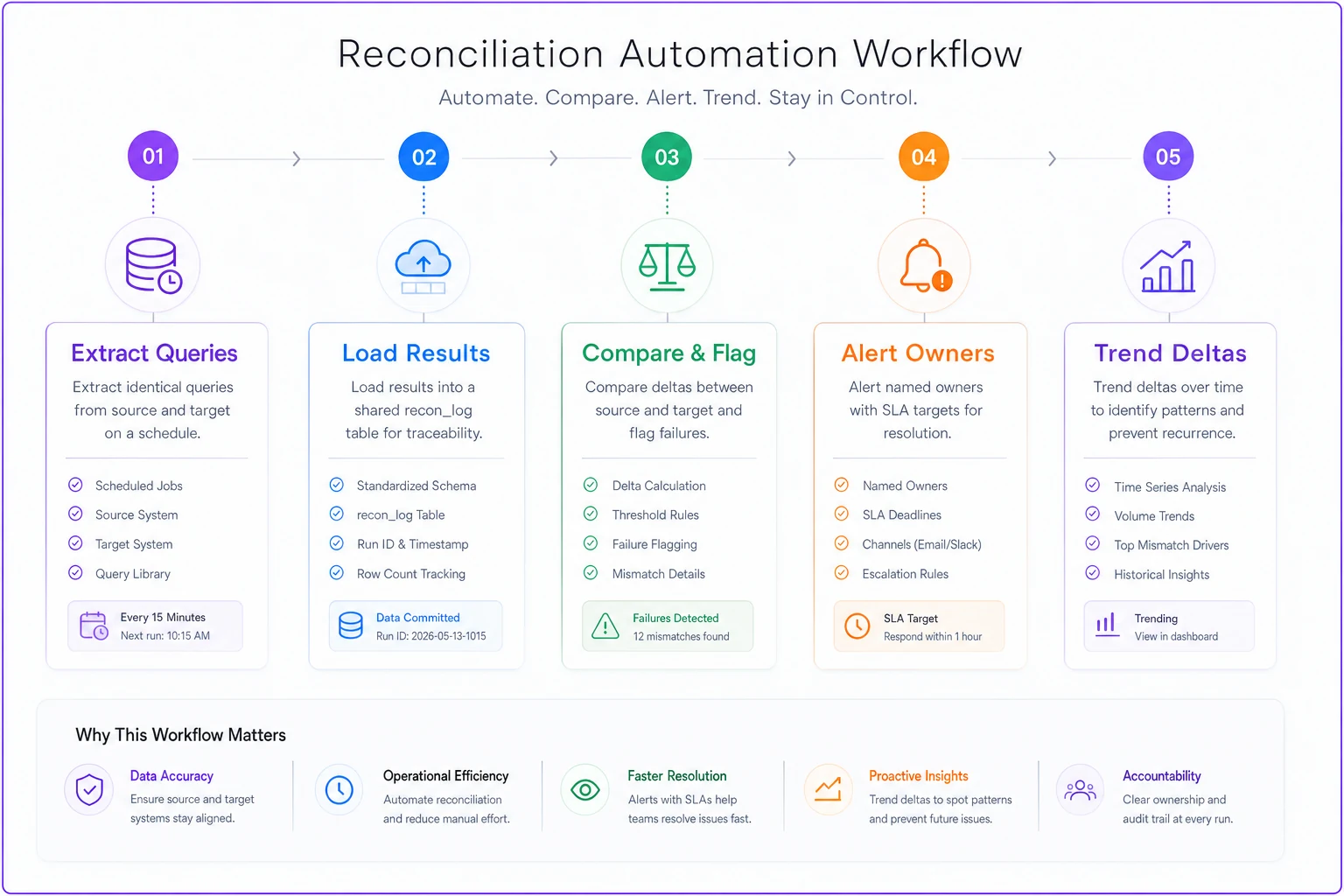
This diagram maps the scheduled runs, the recon_log write, delta computation, and alert routing into a single automation flow.
Owner SLAs: who fixes what, and how fast
Reconciliation that surfaces a defect but doesn't assign it goes nowhere. Every object type needs a named owner and a response SLA, agreed before the parallel run starts — not negotiated at 11pm during cutover.
| Object / check | Owner | Detection SLA | Resolution SLA | Escalation trigger |
|---|---|---|---|---|
| Total ARR by segment | RevOps lead | Daily recon run | 4 business hours | Delta > 0.5% of ARR |
| Record-level amount drift | Data engineering | Daily recon run | Same day | Any high-value acct ($50k+) affected |
| Renewal-date integrity | CS Ops | Daily recon run | Next business day | Any quarter shifts > $25k |
| Pipeline by stage | Sales Ops | Daily recon run | Next business day | Weighted forecast delta > 2% |
| Account-subscription join | Data engineering | Daily recon run | 2 business hours | Any orphaned subscription |
Writing these down isn't about bureaucracy. During a cutover, ambiguity about ownership costs hours you don't have. When the orphaned-subscription alert fires, nobody should be asking "whose job is this?" — the runbook already answered that.
One thing worth flagging: give the high-value amount drift the tightest SLA regardless of how few records it touches. One broken $200k subscription matters more than 400 broken $2k ones, and your SLA structure should reflect revenue weight, not record count.
Rollback triggers tied to forecast confidence
This is where revenue-first cutovers differ most from technical ones. Your rollback decision shouldn't hinge on whether the import succeeded — it should hinge on whether you can still trust the forecast. Those are different questions.
Define rollback triggers before go-live, as hard thresholds nobody can argue away in the moment:
-
ARR reconciliation delta exceeds 1% after the cleanup window closes → rollback
-
Any segment's ARR is off by more than 2% → rollback (segment-level damage hides in a clean total)
-
Weighted pipeline forecast shifts more than 3% with no explainable deal movement → rollback
-
More than a handful of high-value accounts ($50k+ ARR) fail amount validation → rollback
-
Renewal-quarter ARR moves across quarters with no business reason → rollback
A migration can be 99.8% complete by rows and still produce a forecast you can't take to the board. If sales leadership can't trust the number, the migration failed regardless of what the QA report says. This only works if your pipeline stages are standardized to begin with — if stage definitions are mushy, you can't tell a real forecast shift from a mapping artifact, which is the whole argument for standardizing pipeline stages for ARR accuracy well ahead of any cutover.
A real cutover scenario
A mid-market SaaS company — roughly $18M ARR, about 2,100 active subscriptions — moved off a heavily customized legacy CRM. Record-count QA passed cleanly: every account, opportunity, and subscription came across.
The daily ARR reconciliation told a different story. Segment totals matched almost perfectly except for Enterprise, which was light by around $260k. The record-level drift query found the cause: about 30 subscriptions on annual-prepay terms had their MRR recalculated during import by dividing total contract value by 12 using the wrong term length — 11 months of billing history instead of 12. Thirty records out of 2,100. Invisible to counts. Worth roughly a quarter-million in misstated ARR.
Because the reconciliation ran daily and the amount-drift SLA was tight, data engineering caught and fixed it inside the parallel window — before cutover, before the old system went away. The rollback trigger (segment delta > 2%) was armed but never needed to fire. Had they validated on counts alone, that $260k would have surfaced in the first board-level forecast review, with no source system left to reconcile against.
Acceptance gates before you decommission
You don't flip the switch when the import finishes. You flip it when a sequence of gates passes. Each gate is a go/no-go, and no-go means you stay in parallel.
-
[ ] Total ARR reconciles within tolerance for 3 consecutive days
-
[ ] Zero orphaned subscriptions (account-subscription join fully intact)
-
[ ] Zero amount-drift defects on accounts above $50k ARR
-
[ ] Renewal-quarter ARR distribution matches source within tolerance
-
[ ] Weighted pipeline forecast matches source with any delta explained by real deal movement
-
[ ] All reconciliation deltas trending down, not holding steady or growing
-
[ ] Every object owner has signed off on their object's reconciliation
-
[ ] Rollback procedure tested and confirmed executable
-
[ ] Sales and CS leadership have reviewed and trust the forecast in the new system
The three-consecutive-days requirement does quiet work here. A single clean reconciliation can be luck. Three clean days while new deals are still flowing proves the migration logic holds under live load, not just at a static moment.
Who should NOT run a parallel-cutover like this
This runbook is built for teams where recurring revenue reporting is business-critical and a forecast error has real consequences. It's overkill in some situations.
When this makes sense: You have meaningful ARR (roughly $5M+), subscription or renewal-based revenue, a forecast that leadership actually relies on, and enough deal volume that a snapshot validation won't catch drift. Enterprise-weighted books especially — where a few accounts carry disproportionate revenue — need the record-level checks.
When this is too much: Very early-stage teams with a few dozen accounts can reconcile revenue in a spreadsheet in an afternoon. Building automated recon pipelines and three-day acceptance gates for a $400k ARR book is process for its own sake.
Who should skip the full parallel run: Teams migrating a CRM that doesn't hold the system-of-record revenue data. If your ARR truth actually lives in your billing system and the CRM is downstream, your reconciliation should anchor to billing, and a lighter CRM cutover is fine. Know which system owns the money before you decide how heavy the cutover needs to be.
Post-cutover verification: the first two weeks
Go-live isn't the finish line. The parallel run proved the systems matched at a point in time. After cutover, the old system is frozen or gone, so you lose your reconciliation baseline — which means verification has to shift from "do they match" to "does this behave correctly on its own."
A post-cutover verification sequence for problems that only show up under live operation:
-
Day 1–3 Re-run all reconciliation queries against the frozen source one last time. Confirm the final cutover snapshot matches. Archive these results — they're your audit trail if anyone questions ARR later.
-
Day 1–5 Watch that new subscriptions and deals created in the new system roll into ARR correctly. The migration can be perfect while new-record logic is broken.
-
Day 3–7 Run the first renewal-quarter forecast entirely in the new system and compare to what the old system would have shown. Investigate any gap.
-
Day 7–10 Spot-check the highest-value accounts manually. Numbers aggregate correctly far more often than individual enterprise records do.
-
Day 10–14 Close the first weekly forecast review in the new system with leadership. Their confidence is the real acceptance signal — if they trust the number without caveats, the cutover succeeded.
The step teams skip most is #2, and it's the one that bites hardest. You can validate migrated data exhaustively and never confirm that creating a subscription in the new system produces correct ARR. A week later new business is flowing in and quietly mis-booking, and now you've got a fresh problem layered on a migration everyone already declared finished.
Bringing it together
A CRM migration cutover built around revenue integrity treats the switch as a financial continuity event, not a data-transfer task. The difference shows up in what you measure: not whether records moved, but whether every dollar of ARR, every ACV figure, every renewal date, and every forecast-weighted pipeline number reconciles across both systems — daily, under live load, with named owners, hard rollback thresholds, and gates that stay shut until the money matches.
Record counts tell you the migration ran. Revenue reconciliation tells you whether you can still trust your forecast on the other side. When the old system is gone, only one of those answers still matters — so validate for that one from the start.
Record counts tell you the migration ran. Revenue reconciliation tells you whether you can still trust your forecast on the other side. When the old system is gone, only one of those answers still matters — so validate for that one from the start.
Ready to transform your customer relationships?
Join 2,000+ businesses using Rellyly to increase sales, improve client retention, and simplify CRM workflows.