

Most AI rollouts in sales and customer success fail without anyone noticing. There's no dramatic incident and no email to the wrong customer getting forwarded to the CEO. Usage settles at around 15% of the team, the license renews because nobody wants to admit it didn't work, and six months later someone asks, "did that AI thing ever do anything for us?" Nobody can answer, because nobody decided at the start what "doing something" would look like in revenue terms.
The model is rarely the problem. The gap is operational. Nobody wrote down which revenue number the pilot was supposed to move, how much of the book the AI could touch before a human looked at it, or what would make the team pull it back. Without those three things every decision becomes a vibe check, the loudest rep wins the argument, and the tool sits in limbo.
This is a framework for running AI adoption the way you'd run any other change that touches customers and money. It follows a timeline, from the week before a pilot starts to the point where you scale it across the org. It's written for sales and CS leaders who don't want to learn prompt engineering but do want to know whether the thing works and how much risk they're carrying.
Why revenue teams get stuck between "cool demo" and "we actually use this"
The demo always looks great. An AI drafts a follow-up from call notes, summarizes six months of an account's tickets, flags a renewal risk. Everyone nods. Then it goes into the real workflow and three things collide.
First, the people who benefit aren't the people who carry the risk. A CSM saves twenty minutes on a renewal brief, but the CS director is the one on the hook if that brief misses that the customer's champion left two months ago. A rep saves time on follow-ups, and the sales manager owns the forecast if those follow-ups quietly perform worse. When the person feeling the upside isn't the person feeling the downside, adoption gets political fast.
Second, revenue outcomes are slow. A renewal you influence in March might not close until June, and expansion pipeline takes a quarter to mature. So teams measure what's fast: logins, drafts generated, "time saved" surveys. Those numbers go up and to the right whether or not anything good is happening to revenue.
Third, risk isn't uniform across the book. A bad email to a $4k account and a bad email to a $180k account are not the same event, but most teams set one policy for everyone anyway. Usually it's "always review everything," which kills the time savings, or "reps can use it however they want," which is fine until it isn't.
The framework below deals with all three: an explicit KPI mapping before launch, review rules that scale with the ARR at stake, and thresholds that make the scale-up or pull-back decision mostly mechanical.
Before week one: the pilot charter nobody wants to write
The most useful artifact in this whole process is a one-page pilot charter. It's boring, and teams skip it because it feels like paperwork for a "small test." But it's what stops the pilot from turning into an argument in week six.
Never miss a customer touchpoint again.
Rellyly helps you manage contacts, tasks, and sales efficiently in one platform.
- Unified customer profiles
- Automated follow-ups
- Sales pipeline tracking
No credit card required
A charter for a revenue team AI use case should fit on one page and answer these:
PILOT CHARTER — [use case name] Owner (one person, not a committee): Pilot group (named reps/CSMs + their manager): Control group (named, or "same team, prior period"): Start date / planned decision date: The workflow being changed (1-2 sentences, before vs after): Leading KPI (should move in 2–4 weeks): Baseline: Target: Lagging KPI (moves in a quarter+): Baseline: Target: Guardrail metric (must NOT get worse): Baseline: Floor: Action types the AI performs (internal note / internal suggestion / customer-facing draft / customer-facing send): Starting review policy (see ARR exposure matrix): Exposure budget at start ($ ARR touchable without human review): Rollback triggers (pre-agreed): Pause triggers: Graduation criteria: Who gets told if a rollback happens:
Most people fill in the KPI section badly. "Improve efficiency" is not a KPI, and neither is "increase rep productivity." You need a leading indicator that moves fast enough to make decisions on, a lagging indicator that actually connects to ARR, and a guardrail, which is the number that tells you the AI is helping one metric by hurting another.
For the use cases revenue teams actually pilot, the mapping usually looks like this:
| Use case | Leading KPI (2–4 wks) | Lagging KPI (quarter+) | Guardrail metric | Sensible starting review policy |
|---|---|---|---|---|
| AI-drafted sales follow-ups after calls | Follow-up sent within 24h; reply rate | Meetings-to-opportunity conversion; pipeline per rep | Unsubscribe / negative reply rate | Rep reviews every draft |
| Call notes auto-filled into CRM fields | Field completion rate; time from call to updated opp | Forecast accuracy at the stage level | Manager-flagged incorrect fields | Rep confirms before save |
| Pre-renewal account briefs for CSMs | % of renewals with brief 90+ days out | Gross revenue retention on cohort | Missed-risk rate (risks found later that the brief didn't flag) | Internal only, spot-check by CS lead |
| Expansion signal detection from usage | Expansion opps created from flags | Expansion ARR closed | False-positive rate (flags reps reject) | Internal only, rep accepts/rejects |
| Ticket triage + suggested CS responses | First response time on churn-tagged tickets | Churn rate on accounts with high ticket volume | CSAT on AI-assisted responses | Agent reviews; no auto-send above small accounts |
| Auto-sent check-in / nudge emails | Response rate; product actions after nudge | Activation or renewal rate on segment | Complaint rate, opt-outs | Sampled review, low ARR only |
The guardrail column catches the most common failure, which is the AI making one number look better while something else degrades. Follow-ups going out faster with a worse reply rate is a real pattern. Speed goes up, the emails get generic, prospects notice. If you only tracked the leading KPI you'd call it a win.
Piloting two use cases at once with the same group is another easy mistake. It feels efficient, but if renewal briefs and auto-drafted follow-ups launch in the same month and GRR moves, you can't tell which one did it, or whether it was just a good quarter. One use case per pilot group. If you want several in parallel, use separate groups and keep the overlap small.
Before anything goes live, back the charter with a short pre-launch checklist:
-
The owner has a named backup for when they're out.
-
The baseline numbers were pulled from the CRM, not estimated in a meeting.
-
The control group is defined and roughly comparable (similar segment, similar tenure reps).
-
Every action type the AI performs is listed, and each one has a review rule.
-
Rollback triggers are written as numbers, not adjectives like "if quality drops."
-
Reviewers know they're reviewers and have time blocked for it.
-
Every AI output gets logged with an outcome (accepted / edited / rejected).
-
Top accounts and accounts in active renewal or escalation are excluded or flagged.
-
The launch avoids the last two weeks of the quarter.
-
Someone outside the pilot group (finance or RevOps) has seen the charter.
That last item matters more than it looks. If finance hasn't seen the charter, they'll challenge the ROI at the end no matter what the numbers say.
Here's a simple visual of the charter-to-decision workflow.
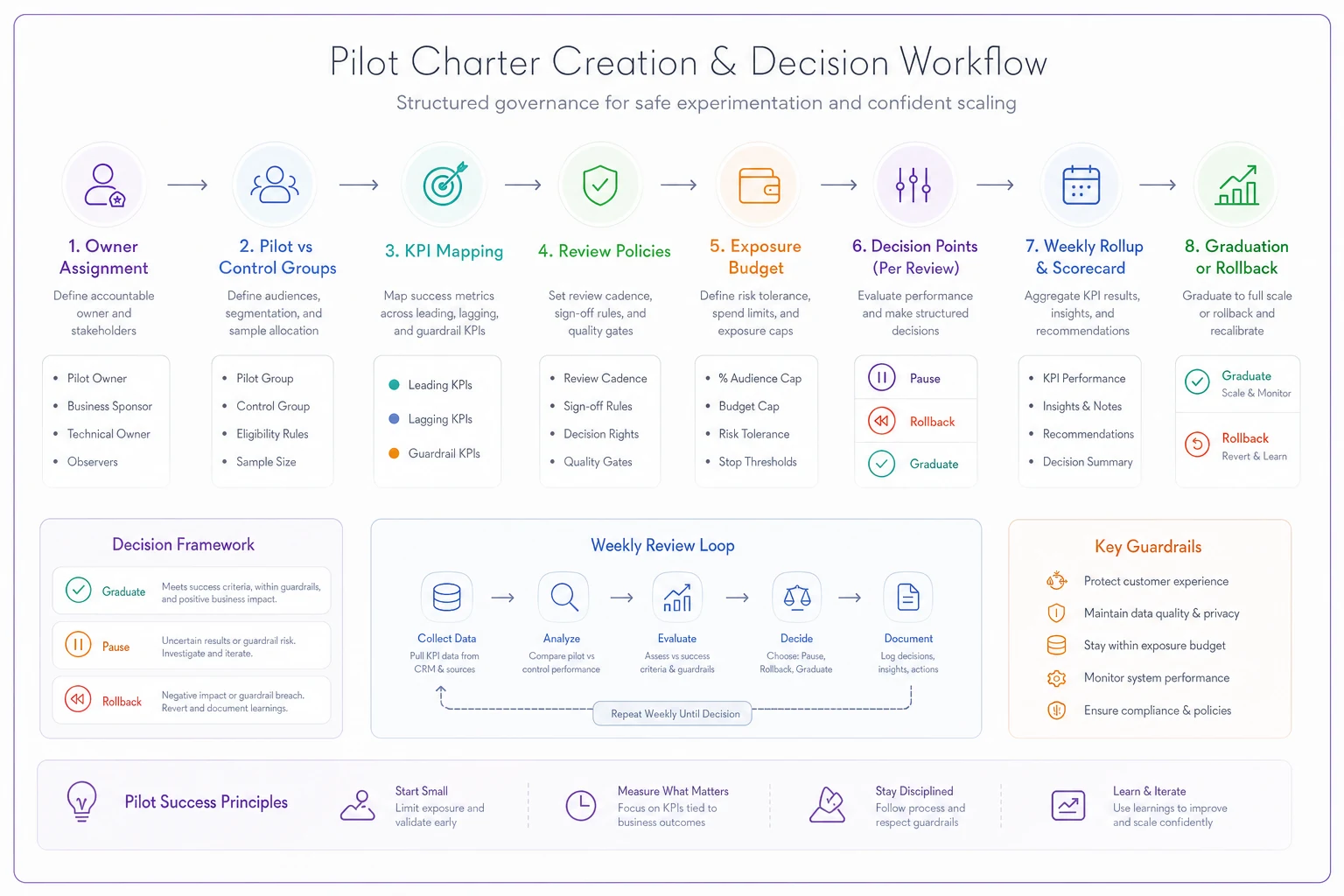
The diagram shows how the charter, the review rules, and the rollup feed the graduation decision.
Weeks one and two: shadow mode, which should last longer than you want
In shadow mode the AI produces its outputs but nobody acts on them. Reps still write their own follow-ups and CSMs still build their own renewal briefs. The AI version sits next to the human version and someone compares them.
Everyone wants to skip this. It feels like double work, and the team is excited. But it's the only time you get a clean comparison between what the AI would have done and what a human actually did, on real accounts, with zero customer risk.
You're not asking "is the AI good." You're looking for where it's wrong and how, because the errors cluster. It might be solid on accounts with clean CRM data and bad on accounts where the last three activities were logged as "call — see notes" with no notes. It might handle standard renewals fine and get confused by multi-entity customers with several contracts. Those clusters become your exclusion rules later.
Shadow mode also tends to expose CRM problems nobody knew about. A renewal brief that confidently says "no open support issues" when there are four open tickets usually means the tickets aren't linked to the account record properly. That's not an AI problem, but it becomes one the moment people start trusting the brief. Teams that skip shadow mode find this out from a customer.
Two weeks is a reasonable minimum. If volume is low, say 20–30 renewals a month, you may need three or four weeks to see enough examples to spot patterns.
The ARR exposure question: who reviews what
Most teams get the review policy wrong in one of two directions. Either humans review everything forever, so the AI saves maybe a third of the time it could and reviewers burn out by week five, or people use it freely and then someone discovers it's been sending check-ins to a strategic account in the middle of an escalation.
A better approach ties review requirements to two things: how much ARR is attached to the account, and how reversible the action is. An internal note in the CRM is completely reversible, because nobody outside the company sees it. A customer-facing email can't be unsent. Anything that touches pricing, commitments, or contract terms is its own category.
| Action type → / Account ARR ↓ | Internal note or summary | Internal suggestion (next step, risk flag) | Customer-facing draft (human sends) | Customer-facing auto-send | Pricing, terms, commitments |
|---|---|---|---|---|---|
| Under ~$10k | Auto | Auto | Sampled review | Sampled review, after graduation | Never AI-generated |
| ~$10k – $50k | Auto | Auto, rep confirms | Human reviews every one | Only after a second graduation gate | Never AI-generated |
| ~$50k – $150k | Auto, spot-checked | Rep confirms | Human reviews every one | Not allowed | Never AI-generated |
| Over ~$150k or top 20 accounts | Spot-checked by account owner | Account owner confirms | Account owner reviews + manager visibility | Not allowed | Never AI-generated |
| Any account in active renewal window, escalation, or open legal | Auto | Owner confirms | Owner reviews every one | Not allowed | Never AI-generated |
Look at the last row. ARR alone isn't enough. A $12k account that's 45 days from renewal with an open escalation carries way more risk than its ARR suggests. Situational flags override the band, and the account goes to the strictest row it qualifies for.
We covered how confidence scores interact with these review rules in human-in-the-loop governance for revenue ops with confidence thresholds. This framework is about the adoption side: how the matrix loosens over time as a pilot earns trust.
The "Never AI-generated" column matters more for adoption than most teams expect. Once reps know the AI will never put a discount or a contract term in front of a customer, they relax. A lot of quiet resistance to AI tools in sales comes from reps imagining the worst case, the AI promising something they'll have to walk back. Drawing that line in writing takes away a big chunk of that fear.
Weeks three to six: confidence and rollback thresholds a sales manager can actually read
Once the AI is live in assisted mode, with humans reviewing outputs and then acting, you need numbers that tell you whether to keep going, tighten up, or pull back. "The team likes it" doesn't count.
The model's own confidence score, if your tool gives you one, is a useful routing hint but a poor main measure. Three things from the review log matter more.
Acceptance rate is the share of AI outputs a reviewer accepted with no edits or only minor ones. "Minor" means cosmetic: a greeting, a trimmed sentence. If the reviewer changed the substance, it's an edit, not an acceptance.
Severe error rate is the share of outputs containing something that would have caused real harm if sent or acted on. Wrong account details, wrong product, a fabricated commitment, a known risk missing from a renewal brief. Define "severe" in the charter with examples, or reviewers will grade inconsistently.
KPI delta vs control compares the pilot group's leading KPI against the control group's, week over week.
The thresholds fall into three tiers, and people often treat them as the same thing when they're not:
-
Narrow means you keep the pilot running but shrink its scope. Exclude a segment, an action type, or an account band. Use it when errors cluster in one identifiable area.
-
Pause means you stop the AI from acting in one action type while you investigate, then resume. Use it for a single serious incident with a clear fix.
-
Rollback means you return to the previous stage entirely
auto-send back to assisted, or assisted back to shadow. Use it when the KPI evidence says it isn't working, or errors keep showing up after fixes.
Example triggers that hold up in practice:
PAUSE (immediate, same day):
-
Any AI-generated pricing or commitment language reaches a customer
-
Any customer complaint that references AI-generated content
-
Any severe error on an account in the top ARR band
ROLLBACK to previous stage:
-
Leading KPI worse than control by more than ~15% (relative) for 2 consecutive weeks
-
Guardrail metric breaches its floor for 2 consecutive weeks
-
Severe error rate above ~1 in 150 outputs over a rolling 2 weeks
NARROW scope:
-
Severe errors concentrated (>60%) in one segment, product line, or data-quality condition
-
Acceptance rate below ~65% in one segment while others are fine
-
Review queue SLA missed for 5+ business days (see below)
That last trigger, the review queue SLA, is the failure point most teams never see coming.
When the review queue backs up, reviewers start rubber-stamping. They're behind, they've got their own accounts to work, the AI outputs have mostly been fine, so they click accept without really reading. Your acceptance rate goes up, the dashboard says the AI is improving, and it's actually getting less scrutiny. Then something bad slips through and everyone's confused because the numbers looked great.
The tell is review time per item. If reviewers spent about a minute and a half on a renewal brief in week two and they're at fifteen seconds in week six, nobody is reading those briefs. Track it. When it collapses, treat it as a scope problem, not a reviewer discipline problem. You've given people more review volume than they have time for, so narrow the scope until the queue is manageable again.
The measurement spreadsheets (and the number everyone forgets to subtract)
You don't need fancy tooling to run a pilot well. You need three sheets and someone who actually updates them weekly.
Sheet 1: the output log. One row per AI output. Everything else rolls up from this.
OUTPUT LOG date | outputid | usecase | actiontype | accountid | accountarrband | situationalflag (renewal/escalation/none) | reviewpath (auto/sampled/full) | reviewer | reviewseconds | outcome (accepted/edited/rejected) | editreasoncode | severeerror (Y/N) | severeerrornote | customer_outcome (reply/meeting/no response/complaint — if applicable)
The editreasoncode column pays off later. Keep the list short, six to eight codes: wrong facts, missing context, tone, too long, wrong next step, data stale, pricing/terms language, other. After a few weeks the distribution tells you what to fix. Lots of "data stale" is a CRM hygiene problem. Lots of "tone" usually means the prompt or template needs work. Lots of "missing context" often means the AI can't see a system your team relies on, like the billing tool or support desk.
Sheet 2: the weekly rollup. One row per week per use case, pulled from the log.
WEEKLY ROLLUP week | usecase | outputstotal | outputsreviewed | samplingrate | acceptancerate | severeerrorcount | severeerrorrate | medianreviewseconds | leadingkpipilot | leadingkpicontrol | kpideltapct | guardrailpilot | guardrailfloor | triggerhit (none/narrow/pause/rollback) | decision_notes
Have the rollup check the thresholds automatically, even if it's just conditional formatting that turns a cell red. The trigger decision should be obvious in the weekly meeting, not debated.
Sheet 3: the ROI sheet. Most pilots overstate their case here.
ROI SHEET (monthly) A. Outputs this month B. Baseline minutes per task (pre-pilot, measured not guessed) C. Assisted minutes per task (including the owner's own edit time) D. Gross hours saved = A × (B − C) / 60 E. Secondary review hours (managers/QA sampling) F. Rework and cleanup hours (fixing errors that got through) G. Admin hours (RevOps maintaining prompts, rules, the log) H. Net hours saved = D − E − F − G I. Loaded hourly cost J. Net time value = H × I K. Tool cost for the month L. Incremental revenue signal (pilot vs control, leading KPI → $ estimate) M. Net monthly value = J + L − K Notes: where did the saved hours actually go?
The number everyone forgets is E plus F plus G. Review and cleanup time can eat a surprising share of the savings, especially on high-ARR accounts where reviews are mandatory and slow.
A typical case: a CS team of seven sends roughly 850–950 AI-assisted customer emails a month. Writing from scratch took around 8 minutes each, and with AI drafts the CSM's own edit-and-send takes about 3. That's 70–80 hours a month of gross savings, which is the number that ends up in the vendor's case study. Then the CS lead samples about 20% of outputs at a couple of minutes each, so 6 or so hours. Fixing the handful of errors that got through, including one awkward call to a confused customer, takes another 4–5 hours. RevOps spends maybe 6–8 hours a month maintaining templates and the log. Net lands closer to 55–60 hours. Still good, just noticeably less than the headline.
Then there's the harder question on the notes line: where did those hours go? If CSMs used them to start renewal outreach earlier, or to cover more accounts per person, that's real value you can tie to GRR or coverage ratios. If the hours dissolved into general busyness, the time value is theoretical. Finance will push on this, and they're right to. The pilots that survive budget review can point at a specific behavior change. "We now start renewal conversations at 90 days instead of 45" beats "we saved 60 hours."
For the incremental revenue line (L), be conservative. Small pilot groups produce noisy numbers. If you're comparing reply rates between four pilot reps and four control reps, a big swing over three weeks might just be one rep having a great month. The sample-size thinking in our revenue experimentation playbook applies directly. If the pilot is too small to detect the effect you care about, write "directionally positive" in the notes and don't put a dollar figure on it.
Week eight-ish: the graduation decision
At some point the pilot either earns more autonomy or it doesn't. The trick is making that call against criteria written down before launch, not in a meeting where the most enthusiastic person in the room carries the day.
The graduation sequence that works for most teams:
-
Check minimum volume. Has the pilot produced enough reviewed outputs to trust the rates? A rough floor is 150–200 reviewed outputs for the action type being graduated. Below that, extend the pilot rather than deciding.
-
Check quality over the last two to three weeks, not the whole pilot. Early weeks are always messier. What matters is where things settled after the fixes.
-
Check the KPI delta against control. Positive or neutral is generally okay to graduate if the time savings are real. Negative means no, even if reps love it.
-
Check the guardrail. If it drifted toward the floor at all, understand why before going further.
-
Check reviewer health. Is median review time stable? Is the queue within SLA? If reviewers are already strained, graduating just adds volume to a strained system.
-
Pick exactly one dimension to expand. More accounts in the same band, OR a higher ARR band, OR a new action type, OR more reps. Not two at once.
-
Set the new exposure budget and sampling rate for the expanded scope (more on this next).
-
Write a two-paragraph graduation note covering what changed, what the new limits are, and what the rollback triggers are for the new stage. Send it to everyone affected, including the CS or sales leader who isn't in the pilot.
Step 6 is where people get impatient. The pilot went well, so why not roll it out to the whole team and move up an ARR band at the same time? Because if something goes wrong, you won't know whether it was the new reps (different habits, different data quality on their accounts) or the bigger accounts (more complex, more stakeholders). One dimension at a time keeps your rollback surgical.
Scaling with exposure budgets and sampling rates
Once a use case graduates past fully-reviewed assisted mode, two controls do most of the work: the exposure budget and the sampling rate.
The exposure budget is the total ARR on accounts where an AI-generated, customer-facing output can go out without a human approving it first. It caps how much revenue is riding on unreviewed AI output at any given moment.
A staged example for a CS team with a book of around $5M ARR:
EXPOSURE BUDGET STAGES — example Stage 0 — Shadow: $0 unreviewed exposure Stage 1 — Assisted: $0 unreviewed (everything reviewed) Stage 2 — Sampled auto: accounts under ~$10k ARR only, total cap ~$250k–$350k ARR (~5–7% of book) Stage 3 — Expanded auto: accounts under ~$25k, total cap ~15% of book, excludes renewal window + escalations Stage 4 — Mature: cap set by leadership, reviewed quarterly, top band permanently excluded
Why cap total exposure instead of just setting an ARR band? Because a band alone quietly accumulates risk. If 200 accounts sit under $10k and all of them are on auto-send, that's a meaningful chunk of revenue, and a systematic error like a template bug or a data sync issue would hit all of them in the same week. The cap forces a deliberate decision every time the AI's reach grows.
The sampling rate is the share of auto-path outputs that still get a human review after the fact (or before, if timing allows). It's how you keep measuring quality once you stop reviewing everything.
-
Start any newly graduated slice at 50% sampling.
-
Drop to 20–25% after two clean weeks under all thresholds.
-
Drop to a floor of 5–10% after another few clean weeks. Never go to zero. The floor is how you catch drift when your data, your product, or your customers change.
-
Weight sampling toward higher ARR within the auto-eligible band. A $9k account should be sampled more often than a $2k account.
-
Any scope expansion resets that new slice to 50%. Expanding from under-$10k to under-$25k means the $10k–$25k accounts start at 50%, even if the original slice is at 5%.
-
Any severe error resets the affected slice to 100% until the root cause is fixed and you've had a clean week.
The resets are what make this work. Teams that lower sampling and never raise it end up with a quality monitoring system that only looks backward, and most AI quality problems show up right after something changes: a new segment, a product launch, a CRM field repurposed, a new pricing tier the templates don't know about.
One seasonal rule is worth adopting too. Freeze exposure increases during the last two to three weeks of a quarter and during any heavy renewal cluster. Reviewers are stretched, managers are distracted, and an error costs the most. No graduations, no new slices. If anything, bump sampling up for a while.
Which CS workflows should ever reach auto-send at all is a separate question, covered in our automation decision framework for customer success. Some things should stay human no matter how good the pilot numbers look.
What breaks when you go from one pod to the whole revenue org
A pilot with five people and one engaged manager is a completely different system from a rollout across forty reps and CSMs, four managers, and two segments. What breaks at that size is mostly coordination, not the AI.
Reviewer capacity becomes the bottleneck. In the pilot, one enthusiastic CS lead reviewed everything. At scale, review gets spread to managers who didn't sign up for it and don't see it as their job. The queue backs up, rubber-stamping starts, and quality degrades without anyone noticing. The fix is structural. Review time has to be budgeted in manager capacity the same way pipeline reviews are, and the review rules should be applied by the system instead of remembered by people.
New users trust it more than pilot users did. This one's counterintuitive. The pilot group watched the AI make mistakes early, so they developed healthy skepticism. People who join later get a tool that's "already been proven," so they edit less, check less, and catch less. Acceptance rates for newer users often run noticeably higher than for pilot veterans, which doesn't mean the AI is better for them. They're just reading less carefully. Watch acceptance rate and review time by user cohort, not only overall.
Data quality varies by team, and the AI inherits it. The pilot pod probably had decent CRM hygiene, often because that's why they were picked. The rest of the org may not. Renewal briefs built on accounts where half the contacts are outdated and activity logging is sporadic will be confidently wrong. Before expanding to a new team, run a quick shadow period on their accounts specifically. Even one week helps.
Handoffs propagate errors. At scale, AI outputs start crossing team boundaries. An AI-generated deal summary written at close becomes the onboarding context for CS. If it misstates what was promised in the sales cycle, CS starts the relationship with the wrong expectations and nobody traces it back. Any AI output consumed by a different team than the one that reviewed it should count as a higher-risk action type in your matrix.
Nobody owns the prompts and templates. In a pilot, the owner tweaks things weekly based on edit reason codes. At scale that maintenance often has no owner. Templates go stale, a product gets renamed, and the AI keeps using the old name for months. Assign ownership per use case and put template review on a recurring calendar.
Leaders stop looking at the rollup. The weekly rollup meeting was sacred during the pilot, and by month four it's been cancelled three times. The thresholds still exist in the spreadsheet but nobody checks them, so triggers fire and nothing happens. Automated alerts on threshold breaches, sent to a named owner, outlast good intentions.
Real scenario: renewal briefs at a mid-sized B2B software company
Business type: B2B workflow software, around $4–5M ARR, roughly 420 customer accounts, 7 AEs and 5 CSMs, one part-time RevOps person.
The problem: Renewal prep was inconsistent. CSMs were supposed to build a renewal brief at least 90 days before each renewal, covering usage trends, open tickets, stakeholder changes, and expansion opportunities. In practice, briefs existed for maybe 40% of renewals at the 90-day mark. Each took 45–60 minutes, pulled from the CRM, the support tool, and product usage reports. Renewals without briefs were noticeably more likely to turn into last-minute discount scrambles.
The pilot: AI-generated renewal briefs (internal only) for two CSMs, plus AI-drafted post-QBR follow-up emails (customer-facing, human sends). The other three CSMs were the control. The leading KPI was the share of renewals with a brief at 90+ days. The lagging KPI was GRR on the pilot cohort. The guardrail was missed-risk rate, meaning risks that surfaced later and the brief should have caught.
What happened: Shadow mode ran three weeks and found the briefs were unreliable for customers with multiple contracts, so those were excluded. In assisted mode, brief prep dropped to roughly 15–20 minutes, mostly spent verifying and adding context the AI couldn't see.
In week four, a post-QBR follow-up draft referenced a promotional discount that had expired. A CSM caught it in review on a ~$38k account. A similar draft had already gone out on a ~$6k account through the sampled auto path the team had just started testing. That hit a pause trigger. Auto-send for follow-ups stopped for about nine days, a rule was added to strip any pricing language from drafts, and that slice went back to 100% sampling for two weeks.
After roughly 10 weeks, the numbers looked like this:
-
Renewals with a brief at 90+ days went from ~40% to around 85–90% for the pilot CSMs.
-
Prep time per brief dropped from ~50 minutes to ~15–20.
-
Briefs flagged seat-overage situations on several accounts, which turned into somewhere around $55k–$65k in expansion pipeline.
-
GRR on the pilot cohort came in about two points better than the same quarter the prior year. With only ~70 renewals in the cohort, the team recorded this as directionally positive and declined to claim it as proven.
Outcome: Renewal briefs graduated to the full CS team, one dimension at a time (all CSMs, same exclusions). Follow-up auto-send stayed limited to accounts under ~$10k with 20% sampling. The expired-discount incident turned out to be useful, since it produced the "never AI-generated" pricing rule that the AEs later asked to adopt for their own follow-ups.
When this framework makes sense
This level of structure pays off when AI outputs touch customers or influence decisions on accounts that matter: customer-facing drafts, renewal and risk assessments, forecast inputs, anything that crosses a team handoff. You also need enough volume to measure. If a use case produces a few dozen outputs a month, you'll never get a statistically meaningful read, and a lighter approach is fine.
It's especially worth it when leadership is skeptical. A charter, a review matrix, and a weekly rollup with clear triggers is how you get a nervous CS director or CFO to agree to a pilot at all. You're not asking them to trust the AI. You're asking them to trust the limits.
When this is a bad idea
For purely internal, low-stakes use cases, like summarizing your own notes, drafting a first pass at an internal Slack update, or brainstorming objection handling, this framework is overkill. Let people use the tools. The cost of an error is a slightly worse internal doc.
It's also a bad idea on top of a CRM that's genuinely broken. If account ownership is unclear, renewals aren't tracked as records, and activity logging is optional, the AI will produce garbage and your pilot will measure garbage. Fix the foundation first, or at minimum pick a use case that doesn't depend on the broken parts.
And if nobody can commit reviewer time, don't start. A pilot where reviews don't happen produces confident-looking numbers that mean nothing. That's worse than not piloting, because it creates false evidence.
Who should NOT do this
Four situations come up often enough to name:
-
Teams of two or three reps with no manager layer. You don't need exposure budgets, you need to talk to each other. Use the "never AI-generated" pricing rule and the edit reason codes, and skip the rest.
-
Companies mid-CRM migration or mid-reorg. Baselines will be meaningless and the control group will shift under you. Wait a quarter.
-
Teams whose leadership has already decided the outcome. If the rollout is happening regardless of the pilot numbers, running a "pilot" just burns goodwill when people realize the thresholds were decorative. Be honest that it's a rollout, and use the guardrails and sampling rules anyway.
-
Revenue teams where every account is enterprise and high-touch. If your smallest account is $200k, almost everything lands in the strictest row of the matrix. AI can still help with internal prep, but the auto-send stages basically don't apply.
None of these mean AI is off the table for you. They just mean the full framework would cost more effort than it returns, so take the pieces that fit and leave the rest.
Where operational software fits (and where a spreadsheet stops working)
Everything above can run on spreadsheets for a single pilot. The output log, rollup, and ROI sheet will carry one use case with a handful of users just fine.
They start to strain at a specific point: more than one use case live, more than a couple hundred outputs a week, and review rules that depend on account ARR and situational flags that change daily. At that point someone is manually checking whether an account just entered its renewal window before deciding whether a draft needs full review. That's exactly the kind of check that gets skipped on a busy Thursday.
This is where AI-powered operational platforms earn their keep. The value isn't the AI writing better emails. It's the system applying the review matrix automatically from live account data, routing outputs to the right reviewer queue, logging outcomes without anyone copying rows, adjusting sampling rates when a slice expands, and alerting the named owner when a threshold is crossed. With that coordination centralized, the guardrails still work in month eight, when nobody remembers the details of the original charter.
Whether you use dedicated software or a well-maintained set of sheets matters less than whether the rules get applied consistently and someone looks at the numbers every week.
Pulling it together
The teams that get real revenue value from AI in sales and CS aren't the ones with the fanciest tools. They treated adoption as an operating change. They wrote down which number should move, limited how much of the book the AI could touch unreviewed, decided ahead of time what would make them pull back, and expanded one dimension at a time as the evidence came in.
Most of that work is unglamorous: a one-page charter, a review matrix, three spreadsheets, a weekly fifteen-minute look at the rollup. It costs very little next to a pilot that drifts for six months without a clear answer, or a rollout that goes wide too fast and burns trust with customers and the team at the same time.
If you're about to start a pilot, write the charter first, even a rough one. The conversation about what the rollback triggers should be will tell you more about whether your team is ready than any demo will.
Ready to transform your customer relationships?
Join 2,000+ businesses using Rellyly to increase sales, improve client retention, and simplify CRM workflows.