


Most CS teams start their automation journey backwards. They look at their ticket volume, panic at the numbers, then try to automate everything that looks repetitive. Three months later, they're dealing with angry enterprise clients whose complex issues got stuck in an automated loop while their team manually handles password resets that should've been self-service from day one.
The real challenge isn't finding things to automate. It's knowing which customer touchpoints actually get better with automation and which ones turn into operational disasters when you remove the human element.
Why automation breaks down differently in customer success
Customer success automation fails in ways that sales or marketing automation doesn't. When marketing automation misfires, you lose some leads. When sales automation breaks, deals might slip. But when CS automation goes wrong, you're actively damaging existing relationships with paying customers who expected better.
The problem gets worse because CS workflows have this weird duality. Half your work is predictable and repetitive—onboarding sequences, usage reports, renewal reminders. The other half requires reading between the lines, catching subtle frustration signals, and making judgment calls about escalation timing.
Most teams try to draw a clean line between these two categories and end up automating things that needed human touch while manually handling stuff that should've been automated years ago.
What makes this particularly tricky is that the same workflow can flip between automated and human-needed depending on context. Take product usage alerts. For a startup customer using your basic tier, an automated health score alert might work perfectly. But that same automated alert for an enterprise client who just expanded their contract needs human interpretation and careful handling.
CS teams discover these nuances through painful trial and error. They automate check-in emails, then realize their enterprise clients feel abandoned. They build elaborate automated onboarding flows, then watch implementation times stretch longer because nobody's catching the early warning signs of confusion.
The decision criteria that actually matter
Successful CS teams evaluate four specific criteria before automating anything.
Never miss a customer touchpoint again.
Rellyly helps you manage contacts, tasks, and sales efficiently in one platform.
- Unified customer profiles
- Automated follow-ups
- Sales pipeline tracking
No credit card required
Relationship risk assessment This goes beyond simple customer tiers. You're evaluating the potential relationship damage if automation fails versus the operational cost of keeping it human. A forgotten birthday email to a small client? Low risk. An automated response to a frustrated enterprise client's escalation? That's career-limiting territory.
Pattern complexity evaluation CS teams consistently overestimate how standardized their workflows actually are. They'll map out an onboarding process, identify fifteen steps, declare it ready for automation, then discover each enterprise client needs seven custom modifications that break the entire flow.
Context sensitivity requirements Some CS workflows look identical on paper but require completely different approaches based on context the automation can't see. Renewal conversations are the classic example. The workflow looks simple: identify renewal date, send reminder, schedule call, process renewal.
Recovery cost calculation When automation fails in CS, someone has to clean up the mess, and that cleanup often takes longer than doing it right manually would have taken.
Common failure modes CS teams walk into repeatedly
Most teams make the same automation mistakes. Recognizing these patterns early can save you months of cleanup work and damaged customer relationships.
The enterprise exception trap Teams build automation for their typical customer, then their enterprise clients break everything. These clients have custom contracts, non-standard implementations, complex approval processes, and they expect white-glove service that automation can't deliver.
One mid-market SaaS company automated their entire onboarding process, cutting implementation time from two weeks to three days. Huge win for their standard clients. Then they signed three enterprise deals and discovered those clients needed security reviews, custom integrations, and multiple stakeholder training sessions.
The false positive disaster CS automation generates alerts and triggers based on data that might be wrong, incomplete, or misleading. Your health score algorithm flags a client as at-risk because their usage dropped forty percent. Your automation sends a concerned check-in email. Turns out they just migrated to a new instance and usage is actually up. Now you look incompetent and the client wonders what else you're getting wrong.
These false positives compound when automation takes action based on them. Automated risk alerts trigger automated save campaigns which trigger automated escalation to leadership. By the time a human looks at it, you've created a crisis where none existed.
The context blindness problem Automation can't read the room. It doesn't know your client just announced layoffs, or their champion just got promoted, or they're in the middle of a merger. It definitely doesn't know they complained on Twitter yesterday about your competitor's aggressive automation.
A health tech startup learned this the hard way when their automated renewal campaign launched right as their biggest client was dealing with a data breach. The tone-deaf "Time to celebrate another successful year!" emails landed while the client's security team was in crisis mode. They didn't renew.
The compound complexity explosion Each piece of automation seems simple in isolation. Automated onboarding emails. Automated usage reports. Automated health scores. Automated escalation. But these systems interact in unexpected ways, creating complexity that nobody fully understands.
Your automated health score triggers an alert, which triggers an automated check-in, which the customer ignores, which lowers their engagement score, which triggers another alert. Six months later, nobody remembers why the system works this way or how to fix it when it breaks.
When to escalate from automated to human handling
Build explicit escalation triggers into your automation from the start. Not as an afterthought when things break, but as core design principles that protect customer relationships while maintaining operational efficiency.
Revenue-based triggers Any customer representing more than 2% of your ARR should have human oversight on all automated touchpoints. This doesn't mean no automation—it means a human reviews and can intervene before automated messages go out. Your biggest clients deserve to know there's a real person watching their account, even if that person uses automation to stay organized.
Sentiment deterioration signals When a customer's sentiment turns negative, automation should immediately step aside. These include support ticket language becoming increasingly frustrated, response rates to automated outreach dropping below 20%, multiple escalation requests in a thirty-day period, and public complaints on social media or review sites.
Complexity indicators Some situations are inherently too complex for automation:
-
Custom contract negotiations
-
Multi-stakeholder implementations
-
Technical escalations requiring engineering involvement
-
Compliance or security reviews
-
Executive business reviews
If multiple complexity indicators appear on an account concurrently, escalate immediately to avoid compounding risk.
The moment any of these appear on an account, automation should notify a human to take over rather than trying to handle it programmatically.
Side-by-side workflow comparison
The same CS workflows look completely different when automated versus human-handled:
Onboarding workflow
Automated approach: Welcome email triggers immediately after contract signature. Login credentials sent automatically. Three-email drip campaign over first week. Automated calendar link for initial training. Usage tracking starts, weekly automated reports. 30-day automated check-in survey. Health score algorithm monitors adoption.
Human-handled approach: CSM personally calls within 24 hours of signature. Customized onboarding plan based on discovery notes. CSM schedules and leads training sessions. Weekly manual check-ins for first month. CSM reviews usage data and provides contextual insights. Proactive outreach based on observed patterns. Quarterly business reviews scheduled manually.
The automated version works great for self-serve and SMB clients who want to move fast. The human version is essential for enterprise accounts where relationships matter more than efficiency.
Health monitoring workflow
Automated approach: Algorithm calculates health score daily. Automated alerts when score drops below threshold. Triggered email campaigns for at-risk accounts. Automated task creation for CSM review. Quarterly automated satisfaction surveys. Renewal reminder sequences 90 days out.
Human-handled approach: CSM manually reviews usage weekly. Personal outreach based on intuition and context. CSM joins customer's internal meetings when invited. Proactive problem-solving before issues escalate. In-person visits for strategic accounts. Renewal conversations start 6 months early.
The human version relies on judgment and relationship-building while the automated version depends on data and triggers. Both can work, but for different customer segments and situations.
Support escalation workflow
Automated approach: Ticket categorization via keyword matching. Auto-routing based on category and severity. SLA timers start automatically. Automated status updates every 24 hours. Resolution survey triggers on ticket closure. Escalation to management if SLA breached.
Human-handled approach: Support engineer reads ticket and assesses context. Manual routing based on expertise and availability. Personal call for urgent issues. CSM looped in for strategic accounts. Proactive updates when meaningful progress occurs. CSM manages executive escalations personally.
The automated version handles volume efficiently but misses nuance. The human version provides better outcomes but doesn't scale.
Building your decision framework
Start by mapping your current CS workflows into a simple 2x2 matrix:
| Relationship Value | High Complexity | Low Complexity |
|---|---|---|
| High Value | Always human (Enterprise renewals, executive reviews) | Human with automation assist (Key account check-ins, strategic planning) |
| Low Value | Selective automation (Complex workflows for small accounts) | Full automation (Password resets, usage reports) |
High complexity + High relationship value = Always human These are your enterprise renewals, executive business reviews, and crisis escalations. Automation here is career suicide.
Low complexity + High relationship value = Human with automation assist Think personalized check-ins with key accounts, strategic planning sessions, and success planning. Use automation for scheduling and reminders, but keep the actual interaction human.
High complexity + Low relationship value = Selective automation This is where most teams struggle. Complex workflows for smaller accounts need partial automation to be economically viable. Build modular automation that handles standard paths but escalates exceptions to humans.
Low complexity + Low relationship value = Full automation Password resets, usage reports, standard onboarding for self-serve tiers. If a human is doing this work, you're wasting money.
The framework only works if you're honest about where each workflow actually sits. Most teams want to pretend their workflows are simpler than they are because automation seems easier than hiring.
Operational software's role in the framework
The teams that successfully balance automation with human touch use their operational software as an orchestration layer, not just an automation engine. Modern platforms can recognize when workflows need human intervention and smoothly hand off between automated and manual processes.
Instead of building pure automation or pure manual processes, you create hybrid workflows. Your software handles the repetitive parts—data collection, initial categorization, reminder scheduling—while flagging specific moments for human intervention. A renewal workflow might be 80% automated but requires human review at two critical decision points.
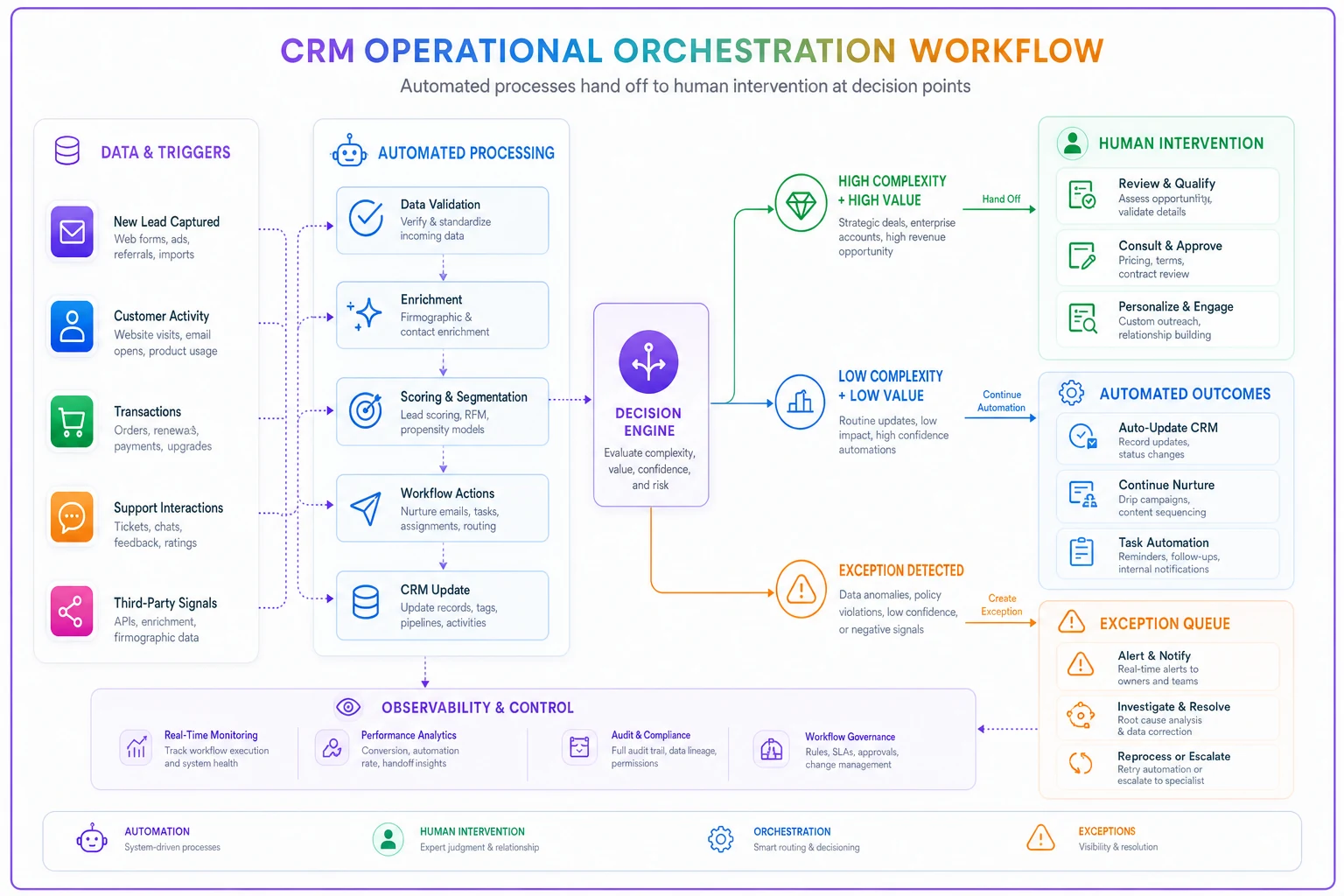
This diagram illustrates how the orchestration layer routes workflows between automated execution and human review based on complexity and relationship value.
This approach also helps with escalation triggers. Rather than building complex rules about when to involve humans, your operational software learns patterns over time. It notices that enterprise accounts in the healthcare vertical always need human touch during compliance reviews. It recognizes that customers who mention "competitor" in support tickets need immediate CSM attention.
Choose software that enhances your team's judgment rather than trying to replace it. The best CS teams use AI-powered platforms to surface insights and automate mundane tasks while keeping humans in control of relationship-critical decisions.
Making the framework stick
Theory is easy. Making this framework actually work requires discipline and constant adjustment.
Document every automation failure. Not to assign blame, but to refine your criteria. When automated onboarding fails for an enterprise client, update your complexity evaluation. When a health score alert causes unnecessary panic, adjust your escalation triggers.
Review your automation mix quarterly. Customer segments change, team capabilities evolve, and what needed human touch last quarter might be ready for automation now. Or vice versa.
Give your CSMs veto power. If someone's gut says a particular account needs human attention despite fitting your automation criteria, listen to them. They're usually picking up on context your framework can't capture.
Measure relationship impact, not just efficiency. Yes, automation might handle 10x more accounts, but if it damages relationships with your most valuable clients, you're optimizing for the wrong metric.
The evolution path most teams follow
Almost every CS team goes through the same progression. They start with everything manual, hit a scaling wall, overcorrect with aggressive automation, deal with the relationship fallout, then finally find their balance.
Stage 1: Manual everything. Team of 3 CSMs handling 50 accounts each, drowning in repetitive tasks, inconsistent execution.
Stage 2: Automation euphoria. Implement CS platform, automate everything possible, feel brilliant as efficiency metrics soar.
Stage 3: Relationship crisis. Enterprise clients complain about feeling abandoned, champion turnover increases, renewal rates drop.
Stage 4: Overcorrection. Pull back most automation, return to manual processes, efficiency plummets again.
Stage 5: Strategic balance. Apply decision framework, segment workflows properly, use automation strategically, finally achieve sustainable scale.
Most teams take two years to reach Stage 5. You can get there faster if you start with clear criteria and realistic expectations about what automation can and cannot do.
The teams getting this right aren't the ones with the most automation or the most human touch. They're the ones who know exactly when to use each approach and have the operational discipline to stick to their framework even when it's tempting to automate everything or throw bodies at every problem.
Your enterprise clients paying six figures annually deserve human attention during critical moments, even if parts of their journey are automated. Your self-serve customers paying $50 monthly want speed and efficiency, not lengthy personal interactions. The same customer might need automation during routine tasks but human intervention during problems.
Build your framework around this reality. Use automation to handle volume and consistency. Use humans to handle complexity and relationships. And use intelligent operational software to orchestrate the handoffs between them.
Ready to transform your customer relationships?
Join 2,000+ businesses using Rellyly to increase sales, improve client retention, and simplify CRM workflows.