

Most teams treat a trial like a countdown timer. Day 1, welcome email. Day 14, "your trial is ending" email. Day 21, a discount to save the deal. Nothing in between except a couple of nudges that fire whether or not the user has actually done anything inside the product.
That gap in the middle is where trials go to die. Not with a bang, not with a "this isn't for us" reply — just silence. The account never crossed the line where the product became useful, so by the time the "trial ending" email lands, there's nothing to renew because there was never anything to lose.
A trial to paid activation sequence only works if it's tied to what the user does, not what day it is. The calendar is a backdrop. The real signal is milestones — specific things a user has to accomplish for the product to click. Miss those, and no amount of discount emails will fix it.
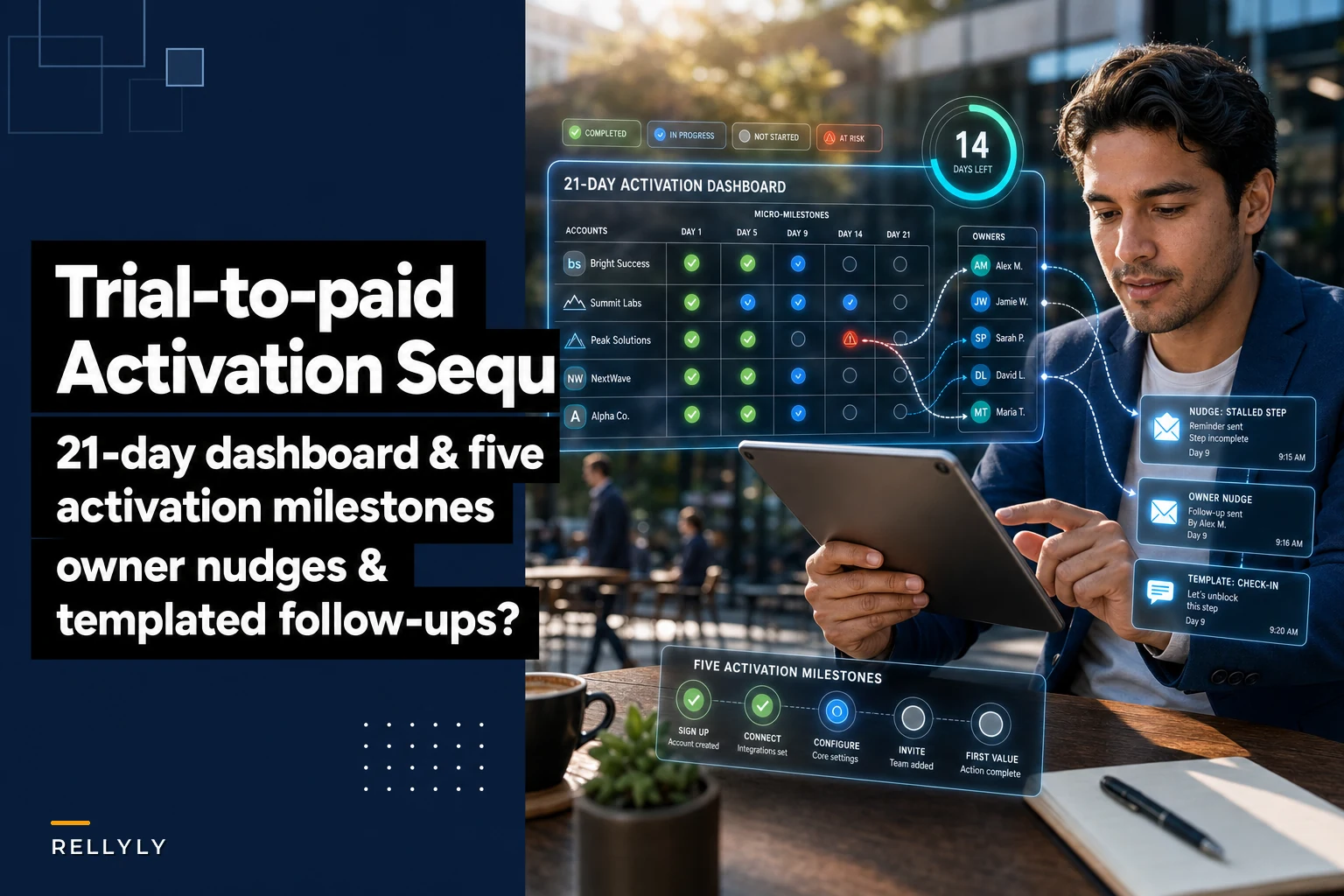
This is a narrow build: five activation events worth tracking, a 21-day dashboard that shows which accounts are stuck and where, and the owner responsibilities plus templated nudges that map to each measured micro-milestone. No broad "how to run onboarding" theory.
The core mistake
The core mistake: measuring time instead of progress
The pattern shows up constantly in mid-market SaaS trials. The sequence is entirely time-based. Everyone gets the same five emails on the same five days. The CS or sales rep assigned to the account "checks in" on day 7 and day 14 because that's what the playbook says.
The problem is that two accounts on day 7 can be in completely different worlds. One has invited three teammates, connected their data source, and built their first report. The other logged in once, poked around the settings page, and left. Sending both of them the identical "how's it going?" nudge is a waste — and worse, it tells the stuck account nothing about what to do next.
This usually happens because the trial funnel and the product usage data live in two different places. The email tool knows what day it is. The product database knows what the user did. Nobody's stitching them together, so nudges fire blind.
What you actually want is a system where day matters only as a deadline, and milestone completion drives everything else. A user who hits milestone three on day 4 shouldn't get the "getting started" nudge on day 7. A user stuck on milestone one at day 10 needs a very different message than the calendar suggests.
Activation events to track
The five activation events worth tracking
Never miss a customer touchpoint again.
Rellyly helps you manage contacts, tasks, and sales efficiently in one platform.
- Unified customer profiles
- Automated follow-ups
- Sales pipeline tracking
No credit card required
Not every action in your product is an activation event. Most aren't. The trick is finding the five that actually predict a paid conversion, and ignoring vanity actions like "viewed dashboard" that everyone does and that correlate with nothing.
| Activation event | What it proves | Rough conversion signal |
|---|---|---|
| 1. Core setup done | Account is configured enough to be usable (data connected, integration live, first project created) | Necessary but weak alone |
| 2. First real output | User got one genuine result using their own data | Strong — this is the "aha" |
| 3. Second user invited | The product is spreading inside the org, not a solo experiment | Very strong for team tools |
| 4. Repeat use | User came back and did the core action a second or third time | Strong — proves it wasn't a one-off |
| 5. Workflow embedded | Product connected to something they already do daily (calendar, Slack, CRM, a saved report) | Strongest — sticky |
The mistake people make is treating all five as equal checkboxes. They're not. Event 2 (first real output) and event 5 (workflow embedded) do most of the predictive work. Events 1, 3, and 4 are the connective tissue that gets users there.
A typical example: a team analytics tool found that trials which invited a second user and built a scheduled report converted at roughly four times the rate of trials that did neither — regardless of how many times they logged in. Login count was noise. Those two events were the whole game.
So before you build any sequence, do the boring homework. Pull your last 100–150 converted trials and your last 100–150 that churned, and find the two or three actions that separate them. Those are your milestones. Don't guess them.
21-day dashboard
The 21-day activation dashboard
The dashboard's only job is to answer one question fast: which trial accounts are stuck, and on which milestone?
Not "how many trials do we have." Not "average time in trial." Which specific accounts are stalled, and where.
-
Segment by days remaining, not by start date. "8 days left" is actionable. "Started October 3rd" makes you do math.
-
Flag the stall point, not just the status. An account stuck on milestone one is a very different problem than one stuck on milestone four. The first is an onboarding failure; the second is close and needs a nudge over the line.
-
Show time-in-milestone. An account that's been sitting on milestone two for five days is more at-risk than one that got there yesterday. Staleness matters more than raw progress.
-
Surface the "silent good" accounts too. Trials blazing through milestones on their own don't need "need help getting started?" emails — they need a light-touch move toward the purchase conversation.
The dashboard replaces the two things that kill trial conversion: reps guessing who to focus on, and nudges firing on the wrong day. When you can see at a glance that eleven accounts are stuck on milestone two with under a week left, you know exactly where the hour goes.
Visualize the workflow so owners and automation align on the same signals.
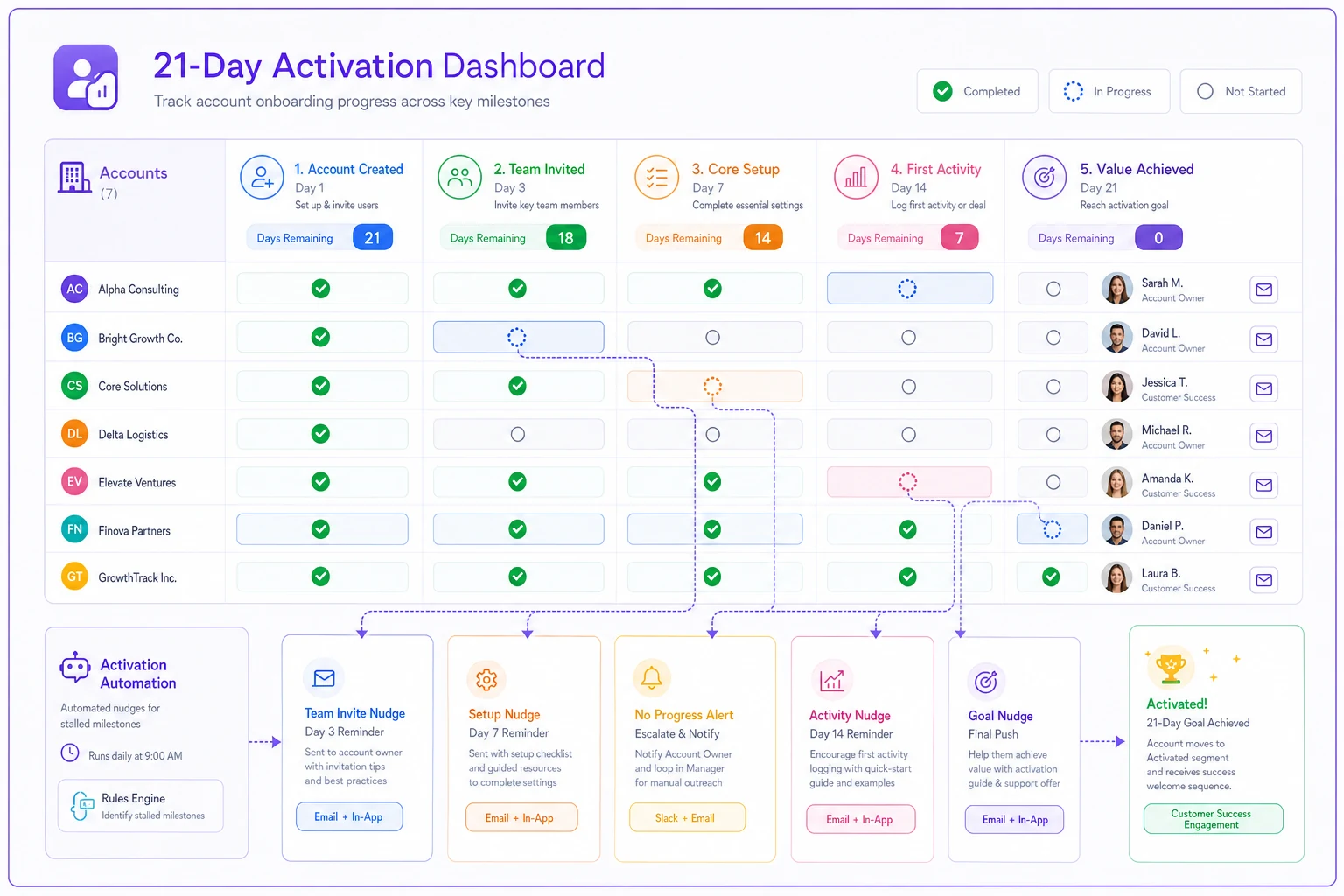
When you can see at a glance that eleven accounts are stuck on milestone two with under a week left, you know exactly where the hour goes.
Who moves each account
Owner responsibilities: who moves each account
A dashboard nobody owns is just a report. Every stalled account needs a name attached and a clear rule for when a human steps in versus when a templated nudge handles it.
Most milestone-one and milestone-four stalls can be handled with templated nudges — they're common, predictable, and usually just need a reminder plus the right link. Milestone-two and milestone-five stalls are where human owners earn their keep, because those are the accounts close enough to convert that a personal touch actually moves the needle.
-
Automated nudge tier (milestones 1 and 4) templated, event-triggered messages fire when an account stalls for more than 48 hours on these milestones. No human required unless the nudge itself fails to move them.
-
Rep-owned tier (milestones 2, 3, and 5) an assigned owner gets a task the moment an account stalls here for 48+ hours. The task isn't "check in" — it's specific: "Acme stuck on first report for 3 days, 9 days left. Offer a 15-min setup call."
-
Escalation tier (any milestone, under 5 days left, still stalled) this goes to a senior CS or the account owner directly. These are the salvageable-but-slipping accounts, and they deserve real attention.
Automate task creation rules so a stalled account never sits unassigned for more than 48 hours.
The logic here: automate the repetitive, predictable stalls so your people spend their limited hours on accounts where a conversation changes the outcome. It's the same thinking behind cutting lead-to-activation time with a task-orchestration playbook — the system decides who does what and when, so nothing sits in a queue waiting for someone to notice it.
One thing worth being strict about: an account should never appear on the dashboard as stalled without either a fired nudge or an owner task within 48 hours. If it does, your routing is broken. The whole point is that "stuck" automatically becomes "someone's problem."
Milestone-tied nudges
Templated nudges tied to each micro-milestone
Generic nudges are the reason nudges get ignored. "Just checking in on your trial!" tells the user nothing and asks them to figure out what's next on their own. Milestone-tied nudges do the opposite — they name the exact next step because the system already knows where the user is stuck.
Bad (time-based): > "You're halfway through your trial! Let us know if you have questions." Good (milestone-based, stuck on 'first real output'): > "You've got your data connected — nice. The next step is building your first report, which takes about 4 minutes. Here's the direct link, and here's a 90-second video showing exactly how. Want me to build it with you on a quick call?" The second one works because it acknowledges what they've done, names the specific blocker, quantifies the effort, and offers help. It only writes itself because the milestone data told you where they were.
A working set of templated nudges, mapped to stall points:
-
Stuck on setup (milestone 1) short, remove-the-friction message with the single next config step and a direct link. No fluff.
-
Stuck on first output (milestone 2) the highest-value nudge. Acknowledge progress, name the exact next action, offer a live assist. This is where a human owner should be watching.
-
Solo user, no invites (milestone 3) frame the invite as a benefit to them, not a favor to you — "these usually work better with your teammate seeing the same data."
-
One-and-done, no repeat use (milestone 4) re-engage with something new since last visit, or a reason to come back today.
-
Not embedded (milestone 5) point at the one integration or saved-workflow feature that makes the tool part of their daily routine.
The subtle discipline here is throttling. Fire a nudge for every stall on every milestone and active users drown in email and tune out. Nudges should respect a cooldown and defer to human contact when an owner is already engaged. Getting those mechanics right — cooldowns, escalation triggers, not overwhelming people — matters more than most teams realize, and the same principles apply to automating recurring check-ins without burning customers. A trial nudge that annoys is worse than no nudge at all.
Real scenario
A real scenario: analytics tool, 21-day trial
A small analytics SaaS was running a flat 21-day trial with the standard time-based email sequence. Conversion sat somewhere around 14–16%. Reps "worked" trials but mostly reacted to whoever replied, which meant the quiet-but-stuck accounts — the majority — got zero attention until the ending-soon email.
They rebuilt around milestones. First they pulled their converted vs. churned trials and found the split cleanly: accounts that built a first report and connected a second data source converted far more often. Those became milestones two and five. The dashboard got organized by days-remaining and stall point.
The change that mattered most wasn't the emails — it was reps finally seeing that on any given day, roughly a dozen accounts were stalled on "first report" with under ten days left. Before, those accounts were invisible. Now they were a to-do list. Owners started firing the milestone-two nudge and offering short setup calls to accounts under five days out.
Over the following couple of months, conversion moved into the low-to-mid 20s. Not a miracle — no trial process turns a bad product into a good one — but a real lift, and most of it came from catching the "stuck on first output" accounts before the trial ran out. The discount emails, which used to carry the whole conversion load, became almost irrelevant.
When it's worth building
When this is worth building — and when it isn't
This kind of milestone-driven sequence pays off when your trial has real setup involved, a clear "aha" moment tied to the user's own data, and enough trial volume that reps can't manually track everyone. Mid-market and up, self-serve-with-sales-assist motions, anything with a 14–30 day window — this fits well.
A few situations where it's overkill. If your product delivers value in the first two minutes with zero setup, you don't have a milestone problem — you have a pricing or value-prop problem, and a sequence won't fix it. If your trial volume is tiny — a handful a week — a spreadsheet and a rep who actually looks at it beats building a dashboard. And if you haven't done the homework to identify which events actually predict conversion, don't build any of this yet. You'll just automate the wrong nudges faster.
The teams that should avoid this are the ones tempted to track ten or twelve "activation events" because more data feels safer. It isn't. Five is already generous. The whole value is in ruthless focus on the two or three events that separate paid from churned. Track more than that and the dashboard turns into noise, and you're back to guessing.
Conclusion
Bringing it together
Time-based trial sequences underperform because they treat every account the same when accounts are wildly different in what they've actually accomplished. The fix isn't more emails or a better discount at the end. It's tying the whole sequence to a small set of milestones that genuinely predict conversion, making stalls visible on a dashboard organized by where accounts are stuck, and routing those stalls to either an automated nudge or a named owner within a couple of days.
Do that, and the deadline stops being the thing you're managing. Progress becomes the thing you're managing — which is what the trial was supposed to measure all along.
Do that, and the deadline stops being the thing you're managing. Progress becomes the thing you're managing — which is what the trial was supposed to measure all along.
Ready to transform your customer relationships?
Join 2,000+ businesses using Rellyly to increase sales, improve client retention, and simplify CRM workflows.