



Most small sales teams think their job ends when the contract gets signed. Customer success thinks their job starts when the customer logs in for the first time. The gap between those two moments is where promising deals quietly fall apart.
That 3–7 day window after someone signs — where sales has mentally moved on to the next prospect, customer success is waiting for the customer to "be ready," and the new customer who just handed over their credit card is sitting there wondering why nobody's reached out. By the time anyone notices, the excitement is gone.
This costs small businesses more than they realize. Not just churn, but expansion revenue, referrals, and the slow erosion of team morale when another "sure thing" disappears after two weeks without a word.
The fix isn't more headcount or another tool. It's a task orchestration playbook — a simple system that bridges the handoff gap with clear triggers, lightweight sequences, and activation milestones that actually hold up when you've got three people doing the job of ten.
Why the traditional handoff model breaks for resource-constrained teams
Small teams don't operate like enterprise sales organizations. You don't have dedicated SDRs, implementation specialists, and customer success managers. You've got maybe two salespeople who also handle support tickets, and one CS person juggling onboarding, training, and probably some marketing tasks on the side.
The enterprise handoff model assumes clean role boundaries. Sales closes the deal, drops detailed notes in the CRM, schedules a formal handoff call with CS, who then runs a structured onboarding process. Clean in theory. Completely unworkable when your salesperson is managing 40 active opportunities and your CS person is helping three other customers troubleshoot integrations.
What actually happens: sales fires off a Slack message — "just closed ABC Company, they seem excited!" CS adds it to their mental list. Three days pass. The customer emails asking when they'll hear from someone. Both teams assumed the other handled it. By day five, mild annoyance has replaced enthusiasm. By day ten, the customer is second-guessing the purchase.
The breakdown is almost always the same pattern. Small teams rely on informal communication and good intentions instead of structured triggers. When everyone's wearing multiple hats, anything that isn't explicitly assigned falls through the cracks. You don't need more meetings or complex workflows — you need a lightweight orchestration system that takes coordination off people's plates entirely.
Building your minimal viable task sequence
Forget comprehensive onboarding flows with 47 touchpoints. Resource-constrained teams need a minimal viable task sequence — the smallest set of actions that move a customer from signup to first value.
Never miss a customer touchpoint again.
Rellyly helps you manage contacts, tasks, and sales efficiently in one platform.
- Unified customer profiles
- Automated follow-ups
- Sales pipeline tracking
No credit card required
Start by mapping your critical path to activation. For most B2B SaaS products, it looks roughly like:
-
Account setup
-
First data import or integration
-
One core workflow configured
-
First successful outcome achieved
Each step becomes a task with three components: a trigger, an owner, and a completion signal.
Take account setup. The trigger is contract signature (automated from your CRM or payment system). The owner is whoever's available first — sales or CS, doesn't matter as long as it's explicit. The completion signal is when the customer has logged in and finished basic profile setup.
Here's what this looks like mapped out:
| Task | Trigger | Owner | Completion Signal | Time Limit |
|---|---|---|---|---|
| Send welcome packet | Contract signed | Sales (whoever closed) | Email sent with login details | 2 hours |
| Schedule setup call | Welcome email opened | First available (Sales or CS) | Call booked within 48 hours | 24 hours |
| Prep account | Setup call booked | Customer Success | Account configured, test data loaded | Before call |
| Run setup call | Calendar event | Customer Success | Customer achieves first success metric | 30 min call |
| Check-in message | 24 hrs post-setup | Sales (original closer) | Response received or follow-up scheduled | 48 hours |
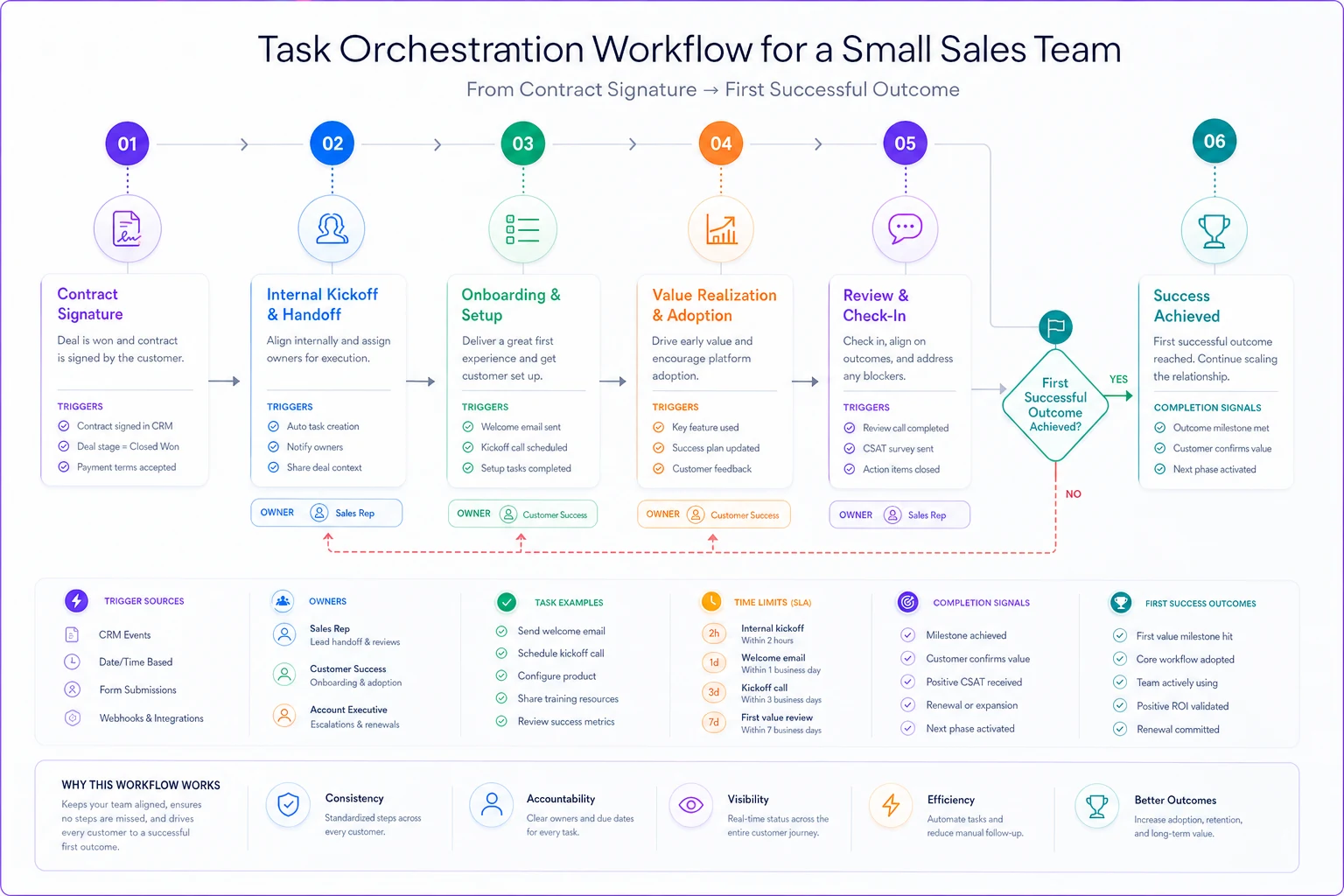
Each task has a trigger that doesn't require someone to remember or go check something. Ownership is flexible but never ambiguous. And every task has a measurable completion signal — not something vague like "customer feels supported."
The time limits matter more than they look. Without them, tasks drift indefinitely. With them, you create urgency even when everyone's buried in other work.
A simple diagram helps visualize the minimal task sequence.
Each task has a trigger that doesn't require someone to remember or go check something. Ownership is flexible but never ambiguous. And every task has a measurable completion signal — not something vague like "customer feels supported."
Creating activation milestones that actually predict retention
Most teams track the wrong activation metrics. Logins, features used, time in app — these are activity metrics, not activation milestones. A real activation milestone is a specific action that correlates with long-term retention, not just early engagement.
For a CRM, it might be adding the fifth contact. For an email tool, sending the third campaign. For a scheduling platform, booking the tenth appointment. The specific number matters less than finding the threshold where customers tip from "testing it out" to "this is how we work now."
Finding your real activation milestone takes some digging. Look at customers who've stayed 6+ months and ask what they did in their first two weeks that churned customers didn't. Usually one or two actions stand out clearly.
A marketing agency rebuilt their entire handoff sequence after discovering their milestone was connecting three data sources to their reporting dashboard. Customers who connected email, ads, and analytics in week one had an 85% six-month retention rate. Those who only connected one or two? Under 40%.
Every touchpoint pushed toward getting those three integrations live. Sales started pre-qualifying which platforms prospects already used. CS prepped integration guides before the first call. They even built a simple tracker showing "1 of 3 connected" to create visible momentum.
Average time to activation dropped from 12 days to 4. Month-two churn fell by almost half.
When to trigger human intervention vs automated sequences
Small teams love automation because it promises more output with less effort. But over-automating activation often backfires.
The principle: automate the logistics, humanize the moments of truth.
Logistics — sending login credentials, booking calendar links, creating accounts, firing off reminders — should be fully automated. No human should be copying and pasting welcome emails or manually creating user accounts.
Moments of truth are different. These are inflection points where customers might get stuck, lose momentum, or quietly give up. The first integration that fails. Realizing the product works differently than expected. Hitting their first real use case and not knowing how to proceed. These need fast human intervention, not an automated drip sequence.
The trick is building smart behavioral triggers for that intervention. Don't wait for the customer to ask for help — by then frustration has already set in. Watch for signals instead:
-
No login within 48 hours of account creation
-
Started but didn't complete first integration
-
Multiple logins but no data created
-
Opened help docs more than five times in one session
Each of these should immediately flag someone for proactive outreach. Not a generic "just checking in!" email — specific help based on exactly where they're stuck.
One approach that works well here: the 15-minute rescue call. When a stuck signal fires, whoever's available sends a quick message: "Noticed you were working on [specific thing]. Quick 15-min screen share to get you unstuck?" No scheduling links, no formal meeting. Just three specific times in the next 24 hours.
Offer three specific times in the next 24 hours for a 15-minute rescue call to increase acceptances.
These calls convert at an unusually high rate because they catch people at the exact moment they need help. They're also short enough that team members can squeeze them between other work without blowing up their day.
The trade-off matrix: speed vs quality vs resources
Every small team faces the same three-way tension — optimize for speed (how fast customers activate), quality (how good the experience is), or resources (how little team time it takes). You can't maximize all three.
Most teams don't explicitly choose, which means they end up with mediocre results across all three. Better to pick your priority consciously and accept the real trade-offs.
If you optimize for speed: Some customers will have a rougher experience. More automation, fewer human touchpoints, push toward self-serve. Works when your product is simple and your customers are technically capable.
If you optimize for quality: Activation takes longer and costs more team time. White-glove onboarding, multiple check-ins, personalized configuration. Works for high-ticket products where each customer represents significant revenue.
If you optimize for resources: Expect slower activation and occasional poor experiences. Mostly automation with minimal human backup. Works when you're severely resource-constrained and need to protect team capacity for other priorities.
You can shift between these modes by customer segment — enterprise customers get quality-optimized treatment while self-serve customers get speed-optimized flows. The key is being deliberate about which mode you're in instead of defaulting to whatever feels right in the moment.
| Customer Segment | Contract Value | Complexity | Chosen Optimization | Activation Approach |
|---|---|---|---|---|
| Self-serve | <$200/mo | Low | Speed | Automated + FAQ |
| SMB | $200–1000/mo | Medium | Balanced | Automated + rescue calls |
| Mid-market | $1000–5000/mo | High | Quality | Guided setup + check-ins |
| Enterprise | >$5000/mo | High | Quality | White glove everything |
These aren't rigid rules. The point is making conscious decisions about where your team's time actually goes, rather than letting it happen by accident.
Measuring handoff effectiveness without complex attribution
You don't need sophisticated analytics to know if your handoff process is working. Three metrics cover most of what matters:
Time to First Value (TTFV): How long from signup to hitting your activation milestone. If this trends up, something in your sequence is broken.
Handoff Drop Rate: Percentage of closed deals that never reach activation. Track this weekly. Anything consistently above 15% is a serious problem.
Activation Velocity: How many customers you can activate per team member per week. This tells you whether your process can actually scale.
A spreadsheet works fine for tracking all three. The insights matter more than the infrastructure.
Look for patterns in the failures. Do certain salespeople have higher drop rates — are they overpromising or closing bad-fit customers? Do activation times spike on Fridays? Does one segment consistently take longer? These patterns usually point directly at fixable process gaps.
One team noticed their handoff drop rate doubled for customers who signed up after 3 PM on Fridays. The welcome sequence was scheduled for "next business day," which meant Monday. By then the customer's urgency had faded. They fixed it by triggering Friday afternoon signups immediately, even though the full onboarding still happened Monday. Small change, meaningful impact.
Common orchestration failures in resource-constrained teams
The same mistakes come up repeatedly:
The "everyone owns it" problem: When multiple people could handle a task, nobody does. Fix: default ownership rules. Sales owns the first 24 hours, CS owns everything after. No ambiguity.
The delayed trigger trap: Triggers that depend on human action — "after sales updates the CRM" — always fail eventually. Fix: use system triggers. Payment received, email opened, login detected.
The perfect sequence fallacy: Trying to build one flow that handles every edge case. Fix: build for the 80% case and handle exceptions manually until they're common enough to systematize.
The missing escalation path: When something falls through the cracks, there's no backup. Fix: daily sweep of stuck accounts with clear escalation if milestones are missed.
The false automation: Tasks labeled "automated" that still require manual work somewhere. Fix: audit every automated step. If a human touches it, it's not automated.
A recruiting software startup had built an elaborate 12-step onboarding sequence that looked great in the workflow diagram. In reality, about half the steps required someone to remember to do something — which meant half the steps happened inconsistently. Activation rate was under 30%.
Stripping it to four truly automated steps plus two human touchpoints with clear triggers pushed activation rate to around 70% within a month. Simpler is almost always better.
Practical tools and systems for orchestration
You don't need expensive customer success platforms to make this work. Most small teams can build a functional system with tools they already have.
CRM + automation tool: Use your CRM (HubSpot, Pipedrive, whatever you've got) to track deal stages and trigger automations through Zapier or Make. When a deal moves to "Closed Won," automatically create onboarding tasks, send welcome emails, and schedule check-ins.
Shared inbox + templates: Front, or even a Gmail shared inbox, handles customer communication fine. Build templates for each activation stage and use tags or labels to track where each customer is in the process.
Simple project management: Trello, Asana, or a well-organized spreadsheet can track activation tasks. Create columns for each stage, move cards as customers progress, set up automation rules for anything overdue.
Calendar scheduling + automation: Calendly or similar handles activation call booking. Connect it to your automation tool to trigger prep tasks when calls get booked.
The tools aren't the hard part — it's connecting them so each action triggers the next without anyone manually pushing it forward. That's where AI-powered operational software starts making a real difference. Instead of manually wiring five different tools together and hoping the automations hold, modern platforms can orchestrate complex handoffs while handling exceptions that would otherwise slip through.
These AI-enhanced platforms can spot when a customer is stuck before they complain, automatically assign the right team member based on availability, and surface next steps based on what's worked for similar customers. What would otherwise be a full-time coordination job runs quietly in the background.
Building sustainable activation momentum with minimal resources
The goal isn't a perfect system on day one. It's a system that gets incrementally better while requiring incrementally less effort from your team.
Start with the absolute minimum: one automated welcome email, one human check-in, and tracking of one activation metric. Run it for two weeks. See what breaks. Fix the biggest thing. Run it again.
Each iteration, add one improvement. A second automated email. A better behavioral trigger for human intervention. Segmenting high-value customers for different treatment. Small improvements compound faster than you'd expect.
Keep the documentation simple — a one-page checklist, not a 50-page manual. Triggers, tasks, owners, edge cases. Update it whenever a new failure mode shows up.
Most importantly, build it with both sales and customer success involved. When both teams help design the system, both teams actually follow it. Orchestration only works when everyone plays their part consistently.
The teams that succeed with constrained resources aren't the ones with the most sophisticated setups. They're the ones who pick something simple, execute it consistently, and improve based on real results. The gap between signup and activation isn't a people problem or a tools problem — it's a coordination problem. And coordination problems have coordination solutions: clear triggers, minimal sequences, explicit ownership at each step. That's how small teams compete with companies ten times their size.
The teams that succeed with constrained resources aren't the ones with the most sophisticated setups. They're the ones who pick something simple, execute it consistently, and improve based on real results. The gap between signup and activation isn't a people problem or a tools problem — it's a coordination problem. And coordination problems have coordination solutions: clear triggers, minimal sequences, explicit ownership at each step. That's how small teams compete with companies ten times their size.
Ready to transform your customer relationships?
Join 2,000+ businesses using Rellyly to increase sales, improve client retention, and simplify CRM workflows.