

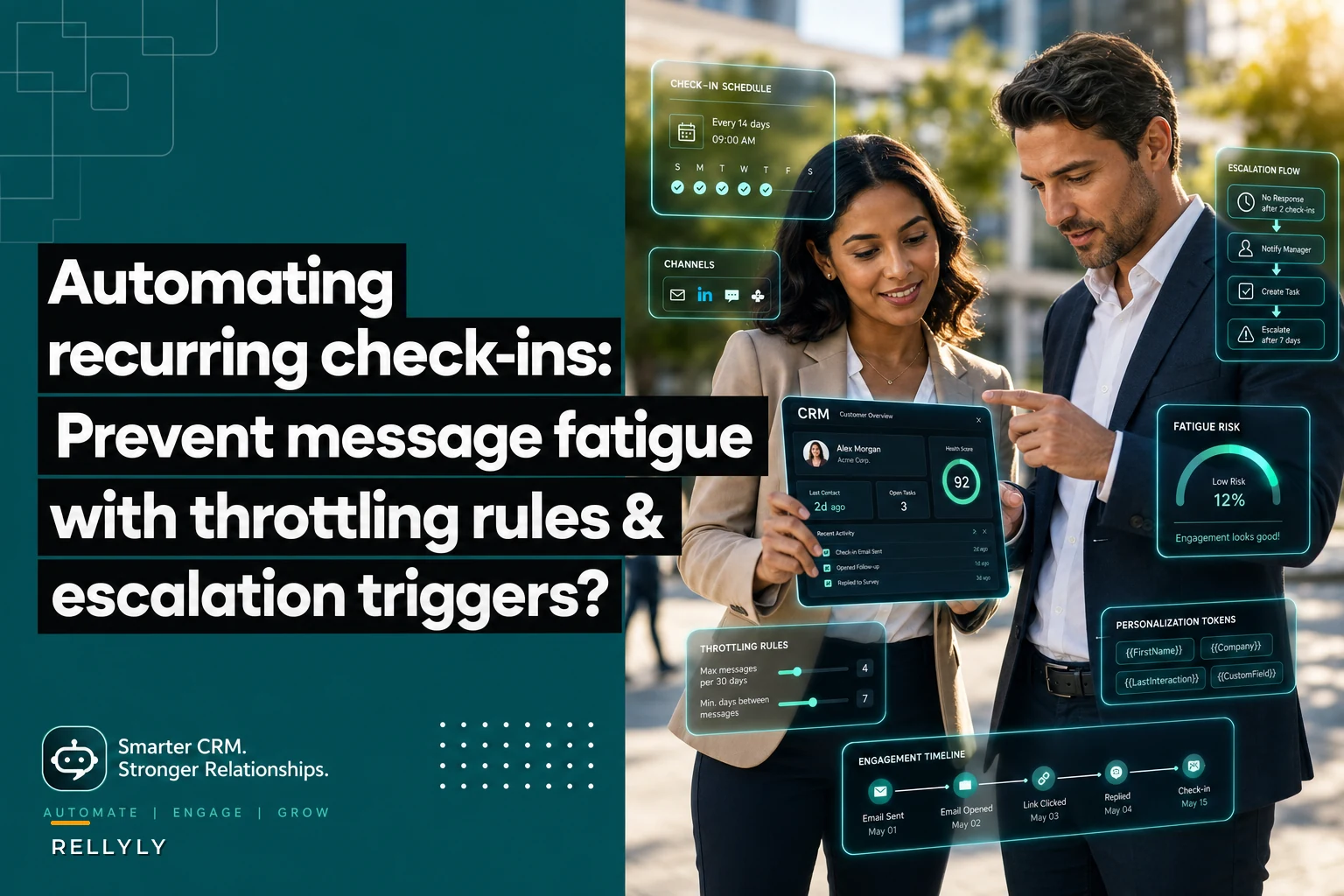

A few months back, a VP of Sales walked me through their check-in setup. They were running automated check-ins to 4,000+ accounts every month. Full coverage, consistent messaging, zero manual effort. Looked great on paper.
Why most check-in automation quietly destroys the relationships it's supposed to maintain
Then we pulled the engagement data.
Response rates had dropped from 18% to under 3% in four months. Unsubscribe rates tripled. Deal velocity actually slowed down because prospects were mentally checked out before sales could even get in front of them. The automation wasn't just failing—it was actively damaging relationships.
This happens constantly. Teams set up automated check-ins thinking they've solved the coverage problem, then end up creating message fatigue that's worse than no outreach at all. The fix isn't better copy or smarter send times. It's building throttling systems that protect your most valuable asset: customer attention.
Why automated check-ins create message fatigue even when done "right"
Most teams approach this with good intentions. They segment lists, personalize subject lines, test different times. Yet message fatigue still creeps in because they're missing the operational reality of how customers actually experience these touchpoints.
Never miss a customer touchpoint again.
Rellyly helps you manage contacts, tasks, and sales efficiently in one platform.
- Unified customer profiles
- Automated follow-ups
- Sales pipeline tracking
No credit card required
Think about what's happening on the customer side. A mid-market SaaS buyer might be evaluating 8–12 vendors simultaneously. Each vendor has their own check-in cadence. Multiply that by the number of internal stakeholders getting copied on these messages. One IT director I talked to was receiving 40+ vendor check-ins per week. At that volume, even genuinely useful messages become background noise.
It compounds when your automation doesn't account for cross-channel activity. Marketing sends a newsletter Tuesday. Customer success sends a usage report Wednesday. Sales fires a check-in Thursday. From your side, it's one touchpoint. From the customer's side, you've hit them three times in three days from three different teams.
What makes it worse is that most automation platforms treat every contact identically. The customer who opened your last three emails gets the same cadence as someone who hasn't engaged in months. The enterprise account worth $200k annually gets the same frequency as the SMB paying $500/month. Without throttling rules that actually reflect engagement patterns and account value, you're spraying messages and hoping something lands.
Real throttling patterns that prevent burnout
After digging through engagement data across a lot of B2B sales teams, certain throttling patterns consistently prevent fatigue without sacrificing coverage. These aren't theoretical—they're operational rules pulled from automation configurations that actually worked.
Engagement-based frequency caps
The most effective throttling starts with engagement scoring. Not some complex lead scoring model that takes months to build—just simple, binary engagement tracking that adjusts frequency in real-time.
| Engagement Level | Check-in Frequency | Max Monthly Touches | Escalation Trigger |
|---|---|---|---|
| High (opened last 3) | Every 14–21 days | 3 total | No response after 2 |
| Medium (opened 1 of 3) | Every 21–30 days | 2 total | No opens after 3 |
| Low (no recent opens) | Every 45 days | 1 total | Re-engagement campaign |
| Dormant (90+ days) | Quarterly only | 1 total | Manual review |
Frequency decreases as engagement drops. Obvious in theory, but most automation platforms default to the opposite—hammering unengaged contacts with more messages trying to "wake them up."
Cross-channel collision detection
-
Marketing email sends
-
Customer success touchpoints
-
Support ticket interactions
-
Product usage notifications
-
Invoice and billing emails
When any touchpoint occurs, it triggers a suppression window. Customer success sends a QBR invite? Sales check-ins pause for 7 days. Support closes a ticket? Check-ins pause for 3 days. These aren't arbitrary numbers—they come from analyzing customer interactions to figure out when people are actually receptive to sales outreach.
Account-tier multipliers
-
Enterprise accounts
0.5x frequency (fewer, higher-quality touches)
-
Mid-market
1x frequency (standard cadence)
-
SMB
1.5x frequency (more touches, simpler messages)
-
Free trials
2x frequency (time-boxed urgency)
This feels counterintuitive—why contact enterprise accounts less? Because their buying cycles are longer, involve more stakeholders, and they're hypersensitive to vendor spam. One poorly-timed automated message can get you blocked by procurement before the deal even gets moving.
Building escalation triggers that actually get responses
Escalation triggers are where most check-in automation falls apart. Teams either escalate too aggressively and annoy customers, or they never escalate at all and miss real opportunities. The key is building triggers based on behavior, not arbitrary timelines.
Pattern-based escalation, not time-based
Traditional escalation looks like this: Day 1 email → Day 3 email → Day 7 call → Day 14 breakup email. It ignores everything about how the customer is actually behaving.
Smart escalation tracks behavior patterns:
-
Opened 3+ emails but never replied → Switch to a different message angle
-
Clicked links but didn't convert → Escalate to product-focused content
-
Previously engaged, now dormant → Trigger re-engagement sequence
-
Multiple stakeholders engaging → Escalate to group meeting request
Someone opening emails but not replying might need a different value prop entirely. Someone clicking product links needs a demo, not another "just checking in" message.
Multi-signal escalation rules
The best escalation logic combines multiple signals to prevent false positives. Here's a framework that cuts unnecessary touches while still catching real opportunities:
Level 1 Escalation (Automated adjustment):
-
2+ email opens AND no reply → Change message template
-
Link clicks AND no meeting booked → Add calendar link more prominently
-
Reply with "not now" → Extend cadence by 2x
Level 2 Escalation (Semi-automated):
-
High engagement score AND competitor mentioned → Alert rep for manual outreach
-
Multiple stakeholders engaged → Trigger executive summary email
-
Sudden re-engagement after dormancy → Fast-track to rep
Level 3 Escalation (Full manual):
-
Enterprise account with no engagement → Strategic account review
-
High-value deal stalled → Manager intervention
-
Explicit "stop" request → Immediate suppression and manual follow-up
You're not escalating based on time passing. You're escalating based on what the customer is actually doing and how much the account matters.
Personalization tokens that don't feel robotic
Personalization has become kind of a joke in B2B sales. Everyone knows {{FirstName}} and {{Company}} are merge tags. The bar for feeling "personal" has risen, and basic token replacement stopped clearing it a while ago.
Dynamic content blocks instead of just tokens
Rather than swapping individual tokens, build dynamic content blocks that change entire sections based on account data:
-
Industry-specific pain points (not just "I see you're in {{Industry}}")
-
Role-based value props (not "As a {{Title}}, you probably...")
-
Engagement-based messaging (not the same template for everyone regardless of behavior)
Instead of "Hi {{FirstName}}, I wanted to check in on {{Company}}'s evaluation process," you'd have two completely different paragraphs:
High-engagement version: "Noticed you've been going through the implementation guides—most teams at your stage have questions about data migration timelines..."
Low-engagement version: "Been a while since we connected. Quick question: is [specific initiative] still a priority for Q4?"
The whole message changes, not just a field or two.
Behavioral personalization beats demographic personalization
Stop personalizing based on static data—name, company, title—and start personalizing based on what people actually do:
-
Pages visited on your website
-
Content downloaded
-
Features used during trial
-
Support tickets filed
-
Competitor comparisons viewed
A check-in to someone who spent 20 minutes on your pricing page should look completely different from one to someone who only ever hit your homepage. Most automation treats them identically because they're both labeled "marketing qualified leads."
Context injection from multiple sources
The most effective personalization pulls from multiple systems at once:
-
CRM
Deal stage, value, timeline
-
Marketing automation
Content engagement, campaign responses
-
Product analytics
Feature usage, login frequency
-
Support system
Recent tickets, satisfaction scores
-
Sales intelligence
Funding rounds, leadership changes, tech stack
Combine these signals and you can craft messages that feel genuinely relevant: "Saw your team just expanded the Eastern region right as usage of our territory mapping feature jumped significantly—might be worth showing you the bulk assignment feature we shipped last month..."
When to keep check-ins human (and when not to)
Not everything should be automated. The question is which check-ins benefit from human judgment and which are better handled at scale.
Automate these:
-
Dormant lead reactivation (low probability, high volume)
-
Trial progress nudges (time-sensitive, predictable)
-
Post-demo follow-ups (standardized process)
-
Renewal reminders (operational, not strategic)
-
Event invitations (broad distribution)
-
Content sharing (educational, not sales-focused)
Keep these human:
-
Enterprise account reviews (high stakes, complex)
-
Post-implementation check-ins (relationship critical)
-
Expansion conversations (strategic, consultative)
-
Complaint resolution (emotional, urgent)
-
Executive touchpoints (political, sensitive)
-
Competitive displacement (nuanced, tactical)
The dividing line isn't deal size or customer segment. It's whether the interaction requires judgment, empathy, or strategic thinking. Automation is great at consistency and scale. Humans are better at reading between the lines and course-correcting when something feels off.
Implementation sequence for teams starting from scratch
Building an intelligent check-in system doesn't happen in a week. Here's a sequence that minimizes risk while getting early wins quickly.
Enforce the 'no more than one automated check-in per week' rule in week 3–4 to see immediate reductions in fatigue.
-
Week 1–2
Audit your current state.
Map every customer touchpoint across all departments. You'll be surprised by the overlap. One team discovered they were sending 14 different automated messages to new customers in their first month alone. -
Week 3–4
Build basic throttling.
Start simple. No customer gets more than one automated check-in per week. No exceptions. This immediately reduces fatigue while you build more sophisticated rules. -
Week 5–6
Add engagement tracking.
Implement open and click tracking across all automated messages. Tag each message with its purpose—check-in, educational, promotional—so you can analyze patterns later. Don't act on the data yet, just collect it. -
Week 7–8
Create behavioral segments.
Based on your tracking, build three segments: highly engaged, somewhat engaged, not engaged. Adjust frequency accordingly. Highly engaged might get bi-weekly touches; not engaged gets monthly. -
Week 9–10
Implement escalation triggers.
Start with one simple trigger—if someone opens three emails without replying, flag for manual review. Don't automate the escalation yet. Have a human handle it first so you learn what actually works. -
Week 11–12
Add personalization layers.
Begin with behavioral personalization—different messages based on what they've done, not who they are. Test two or three variations max. More than that and you can't figure out what's driving results. -
Ongoing
Refine based on data.
Every month, review engagement metrics and adjust. The right cadence for Q1 might be completely wrong by Q4. Keep tweaking based on actual results, not what some best practices guide says.
After you've gone through the full implementation sequence, it's worth stepping back and reviewing how the full process connects—from initial contact to escalation to human handoff.
Having a visual map of those logic flows helps teams spot gaps that aren't obvious when everything is buried in platform settings.
A quick visual of the implementation flow can make it obvious where suppression windows, escalation handoffs, and manual review points should sit.
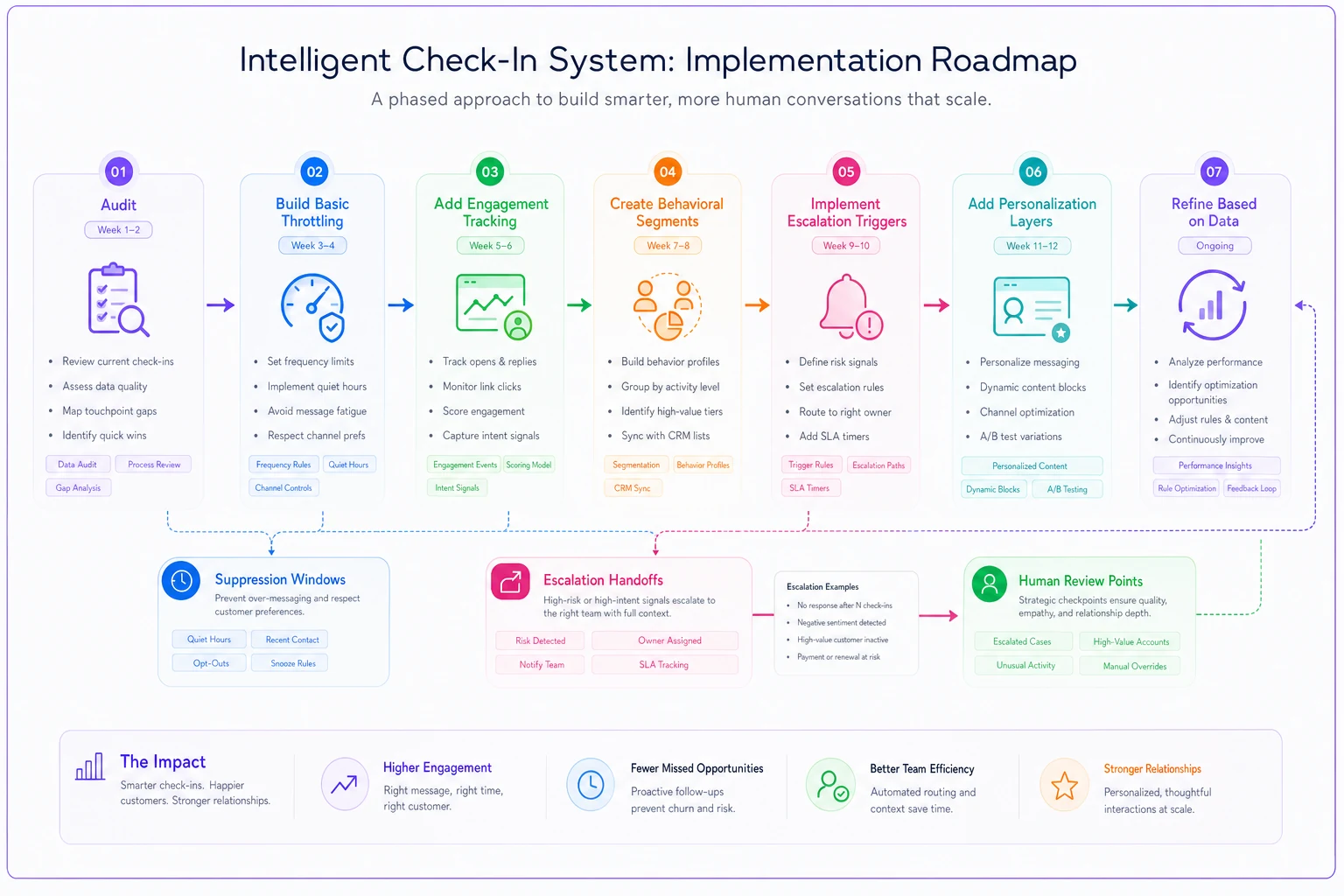
Having a visual map of those logic flows helps teams spot gaps that aren't obvious when everything is buried in platform settings.
Measuring success beyond open rates
Most teams measure check-in success with vanity metrics: open rates, click rates, reply rates. These tell you nothing about whether your automation is actually helping or quietly burning goodwill.
Relationship health metrics:
-
Unsubscribe rate by cadence frequency
-
"Stop" requests per 1,000 sends
-
Response sentiment (positive/negative/neutral)
-
Multi-thread engagement rate
-
Time between touches vs. engagement quality
Business impact metrics:
-
Deal velocity for automated vs. manual check-ins
-
Pipeline influenced by automated touchpoints
-
Customer lifetime value by engagement level
-
Opportunity creation rate from dormant leads
-
Cost per opportunity (automation vs. manual)
Operational efficiency metrics:
-
Rep time saved per week
-
Accounts covered vs. accounts actually engaged
-
Escalation accuracy (good triggers vs. false positives)
-
Message fatigue indicators over time
The goal isn't maximizing any single metric. It's finding the balance where coverage is high, engagement is genuine, and customers don't feel like they're stuck on a drip campaign that nobody's watching.
Common patterns where this breaks down
The "set it and forget it" trap. Team builds sophisticated automation, launches it, then doesn't look at it for six months. By the time someone checks in, engagement has cratered and some relationships are already damaged. Automation needs ongoing tuning—it's not a project you finish.
The "more is more" fallacy. Marketing wants weekly touches. Sales wants bi-weekly. Customer success wants monthly. Everyone gets their way, and suddenly customers are drowning. Centralized orchestration isn't optional when multiple teams are touching the same accounts.
The "perfect message" obsession. Teams spend months crafting the ideal check-in template instead of building proper throttling first. A mediocre message sent at the right frequency beats a perfect message that shows up too often.
The "one-size-fits-all" approach. Same cadence for every account regardless of value, engagement, or buying stage. Your newest enterprise prospect and your oldest SMB customer need completely different handling, full stop.
Making throttling and escalation sustainable over time
The best check-in automation gets better over time without constant manual intervention. That requires building learning loops into the system from day one.
Create feedback mechanisms that automatically adjust rules based on outcomes. If engagement drops below a threshold for a specific cadence, reduce frequency automatically. If certain escalation triggers consistently generate positive responses, give them more weight.
Document every rule and the reasoning behind it. Six months from now, nobody will remember why enterprise accounts get contacted less frequently than SMBs. Without documentation, someone will "fix" it and quietly break everything.
Build override capabilities for edge cases. Sometimes you need to pause all automation for a specific account—they're in legal review, a competitor is circling, something changed internally. Make these overrides easy to trigger but tracked so you can learn from them.
Most importantly, assign clear ownership. Check-in automation isn't a project—it's an ongoing operation. Someone needs to own the performance, review metrics regularly, and adjust rules based on data. Without that, even a well-built system eventually degrades into spam.
The difference between check-in automation that burns relationships and automation that builds them isn't about the technology or the templates. It's about treating customer attention as a finite resource and building systems that respect it while still maintaining real coverage. Get the throttling and escalation right, and automated check-ins become a genuine competitive advantage. Get it wrong, and you're just another vendor clogging up the inbox.
Ready to transform your customer relationships?
Join 2,000+ businesses using Rellyly to increase sales, improve client retention, and simplify CRM workflows.