


The deal is technically won. Champion is bought in, economic buyer nodded, legal has the redlines. Then it goes into procurement and disappears for six weeks. Nobody on your side did anything wrong, exactly, but the quarter slips and the forecast takes a hit you can't explain to leadership.
This is the part of enterprise selling almost nobody builds a real system around. Teams obsess over discovery, demos, and the executive meeting, then treat procurement like a formality that "just happens." It doesn't just happen. It's a multi-party workflow with its own owners, dependencies, and failure points — and when you don't choreograph it, the buyer's procurement team choreographs it for you, on their timeline.
Getting procurement choreography enterprise deals right isn't about pushing harder. It's about pre-staging everything the buyer's process will demand before they demand it, mapping who owns each piece on both sides, and putting response clocks on the handoffs so nothing sits in a queue for eleven days while everyone assumes someone else has it.
## Why procurement stalls even when the deal is "closed"
By the time a deal reaches procurement, the buying committee that got excited about your product hands the ball to a completely different group of people who have zero emotional investment in your solution. Procurement's job isn't to make the deal happen. It's to reduce risk, extract concessions, and satisfy internal controls. Different incentives entirely — and the momentum you built evaporates the moment the handoff happens.
-
Vendor onboarding forms nobody warned you about
-
A security questionnaire that routes back to your InfoSec queue
-
Insurance certificates, W-9s, banking verification
-
A data processing addendum that legal has to reconcile against the MSA
-
Tax exemption documents and entity verification
-
Sign-off from a department (IT, security, finance) that wasn't on a single sales call
Each item on its own is trivial. But they arrive sequentially, not all at once, and every round trip resets a clock on the buyer's side. A deal that needs eight artifacts — each taking three days to source and one day to review — burns a month before anyone's actually negotiating.
The insight most teams miss: procurement delay is rarely a decision problem. It's an artifact-retrieval problem. The buyer isn't hesitating. They're waiting for paperwork you could have had ready.
## The two things that actually compress the cycle
There are only two levers that meaningfully shorten procurement, and they work together:
Never miss a customer touchpoint again.
Rellyly helps you manage contacts, tasks, and sales efficiently in one platform.
- Unified customer profiles
- Automated follow-ups
- Sales pipeline tracking
No credit card required
-
Pre-staging. Have the artifacts, templates, and answers ready before procurement asks. Turn a three-day scramble into a same-day send.
-
Choreography. Assign an owner to every artifact and every handoff, with a response clock, so nothing sits idle waiting for someone to notice it exists.
Pre-staging without choreography means you have great documents that still sit in someone's inbox for a week. Choreography without pre-staging means you route requests quickly to people who then take three days to produce something from scratch. You need both.
Pre-staging and choreography together turn procurement from a reactive scramble into a predictable handoff sequence that you can manage and optimize.
## Build the artifact inventory before you need it
The single highest-leverage thing a revenue team can do is maintain a living inventory of everything procurement has ever asked for. Not per-deal — a master list, maintained centrally, that any deal can pull from.
Here's what a functional artifact inventory covers, with the reality of who actually owns each piece:
| Artifact | Typical owner | Pre-stage status | Common delay when not ready |
|---|---|---|---|
| Security questionnaire responses | Security / RevOps | Template answers to top 40 questions | 5–10 days per round trip |
| SOC 2 / compliance reports | Security | Ready, gated by NDA | 2–4 days |
| MSA + standard redline positions | Legal | Pre-approved fallback clauses | 1–3 weeks |
| Data processing addendum (DPA) | Legal / Privacy | Templated, region-specific | 1–2 weeks |
| Insurance certificates (COI) | Finance / Ops | On file, quick reissue | 2–5 days |
| W-9 / tax / banking verification | Finance | Standing packet | 1–3 days |
| Vendor onboarding forms | Deal desk / RevOps | Pre-filled company profile | 3–7 days |
| Reference customers | CS / Sales | Pre-cleared list by segment | 1–2 weeks |
| Pricing / order form | Deal desk | Templated with approval tiers | 3–5 days |
The artifacts with the longest delays — security responses, legal redlines, DPAs — are exactly the ones you can template most effectively. If your security team is answering the same questionnaire questions for the fifth time this quarter, that's not diligence, that's waste. A pre-approved answer library turns a week into an afternoon.
Assign a single owner to the inventory and review it quarterly to keep answers current.
One thing teams consistently get wrong: they treat the inventory as a static folder. It has to be owned by someone, reviewed quarterly, and updated every time a deal surfaces a new request nobody had answers for. The first time a buyer asks for something new, it costs you days. The second time, it should cost you minutes — but only if someone captured it after the first deal.
## Routing rules: where the deal actually goes when a request comes in
Pre-staged artifacts are useless if a procurement request lands in a rep's inbox and they don't know who to forward it to. This is where routing rules earn their keep.
A routing rule is simply: when X type of request arrives, it goes to owner Y with a response SLA of Z. Sounds obvious. Almost nobody has it written down.
In practice, this breaks in predictable ways. A security question gets answered by a sales rep guessing, which creates a compliance problem later. A legal redline sits with an AE who "didn't want to bug legal." A finance document request gets forwarded to a general team channel where it dies. Every one of these is a routing failure, not a competence failure.
A workable model: the deal owner (usually the AE) stays as the single point of contact for the buyer, but internal requests get triaged immediately to the right function. The AE doesn't answer the security questionnaire — they route it to the security queue, confirm the SLA, and keep the buyer informed. During procurement, the AE's job isn't to produce artifacts. It's to keep the machine moving and make sure the buyer never feels a silence.
A triage flow that works in practice:
-
Request arrives (from buyer's procurement, legal, or security).
-
Deal owner logs it against the deal and classifies it — security, legal, finance, or ops.
-
Auto-route to the function owner with the artifact inventory link and a response clock.
-
Owner responds within SLA using the pre-staged template, or flags an exception.
-
Deal owner relays to buyer and confirms next step, so the buyer always has a named contact and a date.
-
Anything past SLA escalates automatically to the function lead, then to the deal desk.
Here's a quick visual of that triage flow.
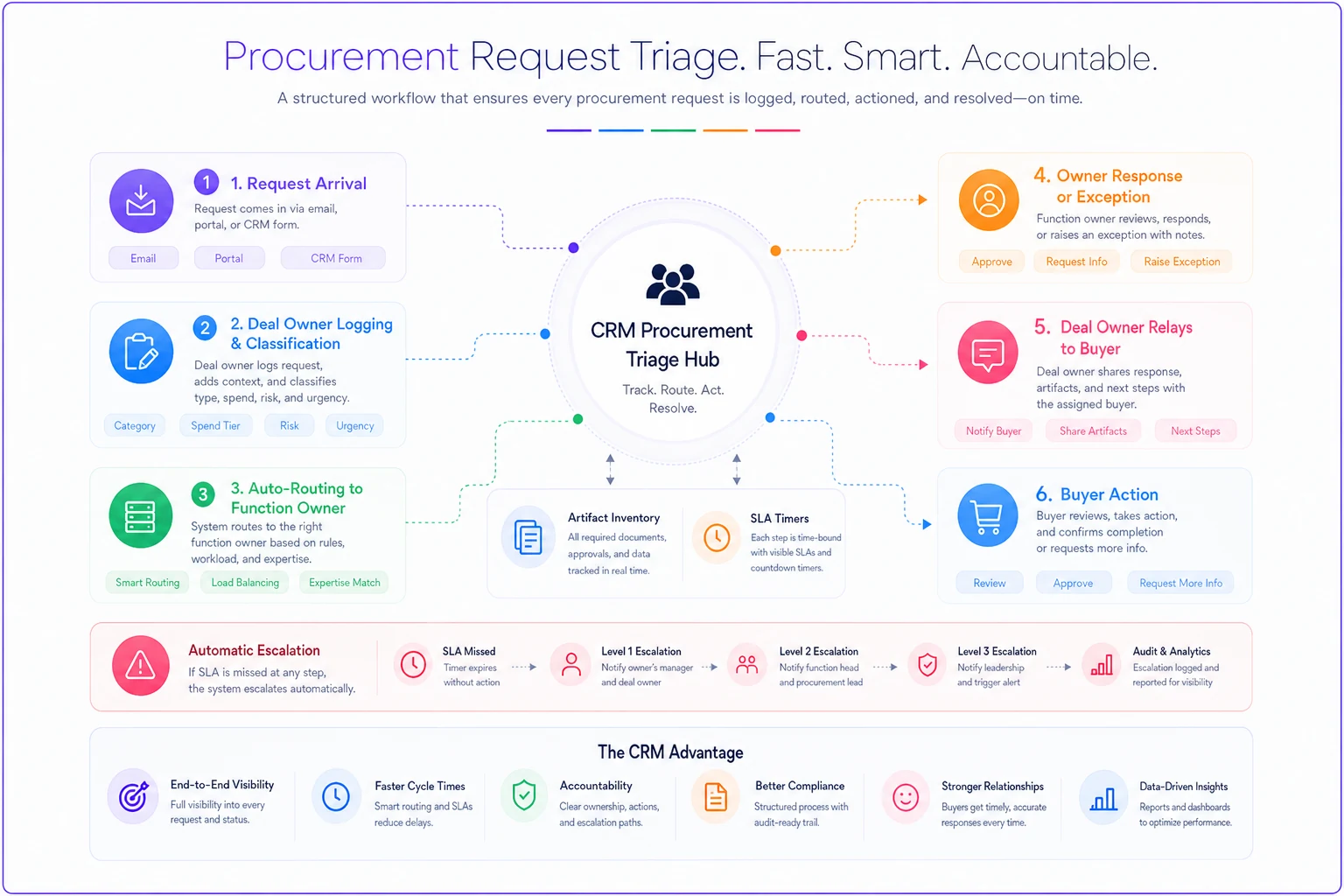
Step 5 is underrated. Most delays feel worse to the buyer than they actually are because nobody tells them what's happening. A buyer who's told "our legal team has the DPA, you'll have redlines by Thursday" is patient. A buyer staring at silence assumes the deal is dead and starts looking at your competitor's paperwork.
The AE's role is orchestration: confirm the SLA, keep the buyer updated, and escalate when clocks are blown. That preserves the buyer's confidence and keeps momentum.
## SLA-driven handoffs and escalation that actually fires
An SLA that nobody enforces is just a wish. The reason procurement stalls even in teams that "have SLAs" is that the clock has no teeth — it expires and nothing happens.
Effective escalation needs three things: a defined response window per artifact type, a named person the request escalates to when the window is blown, and a trigger that fires without someone having to remember to check. That third one is where most teams fail. Relying on an AE to manually notice that legal has been sitting on a redline for four days is exactly how deals rot — the AE is busy, the request is out of sight, and by the time anyone notices, a week is gone.
-
Tier 1 (within SLA) Function owner handles it. No noise.
-
Tier 2 (SLA missed by 1 day) Function lead notified, deal owner notified, request re-prioritized.
-
Tier 3 (SLA missed by 3+ days, or deal above a revenue threshold) Deal desk and the relevant VP get looped in. For strategic deals, this is also where you consider whether an executive-to-executive nudge unblocks things faster than another internal escalation. The mechanics of that kind of push are worth borrowing from a mid-deal executive outreach checklist — a short, well-prepped exec touch often clears a procurement logjam faster than three more emails.
Escalation tiers should also be tighter for larger deals. A $40k deal and a $600k deal do not deserve the same response clock. Weight your SLAs by deal size and strategic importance, and make sure the biggest deals get the shortest windows and the most senior escalation path.
Make triggers automatic and visible: notifications, dashboards, and a clear escalation path that doesn't rely on memory.
## What breaks as you scale
At low deal volume, a good AE can hold all of this in their head. They know procurement will ask for a COI, they've got the security answers in a personal doc, they email legal directly. It works — for maybe fifteen concurrent enterprise deals.
Then the team grows. Now there are eight AEs, each with their own personal artifact stash, each routing requests to legal in a slightly different way, each with their own idea of what "urgent" means. Legal gets thirty ad-hoc requests a week with no prioritization. The security team answers the same questionnaire from scratch four times because nobody shared the answer library. Finance reissues insurance certificates one at a time via email threads.
This is the scale breakpoint, and it shows up as a specific symptom: procurement cycle time gets longer as the team gets bigger. That feels backwards, but it's exactly what happens when tribal knowledge doesn't get systematized. The knowledge that lived in one great AE's head doesn't transfer cleanly, so every new hire rebuilds it slowly and imperfectly.
The fix is boring but real: centralize the artifact inventory, standardize the routing rules so every deal follows the same path, and make the SLA clocks automatic instead of relying on people to remember. This is where a workflow platform with owner mapping and automated escalation earns its place — not because it's clever, but because it makes sure a blown SLA actually pings someone instead of silently expiring. The AI-assisted piece that genuinely helps here is drafting first-pass answers to repeat security and questionnaire items from your approved library, so your specialists review and approve instead of writing from scratch. Everything still gets human sign-off; the machine just removes the retyping.
## A real scenario
A mid-market infrastructure software company, roughly 40 people, was closing enterprise deals in the $80k–$250k range. Their sales cycle looked healthy until the final stage. Deals that hit procurement were averaging somewhere around 38–45 days from verbal yes to signed contract, and a couple of Q4 deals slipped entirely into the next quarter because paperwork wasn't ready.
When they dug in, the pattern was obvious. Every deal triggered the same eight-ish artifact requests, and the team was sourcing each one reactively. The security questionnaire alone was eating close to two weeks per deal because it bounced between an AE and a single overloaded security engineer with no template.
They did three things: built a central artifact inventory with pre-approved answers to the 40 most common security questions, assigned an owner and a response clock to each artifact type, and set up automatic escalation so anything past its SLA pinged a function lead instead of dying in an inbox.
The procurement stage dropped to somewhere around 22–26 days over the next two quarters. Not a magic number, and it varied by deal complexity — but roughly a third of the cycle came out, and fewer deals slipped the quarter. The security engineer stopped being a bottleneck because he was reviewing pre-drafted answers instead of writing everything cold.
## When this level of structure makes sense — and when it doesn't
This isn't for everyone. If you're closing transactional deals under $20k with a one-page order form and no security review, building an artifact inventory and tiered escalation is overkill. You'd spend more time maintaining the system than you'd save.
This makes sense when:
-
Deals routinely involve security review, legal redlines, or vendor onboarding
-
Procurement is a distinct stage that adds weeks to your cycle
-
You have more than a handful of concurrent enterprise deals
-
Cycle time is hurting your quarterly forecast
This is a bad idea when:
-
Your deals close on a credit card or simple order form
-
Volume is low enough that one person can genuinely track everything
-
You'd be building process for deals you don't actually have yet
Who should NOT do this: early-stage teams still figuring out their ICP and pricing. If your deal shape is still changing every month, you can't template artifacts for a process you haven't stabilized. Get to a repeatable deal motion first, then systematize the procurement stage.
## A quick self-audit checklist
Run your last five enterprise deals through this:
-
[ ] Do you have a written list of every artifact procurement requested?
-
[ ] Is there a named owner for each artifact type?
-
[ ] Are your top security questionnaire answers templated and approved?
-
[ ] Does each handoff have a response SLA?
-
[ ] Does a blown SLA automatically escalate, or does someone have to notice?
-
[ ] Does the buyer always have a named contact and a date, even during delays?
-
[ ] Are your SLAs weighted by deal size?
-
[ ] Is the inventory updated whenever a new request type appears?
If you checked fewer than half of these, procurement is almost certainly costing you more cycle time than any other stage — and it's the most fixable one, because it's a coordination problem, not a selling problem.
## Where procurement connects to everything else
The procurement stage doesn't exist in isolation. The concessions your deal desk approved during negotiation flow directly into what procurement scrutinizes. The clauses your legal team pre-approved determine how fast redlines resolve. And the way you handle procurement sets the tone for the relationship going forward — a buyer who experiences a clean, well-choreographed close expects the same competence at renewal.
That continuity matters more than most teams realize. It's worth thinking about how procurement discipline feeds into a broader renewal operating model where stakeholder mapping and guardrails carry through the full customer lifecycle.
The teams that win the procurement stage aren't the ones with the best negotiators. They're the ones who treated procurement as a designed workflow — with a stocked inventory, clear routing, and clocks that actually enforce themselves — long before the deal ever got there. The buyer's process is going to run either way. The only question is whether you're running with it or waiting on it.
Ready to transform your customer relationships?
Join 2,000+ businesses using Rellyly to increase sales, improve client retention, and simplify CRM workflows.