

Enterprise procurement doesn't kill deals with a "no." It kills them with silence — a security questionnaire that lands in a rep's inbox on a Tuesday, gets forwarded to the wrong person, and sits half-answered for two weeks while the buyer's champion quietly loses political capital internally.
The frustrating part is that most of these questions repeat. The same 12 or so topics show up across SOC 2 spreadsheets, vendor risk portals, and legal redlines. What separates teams that clear security review in days from teams that stall for a month isn't better security posture — it's whether they've pre-decided who owns each answer and have language ready to paste.
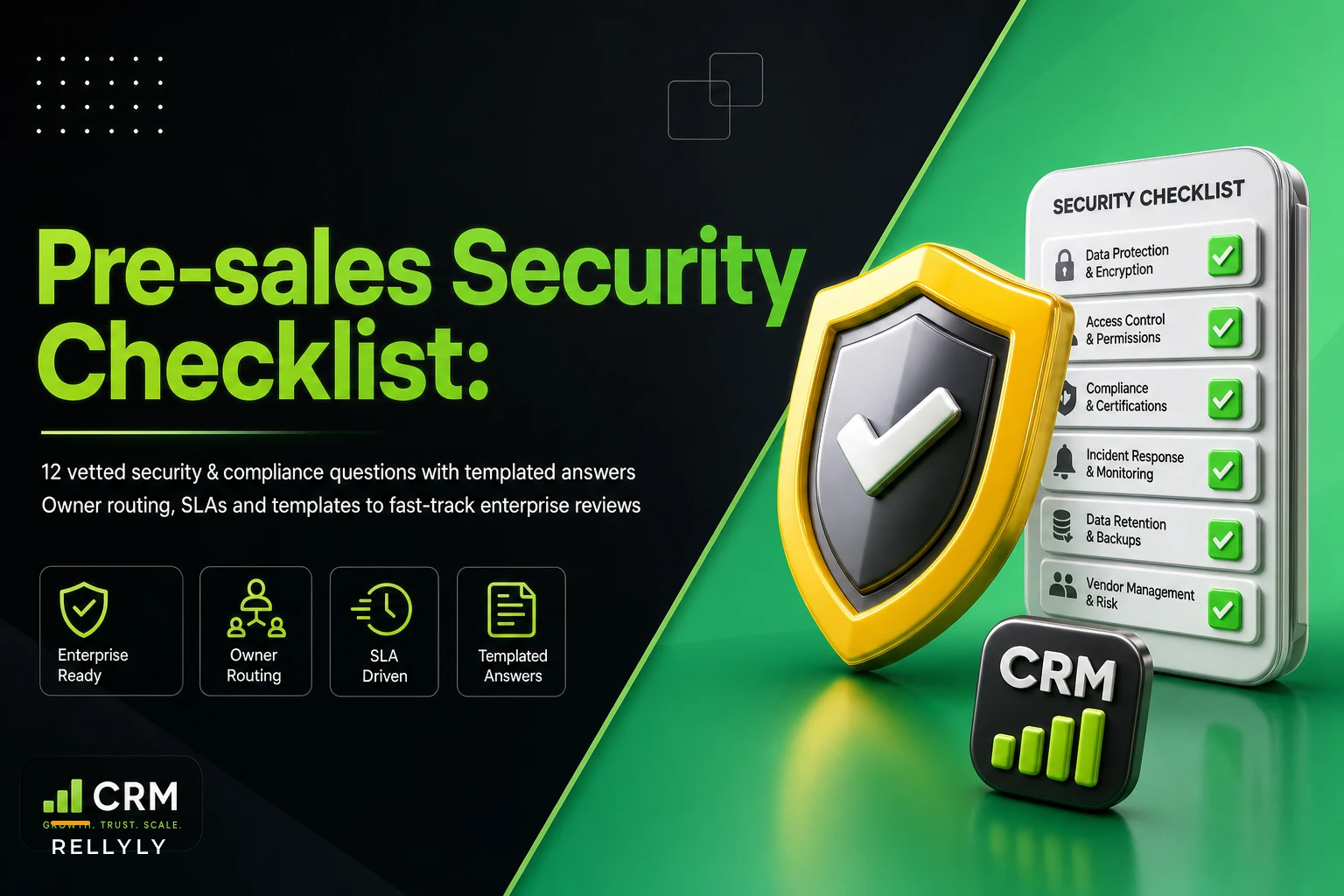
This is a pre-sales security checklist SaaS teams can actually run without a full-time security hire. It covers the 12 questions that show up most often, templated response language you can adapt, and a routing plan so the right person answers within hours instead of days.
Why security reviews stall (and it's rarely the security)
The reviews that drag on usually aren't blocked by a real gap. They're blocked by ambiguity about ownership.
A typical breakdown looks like this: a mid-market rep gets a 140-line questionnaire from a prospect's InfoSec team. The rep doesn't know the answer to "Do you encrypt data at rest with customer-managed keys?" so they guess, or they forward it to an engineer who's mid-sprint and lets it sit. Three days pass. The buyer's champion pings, "Any update?" The rep chases internally. Another few days. By the time answers come back, half are wrong or too vague, and InfoSec kicks it back with follow-ups.
Now you're in a second round. Each round adds roughly 4–7 business days. Two or three rounds and you've burned a month — often past the buyer's quarter-end budget window.
What compounds this is that the delay isn't just calendar days lost. Every stall signals disorganization to a security team whose entire job is spotting risk. A vendor that can't answer basic questions cleanly reads as a vendor that might be sloppy with your data. The review gets more scrutiny, not less.
If your reviews keep stalling for reasons like this, the same logic that helps recover mid-funnel opportunities when deals go quiet applies here — diagnose the specific reason for the stall instead of just sending another "checking in" note.
The 12 questions that show up in almost every review
These are the recurring ones. If you have crisp, honest answers to these ready before a questionnaire ever arrives, you'll clear the majority of a standard review without waking up an engineer.
Never miss a customer touchpoint again.
Rellyly helps you manage contacts, tasks, and sales efficiently in one platform.
- Unified customer profiles
- Automated follow-ups
- Sales pipeline tracking
No credit card required
-
Where is customer data hosted, and in what regions? (Cloud provider, data residency options.)
-
Is data encrypted in transit and at rest? (Protocols and key management.)
-
What certifications or attestations do you hold? (SOC 2 Type II, ISO 27001, HIPAA, etc.)
-
How do you handle access control internally? (Least privilege, SSO, MFA for employees.)
-
What's your data retention and deletion policy? (Including on contract termination.)
-
Do you use subprocessors, and can you list them? (Sub-vendor risk.)
-
What's your incident response and breach notification process? (SLA to notify, in hours or days.)
-
How do you manage vulnerabilities and pen testing? (Cadence, remediation timelines.)
-
What authentication does the product support? (SSO/SAML, SCIM, MFA for end users.)
-
How is customer data logically separated? (Multi-tenancy isolation.)
-
What's your business continuity / disaster recovery plan? (RTO/RPO targets.)
-
How do you handle GDPR / CCPA and data processing agreements? (DPA availability, data subject requests.)
The mistake most teams make is treating each questionnaire as new. It isn't. Probably 80% of the surface area is these 12 questions. Build the library once and you're mostly maintaining it, not rewriting it from scratch every time.
Templated responses you can adapt
The trap with templates is making them so generic they get flagged as evasive. Security reviewers can smell boilerplate. The good version is specific, honest, and includes a pointer to evidence.
On encryption (Q2): > "Customer data is encrypted in transit using TLS 1.2+ and at rest using AES-256. Encryption keys are managed via [KMS provider] with rotation on a [X]-day schedule. Customer-managed keys are available on [tier/plan]. Details are documented in our security overview, available under NDA."
On incident response (Q7): > "We maintain a documented incident response plan reviewed [annually/quarterly]. In the event of a confirmed breach affecting customer data, we notify affected customers within [X] hours via [channel]. Our IR runbook and notification SLA are covered in Section [X] of our security packet."
On subprocessors (Q6): > "We maintain a current subprocessor list at [URL]. Customers are notified [X days] before onboarding any new subprocessor that processes customer data, per our DPA."
Notice what these do: they answer the actual question, give a specific number or standard, and point to where the reviewer can verify. Vague answers create follow-up rounds. Specific answers close them.
One important caution — never template an answer to a capability you don't have. If you don't offer customer-managed keys, say so plainly and mention the roadmap if there is one. "No, and here's our compensating control" survives review far better than a dodge that gets exposed in a follow-up call.
The owner-routing plan (this is what actually saves days)
Templates handle the easy 80%. Routing handles the 20% that needs a real human — and that's where most time gets lost. The fix is deciding in advance who owns which category and what their response SLA is, so nothing sits in a rep's inbox waiting for someone to figure out who to ask.
Here's a routing map that works for most mid-market and enterprise-motion teams:
| Question category | Primary owner | Backup owner | Target response SLA |
|---|---|---|---|
| Hosting, data residency (Q1) | Solutions Engineer | Security lead | Same day |
| Encryption, key mgmt (Q2, Q10) | Security lead | Platform eng | 1 business day |
| Certifications / attestations (Q3) | Security/Compliance | Ops | Same day (doc pull) |
| Internal access control (Q4) | Security lead | IT/Ops | 1 business day |
| Retention & deletion (Q5) | Legal + Security | Product | 1–2 business days |
| Subprocessors (Q6) | Legal | Security | Same day (list exists) |
| Incident response (Q7) | Security lead | Eng on-call | 1 business day |
| Vuln mgmt / pen testing (Q8) | Security lead | Platform eng | 1–2 business days |
| Product auth (SSO/SCIM) (Q9) | Solutions Engineer | Product | Same day |
| BC/DR (Q11) | Security/Ops | Platform eng | 1–2 business days |
| GDPR/CCPA, DPA (Q12) | Legal | Security | 1–2 business days |
Keep a single, versioned source of truth for documents like certifications and the subprocessor list so they can be pulled quickly.
What that table makes clear: most of these can be answered same-day if the doc already exists. Certifications, subprocessor lists, DPAs — these are documents, not decisions. The routing problem is knowing they exist and who holds the current version. The genuinely hard ones — retention edge cases, custom BC/DR commitments — are few, and those are the ones worth a named live owner.
A workflow that keeps reviews moving
Here's how this plays out in practice, from questionnaire arrival to close.
The rep receives the questionnaire and immediately triages it against the 12 categories — not answering yet, just tagging. Anything that maps to a templated answer, the rep fills directly. Anything needing an owner gets routed the same hour with the SLA attached, not "when you get a chance." The rep tracks what's outstanding and to whom, so nothing disappears into someone's inbox.
Below is a quick visual of the workflow.
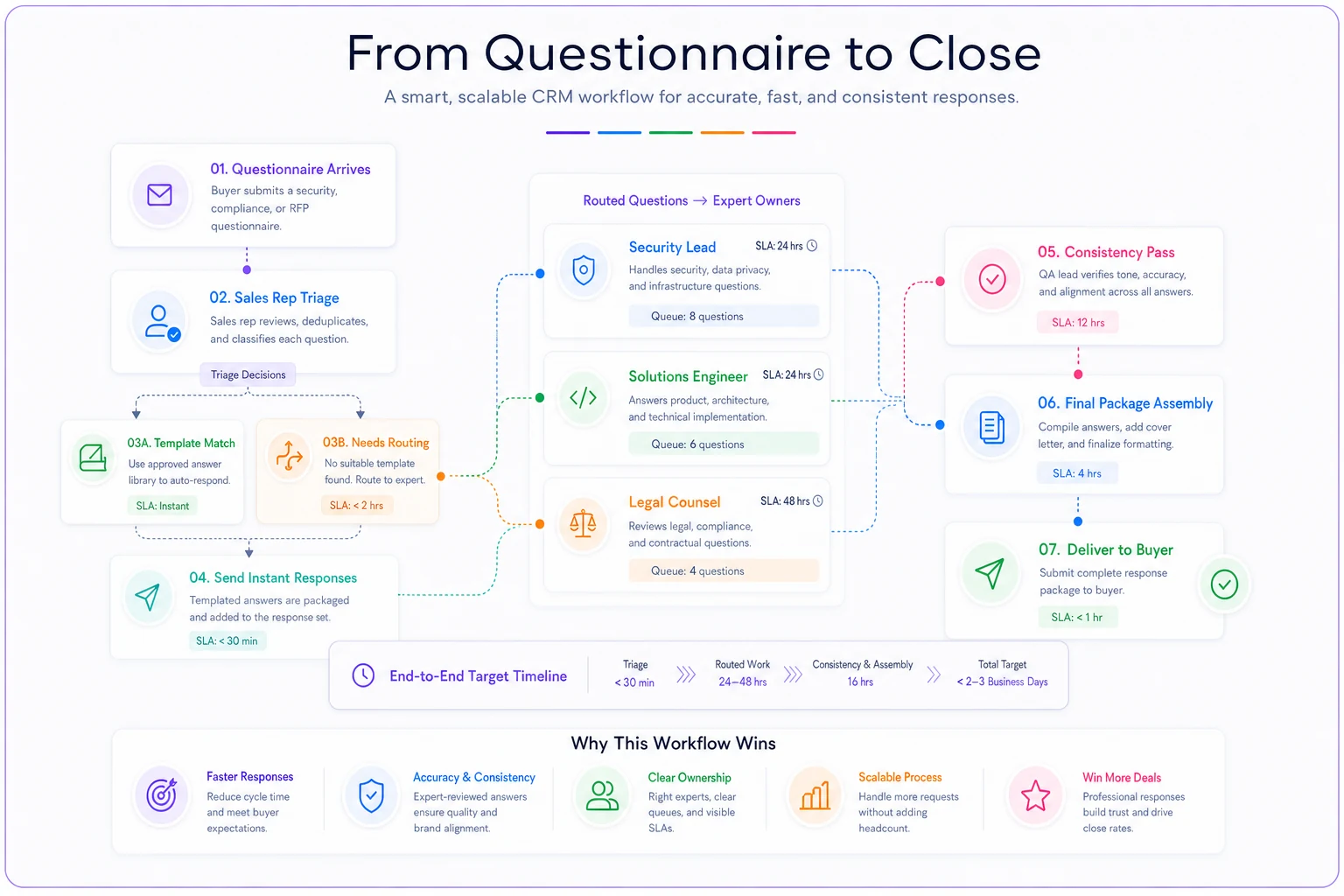
While owners work their items, the rep sends the buyer's champion a short note: "We've received the questionnaire, most items are already answered, and the remaining [X] are with our security lead — you'll have the full set by [date]." That single message does more for deal momentum than people give it credit for. It turns silence into a visible timeline, which is exactly what a nervous champion needs to defend the deal internally.
When answers come back, the rep does a consistency pass — making sure the encryption answer matches the DPA answer matches the security packet. Inconsistencies across documents are the fastest way to trigger another follow-up round. Then the full set goes back in one package, not dribbled out item by item.
Deciding which parts of this to route to a person versus keep as a self-serve template is its own judgment call — the same what-to-automate-versus-keep-human framework that applies to CS check-ins applies here. Route the judgment calls to humans; template the document pulls.
When this makes sense — and when it doesn't
When a full pre-sales security checklist is worth building: You're running an enterprise or mid-market motion where questionnaires are routine, deals are worth enough that a lost month hurts, and you're handling customer data of any real sensitivity. If security review gates more than a handful of deals a quarter, the library pays for itself quickly.
When it's overkill: If you're selling low-ACV, self-serve product to SMBs who never send a security questionnaire, don't build a 12-answer library and a routing map for a review that rarely shows up. A one-page overview answered ad hoc is enough.
Who should NOT template heavily: Very early-stage teams still changing their security posture regularly. If your encryption approach or subprocessor list shifts every few weeks, a stale template is worse than no template — it creates answers that contradict reality by the time a reviewer checks. Build the routing plan first, add templates once your posture stabilizes.
Real scenario: a 22-person SaaS team stuck in review purgatory
A B2B analytics company selling into mid-market finance teams kept losing time on security reviews. Their deals ran roughly $40k–$60k ACV, and they were closing around 6–8 enterprise-flavored deals a quarter, most of which triggered a questionnaire.
The pattern was painful: each review averaged close to three weeks, driven almost entirely by internal chasing. The rep didn't know who owned what, so questionnaires bounced between the CTO and a single overloaded engineer. Two deals the prior quarter slipped past the buyer's budget window and pushed to the next quarter — one of them never closed.
They didn't fix it by hiring a security person. They built the 12-answer library, wrote templated responses for the eight document-backed questions, and assigned named owners with SLAs for the rest. The CTO handled the four judgment-call categories; everything else the rep could answer or pull directly.
The following quarter, review time dropped to somewhere around 5–7 business days on average. No deals slipped for security reasons. The bigger surprise was qualitative — a couple of buyers' security teams mentioned that the vendor "clearly had their act together," which pushed the overall review toward a lighter touch.
The takeaway for sales and CS teams
Security review speed isn't a function of how good your security actually is — it's a function of how ready you are to prove it. Teams that clear reviews fast have pre-decided answers to the recurring 12 questions, honest templated language pointing to real evidence, and a routing map so no item sits in the wrong inbox waiting to be forwarded.
Build the library once. Assign owners before the next questionnaire arrives. Treat every stall as a routing problem to diagnose, not a form to slowly fill out.
That's the difference between a two-week close and a two-month one — and in enterprise procurement, two months is often the difference between closing this quarter and hoping for next.
Ready to transform your customer relationships?
Join 2,000+ businesses using Rellyly to increase sales, improve client retention, and simplify CRM workflows.