


Most customer success teams track churn wrong. They wait for renewal dates, watch for usage drops, or react when accounts go completely dark. By then, the customer checked out weeks ago.
The real damage happens in the first 90 days. A customer who struggles early rarely recovers. They limp along for months, then churn at renewal. Or they become that exhausting account that drains your support team while never actually adopting the product.
Customers broadcast their intention to leave through specific behavioral patterns long before they stop paying. The trick is knowing which signals actually matter and having a systematic way to catch them early enough to do something about it.
The five indicators that predict 90-day churn
1. Setup completion stalls at 60%
New customers who abandon setup somewhere between 50–70% completion churn at roughly triple the rate of those who either finish or never really start. It's the worst possible position to be in—they're invested enough to feel frustrated but not enough to see any real value.
-
Core integrations are still disconnected after week two
-
They've added data but haven't configured key workflows
-
Admin users log in daily but end users were never invited
-
They keep rescheduling implementation calls
Picture a marketing agency that signs up for project management software. They upload their client list, create a few projects, but never set up task templates or invite their creative team. The owner logs in every couple of days, clicks around, then leaves. They're trying to make it work but hitting friction they can't resolve on their own.
2. Support ticket velocity changes
The pattern isn't what you'd expect. High-churn accounts don't flood support—they go eerily quiet after an initial burst.
-
Days 1–7
Multiple excited questions about advanced features
-
Days 8–21
Radio silence
-
Days 22–30
One or two frustrated tickets about basic functionality
-
Days 31+
Complete disengagement
Healthy accounts maintain steady, evolving questions. Their tickets progress from "how do I" to "can I customize" to "what if we tried." Churning accounts regress from complex questions to basic ones, then disappear entirely.
3. Feature adoption sequence breaks
Every product has a natural adoption path. When customers skip steps or pick up features out of order, they're usually forcing your product to fit a workflow it wasn't really built for.
-
Using advanced features before mastering the basics
-
Cherry-picking random features without connecting them
-
Repeatedly trying and abandoning the same feature
-
Building elaborate workarounds instead of using core functionality
An ecommerce business jumps straight into setting up multi-warehouse transfers before they've even configured their primary inventory counts. They're attacking their most complex problem first, which means they'll never experience the quick wins that build confidence in the product.
4. Usage consolidation to a single user
This one's subtle but deadly. When a multi-user account gradually consolidates all activity to just the admin, you're watching organizational rejection happen in slow motion.
-
Week 1
Admin and 3–4 users actively exploring
-
Week 3
Admin and maybe one power user still active
-
Week 6
Only the admin logs in, usually just to export data
-
Week 9
Even admin access becomes sporadic
The admin becomes a reluctant bridge between your software and the team's actual workflow. They're manually moving data in and out because the team quietly rejected the new process.
5. Engagement pattern shifts from exploratory to transactional
Early healthy usage looks messy—users click everywhere, try things, make mistakes. Churning customers shift toward rigid, transactional patterns. They log in, complete one specific task, and leave.
-
Session times dropping from 15+ minutes to under 3
-
Click depth collapsing (homepage → single feature → logout)
-
No experimentation with new features after week 2
-
Login frequency becoming weirdly regular, like exactly once per week
They're treating your product like a chore.
Why traditional "health scores" miss early churn signals in the first 90 days
Most health scoring systems weight the wrong signals. They track login frequency, feature usage breadth, data volume—metrics that look fine on paper but miss the actual emotional journey of adoption.
Never miss a customer touchpoint again.
Rellyly helps you manage contacts, tasks, and sales efficiently in one platform.
- Unified customer profiles
- Automated follow-ups
- Sales pipeline tracking
No credit card required
A customer can log in daily and still be headed for churn if they're only checking whether their problem magically resolved itself. They can use five features and still leave if those features don't connect into something useful. They can upload gigabytes of data and then realize migration was way easier than actual day-to-day usage.
Traditional scoring also assumes linear adoption. Real customers don't follow your perfect onboarding flow. They jump around, backtrack, abandon paths, and retry. The question isn't whether they're using features—it's whether their usage shows increasing confidence or increasing frustration.
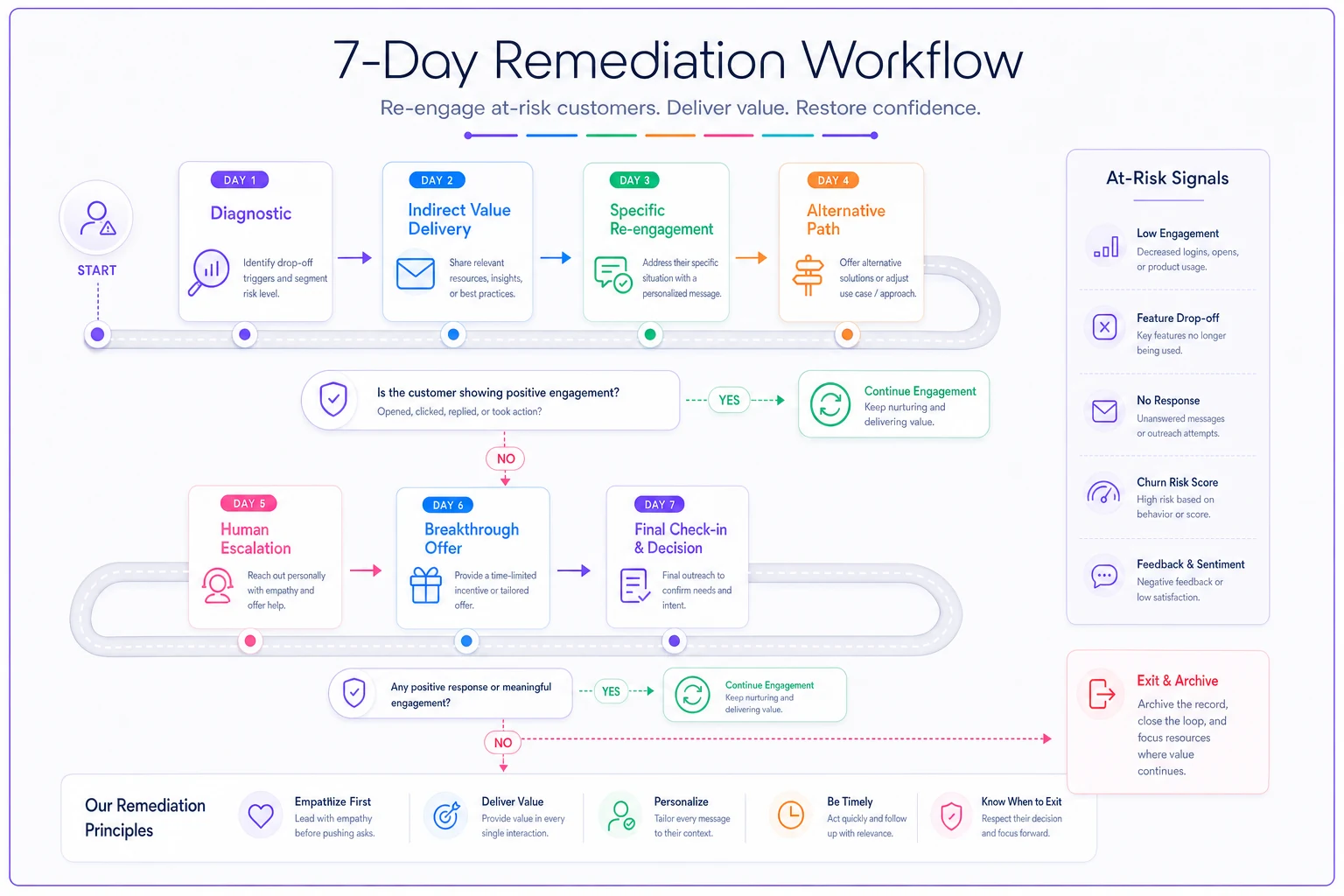
The 7-day remediation sequence that actually works
When you spot early churn signals in the first 90 days, you have a narrow window. But most save attempts make things worse—they feel pushy, generic, or reveal just how little you understand the customer's actual situation.
Here's a sequence that genuinely re-engages at-risk accounts:
Day 1: Diagnostic before contact
-
What specific action triggered the alert?
-
Where exactly did they stall in setup or adoption?
-
What were they trying to accomplish based on their clicks?
-
Which integration or feature caused friction?
Never send a "just checking in" email without this context first.
Day 2–3: Indirect value delivery
-
A tactical guide for their specific use case, not generic best practices
-
A spreadsheet template that solves part of their problem
-
A 3-minute video showing exactly the workflow they abandoned
The goal is to make them think "these people actually understand my problem" before you ask them to try again.
A visual workflow of the 7-day remediation sequence.
Day 4: Specific re-engagement
-
"I noticed you were setting up [specific feature] for [specific goal]"
-
"Most people hit a snag at [exact step they stalled]"
-
"Here's a 2-minute fix
[specific instructions]"
-
"Reply with 'stuck' if this doesn't work and I'll record a custom video"
Day 5–6: Alternative path
If they don't respond to the specific fix, offer a completely different approach to the same goal.
"Since [original approach] seems to have hit a wall, here's how other [similar business type] handle [same problem]..."
Then show a simpler, slightly less powerful way to achieve partial value. Sometimes people need a quick win before they're ready to tackle the full solution.
Day 7: Human escalation with context
If they're still disengaged, escalate to a human—but not a success manager who's obviously trying to save the account. Frame it as product feedback.
"Hey [name], I lead the product team working on [specific feature they struggled with]. I noticed you tried to [specific action] but ran into issues. Would love 15 minutes to understand what you were trying to accomplish—honestly more interested in improving the product than saving your account. If it's not a fit, I get it."
Setting success thresholds that predict recovery
Not every remediation attempt will work, and that's fine. But you need clear indicators of whether your intervention is actually moving anything.
Green flags (customer is recovering):
-
They respond to outreach, even briefly
-
Session time increases by 50%+ after intervention
-
They attempt the stalled workflow again
-
They ask a specific how-to question
-
Other users from their account come back
Yellow flags (still at risk but engaged):
-
They acknowledge the help but don't act on it
-
They log in but don't complete the suggested action
-
They schedule a call but push it 2+ weeks out
-
They mention exploring alternatives
-
Usage stays flat but doesn't drop further
Red flags (remediation failing):
-
No response to any outreach
-
They only log in to export data
-
Support tickets shift from questions to complaints
-
They ask about cancellation policies
-
The decision maker delegates everything to an assistant
Two or more red flags by day 5 means it's time to shift from remediation to graceful exit. Help them export their data, offer honest recommendations for alternatives, and leave the door open for future return.
Building automated detection without overwhelming your team
The challenge with early churn signals isn't spotting them—it's managing the volume without burning out your CS team. Every new account could theoretically look at-risk if you're watching closely enough, but you can't manually track hundreds of behavioral signals.
This is where smart automation makes a real difference. Rather than flagging every minor deviation, you need rules that balance sensitivity with practicality.
Start with trigger combinations, not individual signals:
-
Setup stalled + support tickets stopped = immediate flag
-
Single user consolidation + session time drop = 48-hour monitoring
-
Feature adoption backwards + no team expansion = weekly review
The key is throttling alerts so your team doesn't get buried. If your system flags 30% of new accounts as at-risk, your thresholds are too sensitive. A realistic target is somewhere around 10–15% flag rate with a 60%+ save rate on the accounts you actually catch.
Some patterns warrant instant intervention:
-
Admin explicitly asks about cancellation
-
Usage drops to zero after an initial setup push
-
Multiple angry support tickets submitted in quick succession
-
Payment method fails on first renewal attempt
Others can wait for a batch review:
-
Gradual usage decline over several weeks
-
Feature exploration without commitment
-
Slow team adoption rates
-
Minor setup incompletions
Your alert rules should also factor in account value. A $50/month account showing early churn signals might get an automated email sequence. A $5,000/month account gets immediate human attention.
Prioritize alerts by account value so human effort targets the highest ROI.
Your alert rules should also factor in account value. A $50/month account showing early churn signals might get an automated email sequence. A $5,000/month account gets immediate human attention.
Common mistakes that make early churn worse
Even with solid detection, most remediation attempts fail because of a few recurring mistakes:
Treating all churn signals equally. A customer who never started setup has completely different needs than one who stalled at 80% completion. The intervention has to match the specific situation.
Overwhelming with help. When customers struggle, the instinct is to pile on resources—documentation, training videos, extra calls. But struggling customers need less complexity, not more. One clear next step beats ten options every time.
Forcing the original use case. Sometimes customers sign up planning to solve Problem A and then realize they actually need to solve Problem B first. Rigid onboarding flows that don't allow for that kind of pivot lose these accounts almost every time.
Ignoring the human element. Behind every churning account is a person who feels frustrated, embarrassed they can't figure something out, or quietly guilty about wasting company budget. Address the emotion, not just the technical friction.
Intervening too late. By the time usage drops to zero, they've mentally moved on. Early signals like setup stalls and support ticket patterns are the window you have—once it closes, your odds drop dramatically.
Measuring whether your early intervention system works
Track these metrics to validate your approach:
| Metric | Definition |
|---|---|
| Detection accuracy | Of accounts flagged as at-risk, what percentage actually churned without intervention? Aim for 70%+ accuracy. |
| Save rate | Of accounts that received intervention, what percentage stayed active at 90 days? Target 40–60% depending on your market. |
| False positive rate | How many healthy accounts did you flag unnecessarily? Keep this below 20%. |
| Time to detection | How many days between the first churn signal and the alert? Earlier detection meaningfully improves save rates. |
| Intervention effort ROI | Compare time spent on remediation to revenue saved. For most SaaS businesses, each saved account should justify somewhere around 2–3 hours of effort. |
Also track which specific interventions actually work:
-
Response rate by outreach type
-
Re-engagement rate by intervention method
-
Long-term retention of accounts you saved
-
Which signals best predicted a successful intervention
Track these metrics to validate your approach:
The uncomfortable truth about early churn
Not every customer should be saved. Some signed up with unrealistic expectations. Others need capabilities you'll never build. Many are too small to justify the price once they actually understand the full cost.
The goal isn't zero churn—it's efficiently identifying saveable accounts and intervening before they mentally check out. Your early churn signals in the first 90 days tell you who's struggling with solvable problems versus who's just fundamentally misaligned with your product.
Focus your energy on customers who:
-
Show initiative but hit specific technical barriers
-
Have clear use cases that match your core capabilities
-
Respond positively to initial outreach
-
Have the budget and authority to actually continue
Let go of customers who:
-
Signed up to solve problems you don't address
-
Need extensive customization to see any value at all
-
Show no internal adoption despite multiple attempts
-
Fundamentally misunderstand what your product does
The best early churn detection system isn't just about flagging at-risk accounts—it's about quickly sorting which battles are worth fighting. Build your automated alerts, establish your remediation sequence, and trust the process to surface the customers worth saving.
Your CS team can't save everyone. But with the right early warning system in place, they can focus on the accounts that actually matter, step in before it's too late, and build processes that compound over time. That's how you turn early churn signals from warning signs into real opportunities for deeper engagement.
Ready to transform your customer relationships?
Join 2,000+ businesses using Rellyly to increase sales, improve client retention, and simplify CRM workflows.