

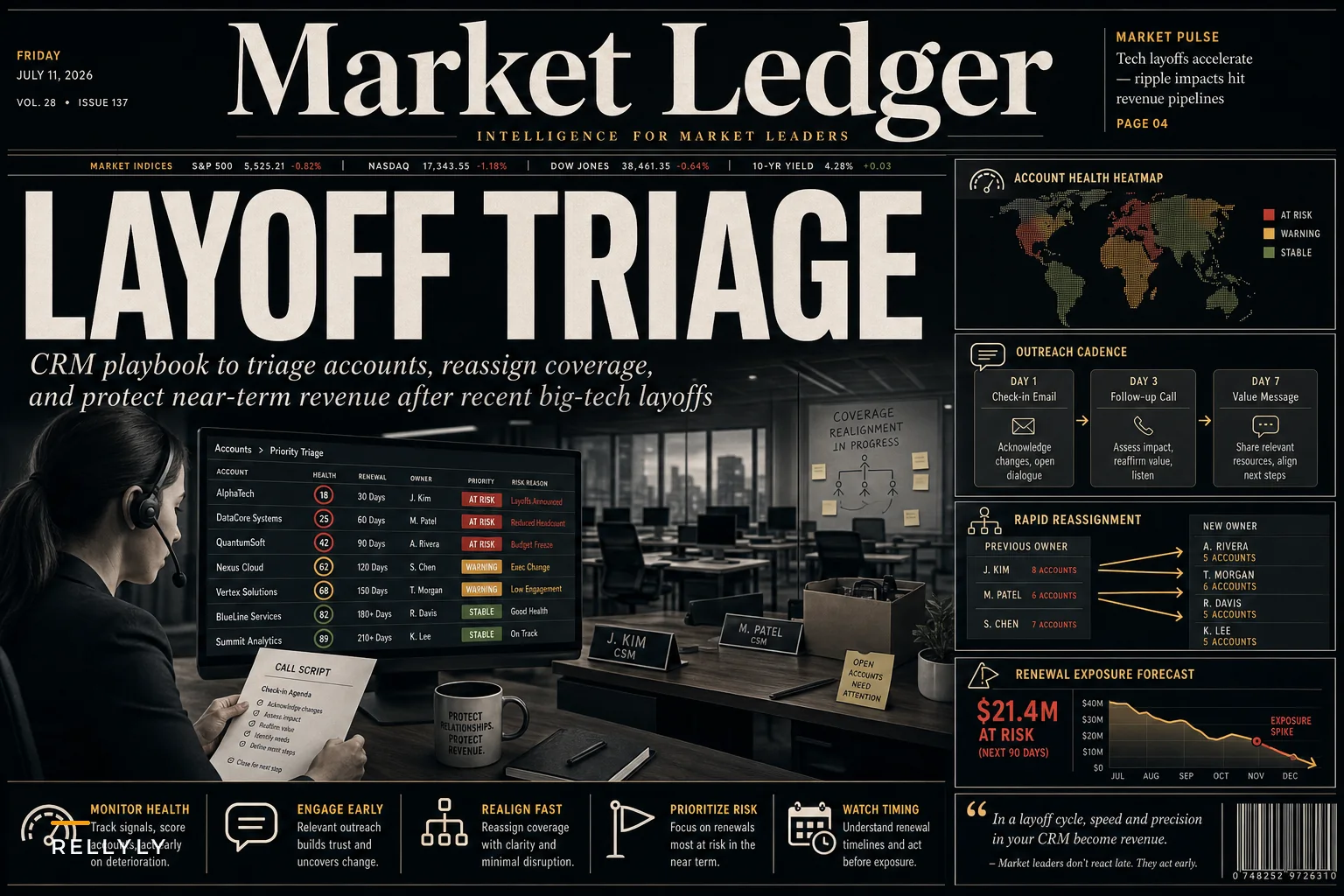

Microsoft cutting 4,800 jobs this week isn't just another tech headline—it's a preview of what's about to hit your pipeline. Reuters reported that this latest round reflects broader AI-driven restructuring across the industry, and if you're in sales or customer success, you're about to feel the aftershocks in every account review, renewal conversation, and quarterly forecast.
When your customer's org chart gets shredded overnight
The real damage happens in the weeks after the announcement. Your champion at a Fortune 500 account disappears. Three decision-makers on a six-figure renewal get reassigned. The procurement team that was finally moving forward goes dark. These aren't hypothetical scenarios—they're playing out across sales floors right now.
What makes this wave different is the speed and scope. Companies aren't just trimming headcount; they're restructuring entire departments around AI initiatives. Your contacts aren't just leaving—their whole buying committees are getting scrambled. Waiting it out or hunting for a new champion doesn't work when the organizational chaos drags on for months.
The cascade effect that doesn't get enough attention
Most sales teams only track the obvious damage: lost contacts, stalled deals, delayed renewals. The real operational nightmare happens underneath, in the systems and processes that quietly break when customer organizations implode.
Never miss a customer touchpoint again.
Rellyly helps you manage contacts, tasks, and sales efficiently in one platform.
- Unified customer profiles
- Automated follow-ups
- Sales pipeline tracking
No credit card required
Think about what happens to your CRM data when a customer goes through massive layoffs. Email bounce rates spike. Org charts you spent months mapping become fiction. Engagement scores go meaningless because half the people aren't there anymore. Health scores show green while accounts are actively dying.
The typical response is reactive scrambling—reps manually updating contact records one by one, CSMs sending desperate LinkedIn messages hunting for new champions, leadership demanding updated forecasts while the underlying data is completely unreliable.
What separates teams that survive these periods from those that crater is having a systematic response ready before the chaos hits. Not a generic "economic downturn" playbook, but actual protocols for when your customer base gets reorganized overnight.
Building your layoffs CRM playbook: the three-phase response
Phase 1: Immediate triage (Days 1-7)
The moment layoff news breaks at a customer account, you have roughly 72 hours before the organizational fog of war sets in. People don't know if they're staying or going. Projects freeze. Nobody wants to make decisions.
Start with account segmentation based on exposure risk:
Critical exposure accounts:
-
Annual contract value over $100k
-
Renewal within 90 days
-
Single-threaded relationships
-
Recent champion changes
Moderate exposure accounts:
-
Mid-market deals ($30k-$100k)
-
Renewals in 3-6 months
-
Multiple contacts but concentrated in one department
-
Active expansion discussions
Lower exposure accounts:
-
Under $30k ACV
-
Auto-renew contracts
-
Multi-department relationships
-
Strong usage metrics
For critical exposure accounts, you need immediate human intervention. Most teams mess this up by trying to reach everyone at once, creating noise when customers are already overwhelmed. Run a targeted reconnection sequence instead.
Days 1-2: Monitor, don't message. Set up alerts for email bounces, out-of-office replies, and LinkedIn job changes. Document everything in your CRM but don't react yet.
Days 3-4: Send a single, high-value touchpoint. Not "checking in on the layoffs" but something genuinely useful—a report, an insight, a resource that helps them navigate the transition. One CSM sent a "Remote Team Transition Toolkit" that had nothing to do with their product but helped customers manage distributed teams post-layoffs. Response rate was around 67%.
Days 5-7: Identify and engage the survivors. Use LinkedIn Sales Navigator to see who's still active. Look for people posting about taking on new responsibilities—they're your new champions in waiting.
Phase 2: Relationship reconstruction (Weeks 2-4
After the initial shock, organizations enter a weird limbo phase. Some people have new responsibilities they don't fully understand yet. Others are doing three jobs while leadership figures out the new structure. This is when deals die—not from rejection, but from organizational paralysis.
Your CRM needs new fields to track the chaos:
-
Transition status
stable / uncertain / confirmed departure / role change
-
Authority shift
expanded / reduced / unclear / transitioning
-
Project status
active / paused pending reorg / killed / unknown
-
Engagement pattern
normal / delayed responses / ghost mode / new stakeholder
The biggest mistake here is assuming no response means no interest. Usually it means your contact is drowning.
Build what I'd call "reorg-resistant messaging"—communication that acknowledges the situation without requiring deep engagement:
Instead of: "Hi Sarah, following up on our expansion discussion from last month. When can we schedule time to review the proposal?"
Try: "Hi Sarah, I'm holding our Q3 slots for when you're ready. No rush—I've documented everything in a one-page summary you can forward internally when timing makes sense. Should I check back in 3 weeks or would early August work better?"
The second version performs significantly better during organizational upheaval. It removes pressure, provides something useful, and gives them control over timing.
Phase 3: Strategic repositioning (Months 2-3)
By month two, the new organizational reality starts to solidify. Surviving employees have figured out their scope. Budgets have been recut. Priorities have shifted. This is when you either lose the account or actually strengthen it.
Most teams miss this window because they're still operating from pre-layoff assumptions. The champion you cultivated for six months might now report to someone who's never heard of you. The problem your solution solved might not exist anymore because that entire workflow got eliminated.
-
Re-qualify from scratch. Treat every post-layoff account like a new prospect. Previous pain points, buying criteria, and success metrics might be completely different now. One software company found that roughly 40% of their customers' priorities had fundamentally shifted after layoffs—what was sold as an efficiency tool was suddenly needed for compliance because the compliance team got cut.
-
Expand your stakeholder map horizontally. When organizations shrink vertically, they often expand horizontally—more cross-functional collaboration, more hybrid roles. That IT director who never cared about your sales tool might now own rev ops too. Map these new hybrid roles aggressively.
-
Reframe your value proposition. "Help teams scale" messaging is tone-deaf when teams just got cut by 30%. Shift to "maintain performance with fewer resources" or "preserve institutional knowledge during transitions." Same product, different lens.
Below is a simplified view of how account status typically moves through each phase during a customer layoff event:
This isn't a linear guarantee—accounts can skip phases or regress—but having the flow documented gives your team a shared mental model when things move fast.
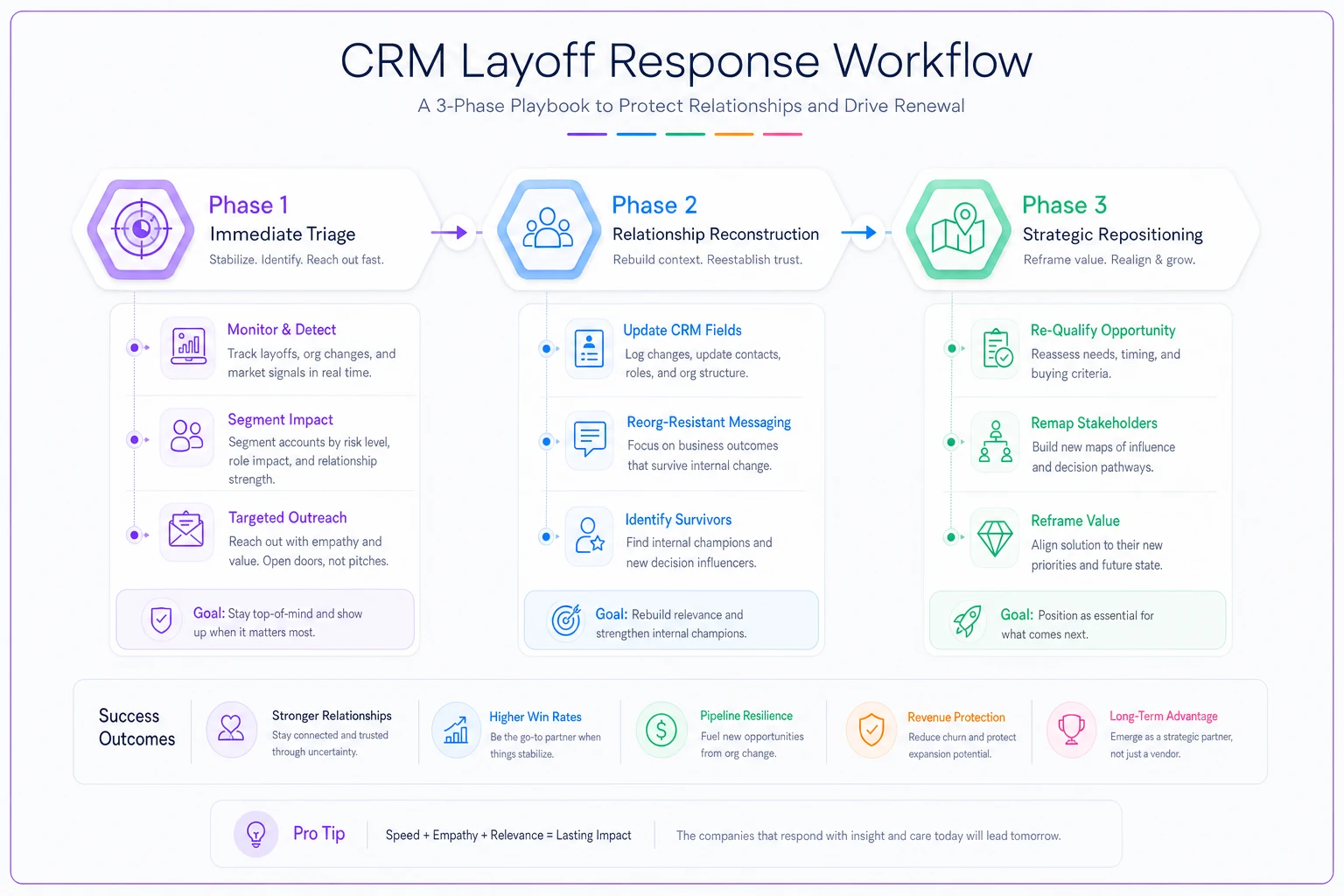
Use this flow as a shared reference so that your team reacts consistently when multiple accounts hit turbulence.
Early warning systems that actually work
Traditional churn signals are lagging indicators. By the time usage drops or renewals get pushed, it's usually too late. During layoff periods, you need leading indicators that catch problems while they're still fixable.
Email engagement patterns
-
Bounce rate increases over 10% in a single week
-
Out-of-office messages containing "no longer," "transition," or "departed"
-
Response time degradation (from same-day to 3+ days)
-
Forward patterns—your emails getting sent to new people
LinkedIn activity signals
-
Job title changes at customer accounts
-
"Open to work" badges appearing
-
Increased recruitment activity from the customer's competitors
-
Key contacts going quiet (no posts or comments for 2+ weeks)
CRM behavior changes
-
Login frequency drops by 50%+
-
Feature usage shifts from advanced to basic
-
Support ticket language changes from feature requests to basic how-tos
-
New users appearing without proper onboarding
The key is combining these signals, not overreacting to individual ones. A single bounced email means nothing. Three bounced emails plus LinkedIn changes plus a usage drop means you're probably about to lose the account.
The multi-threading myth (and what actually works)
Everyone preaches multi-threading, but it usually just means collecting more email addresses. During layoff chaos, you need depth, not breadth.
Department diversity over title diversity
-
Revenue teams (sales, marketing, CS)
-
Operations teams (IT, rev ops, data)
-
Finance teams (procurement, FP&A)
-
Executive sponsors, even if they're not active users
Informal influence mapping
-
Who do people CC on important emails?
-
Who joins calls unexpectedly?
-
Who gets mentioned in conversations repeatedly?
-
Who writes the internal documentation?
These informal influencers often survive layoffs because they're the connective tissue between departments. They rarely show up in CRM records.
Create organizational memory anchors
-
Detailed mutual success plans in shared documents
-
Recorded training sessions accessible to new team members
-
ROI documentation that new stakeholders can reference
-
Integration documentation that IT can maintain independently
When people leave, institutional knowledge walks out with them. Combat this by creating artifacts that survive personnel changes.
Renewal velocity tactics when everything's on fire
Traditional renewal playbooks assume organizational stability. Start 120 days out, build consensus, negotiate terms, close. When your customer just lost 30% of their team, that timeline is fantasy.
| Phase | Timeline | Key Actions |
|---|---|---|
| Rapid re-qualification | Days 1–10 | Confirm buying committee, verify budget status, document scope changes |
| Value re-establishment | Days 11–20 | Show usage data from surviving team, recalculate ROI, present transition support options |
| Simplified close | Days 21–30 | One-page renewal summary, pre-filled contracts, flexible terms |
Staying human through this process matters. Customers in transition can tell when they're being processed through a playbook versus when someone actually cares about their situation. The table above is a guide, not a script.
Concession strategy for retention
The instinct during customer layoffs is to discount aggressively. That's usually the wrong move. Organizations in transition tend to value stability and simplicity over cost savings. Instead of price cuts, offer:
-
Contract length flexibility (month-to-month until things stabilize)
-
User count true-ups (adjust licenses quarterly)
-
Pause provisions (ability to suspend without cancellation)
-
Transition services (help onboard replacement staff)
These cost you less than discounts and create more actual value for customers navigating chaos.
The bridge renewal technique
When customers can't commit to annual renewals during a reorg, offer a bridge renewal—a 3-month extension at current terms while they figure things out. It maintains revenue momentum, keeps competitors out during a vulnerable period, and shows flexibility without looking desperate. Around 70% of bridge renewals convert to full renewals once organizations stabilize.
Automation without losing the human touch
During customer layoffs, the instinct is to go full manual—every account gets white-glove treatment. That doesn't scale, and honestly, it often makes things worse. Customers dealing with organizational chaos don't want five check-in calls a week.
The key is knowing what to automate and what to keep human. During layoff response, automate the monitoring and detection, but keep the intervention human.
Automate these pieces:
-
Contact verification (bounce detection, role changes)
-
Engagement tracking (email opens, platform logins)
-
Alert generation (risk scores, trigger events)
-
Data hygiene (updating titles, removing departed contacts)
-
Report generation (account summaries, usage trends)
Keep these human:
-
First outreach after a layoff announcement
-
Executive escalations
-
Renewal negotiations
-
Relationship rebuilding conversations
-
Strategic account planning
Teams that handle customer layoffs best use automation to stay informed and surface risk early—not to fire off automated "sorry about the layoffs" messages. The operational software should be doing the detection work so your team can focus on the response.
Coverage model adjustments when everyone's underwater
When customers are going through layoffs, your team is probably stretched too. The standard coverage model—dividing accounts by ARR or segment—breaks down when every account needs attention at the same time.
Switch to a dynamic coverage model based on risk and opportunity:
Triage tier assignments:
Tier 1: Active fire (immediate human intervention)
-
Renewal in under 30 days with confirmed champion departure
-
Strategic accounts with more than 50% contact loss
-
Expansion deals in final stages with committee changes
Tier 2: Smoke detected (monitored with triggered intervention)
-
Renewals in 31-90 days with organizational changes
-
Stable accounts with single-thread risk
-
Paused projects due to reorg
Tier 3: Watching brief (automated monitoring only)
-
Auto-renewal accounts with strong usage
-
Multi-year contracts with 6+ months remaining
-
Small accounts with distributed stakeholders
Reassign coverage weekly based on risk shifts. An account can move from Tier 3 to Tier 1 overnight if their champion leaves.
The pooled resource model
-
Renewal specialists who jump in for final negotiations
-
Technical resources for emergency onboarding
-
Executive sponsors for escalation conversations
-
Administrative support for data cleanup
This lets your core team focus on relationship management while specialists handle specific crisis moments.
Practical example: SaaS company navigating customer aftermath
Here's what this playbook looked like for a mid-market SaaS company (around $8M ARR) when three of their top-10 customers announced layoffs in the same quarter.
Week 1: The CRM flagged unusual email bounce patterns at Customer A—a 15% bounce rate spike. The team discovered they'd cut roughly 20% of their workforce, including two of three contacts. Instead of panicking, they executed the triage protocol: identified the survivor, sent a one-page transition summary of all active projects, and offered to pause implementation for 30 days.
Week 3: Customer B's champion got promoted to cover her departed boss's role. The CSM recognized this as an opportunity and repositioned the solution from "team efficiency tool" to something that would help the champion manage expanded responsibilities. The customer increased licenses by 20%.
Week 8: Customer C went completely dark. No responses, usage dropped 60%, renewal in 45 days. Instead of desperate outreach, the team used LinkedIn to identify a new stakeholder in finance who'd inherited the contract. One well-crafted email about "simplifying vendor management during transition" got an immediate response. They closed a 6-month bridge renewal within two weeks.
Despite the chaos, they retained all three accounts. Customer A renewed after the pause period. Customer B expanded. Customer C stabilized and is moving toward annual renewal. Total revenue impact was a positive 5% rather than the projected 30% loss. It wasn't a smooth ride—there was a lot of stress and some close calls—but the playbook held.
The uncomfortable truth about vendor relationships
When your customers go through layoffs, your relationship with them fundamentally changes. You're no longer a partner helping them grow. You're overhead they're trying to cut.
Acknowledging that shift—instead of pretending nothing's changed—is what separates teams that maintain accounts from those that lose them.
Stop sending "checking in" emails. Stop pretending their priorities haven't shifted. Stop pushing for expansions when they're in cost-cutting mode. Position yourself as part of the solution to their new reality:
-
Help them maintain output with fewer people
-
Provide documentation for knowledge transfer
-
Offer flexible terms that acknowledge the uncertainty
-
Share what you've seen other customers do when navigating similar transitions
The goal during a customer crisis isn't to maximize revenue. It's to survive the storm and be positioned for growth when stability returns.
Building organizational resilience for the next wave
This Microsoft round won't be the last. Companies are restructuring around AI investments, and that means more organizational turbulence ahead. The question isn't whether your customers will face layoffs—it's whether you'll be ready when they do.
Build your layoffs CRM playbook now, while things are relatively stable. Map your accounts' organizational structures. Build horizontal relationships. Set up monitoring systems. Document your response protocols.
Train your team to recognize that customer layoffs aren't just a sales problem or a relationship problem—they're an operational challenge that requires a systematic response. Companies that treat them that way tend to hold onto the vast majority of revenue through these periods. Those that rely on ad hoc scrambling often lose 40% or more.
Your CRM isn't just a record system during these moments—it's your command center for navigating chaos. Make sure it's configured to detect, respond, and adapt when your customers' organizations get turned inside out. In this environment, it's not a matter of if, but when.
Ready to transform your customer relationships?
Join 2,000+ businesses using Rellyly to increase sales, improve client retention, and simplify CRM workflows.