


When a supplier misses a shipment or a plant goes offline, the customer-facing side of the business almost always breaks before operations does. Orders are still promised, dates are still quoted, and nobody has told the CRM that reality changed. Then the tickets arrive.
This is a build guide, not a strategy essay. If you already know why supply shocks hurt revenue and want the messaging side of things, the customer cadences for supply shocks playbook covers who says what and when. This piece is about the wiring underneath: the triggers, templates, integrations, SLAs, and the rollback plan you'll want ready before you flip anything on.
The specific failure this config prevents
There's a pattern that shows up almost every time a supply shock hits a company that hasn't prepped its CRM.
Inventory drops in the ERP. Nothing changes in the CRM. Reps keep quoting standard lead times because that's what the product record says. Support agents keep telling customers "let me check on that" one ticket at a time. Within 48 hours you've got a queue full of "where's my order" cases, three different ship-date answers going out to the same account, and a couple of angry escalations that reach an exec who had no idea anything was wrong.
The root issue is the CRM treating a systemic event like a pile of individual, unrelated tickets. Every agent re-discovers the problem from scratch. Every customer gets a slightly different story. The fix is making the CRM aware of the shock so it routes around it automatically, and humans spend their time on the accounts that actually need judgment.
Step one: create a shock "mode" the whole system can react to
Before you touch a single automation, you need one field that everything else keys off of. Call it whatever you want — SupplyShockActive as a checkbox, or a picklist like Supply_Status with values Normal / Constrained / Halted.
Never miss a customer touchpoint again.
Rellyly helps you manage contacts, tasks, and sales efficiently in one platform.
- Unified customer profiles
- Automated follow-ups
- Sales pipeline tracking
No credit card required
Give the flag a single, easy-to-script name like
Supply_Statusso integrations and automations can refer to it without ambiguity.
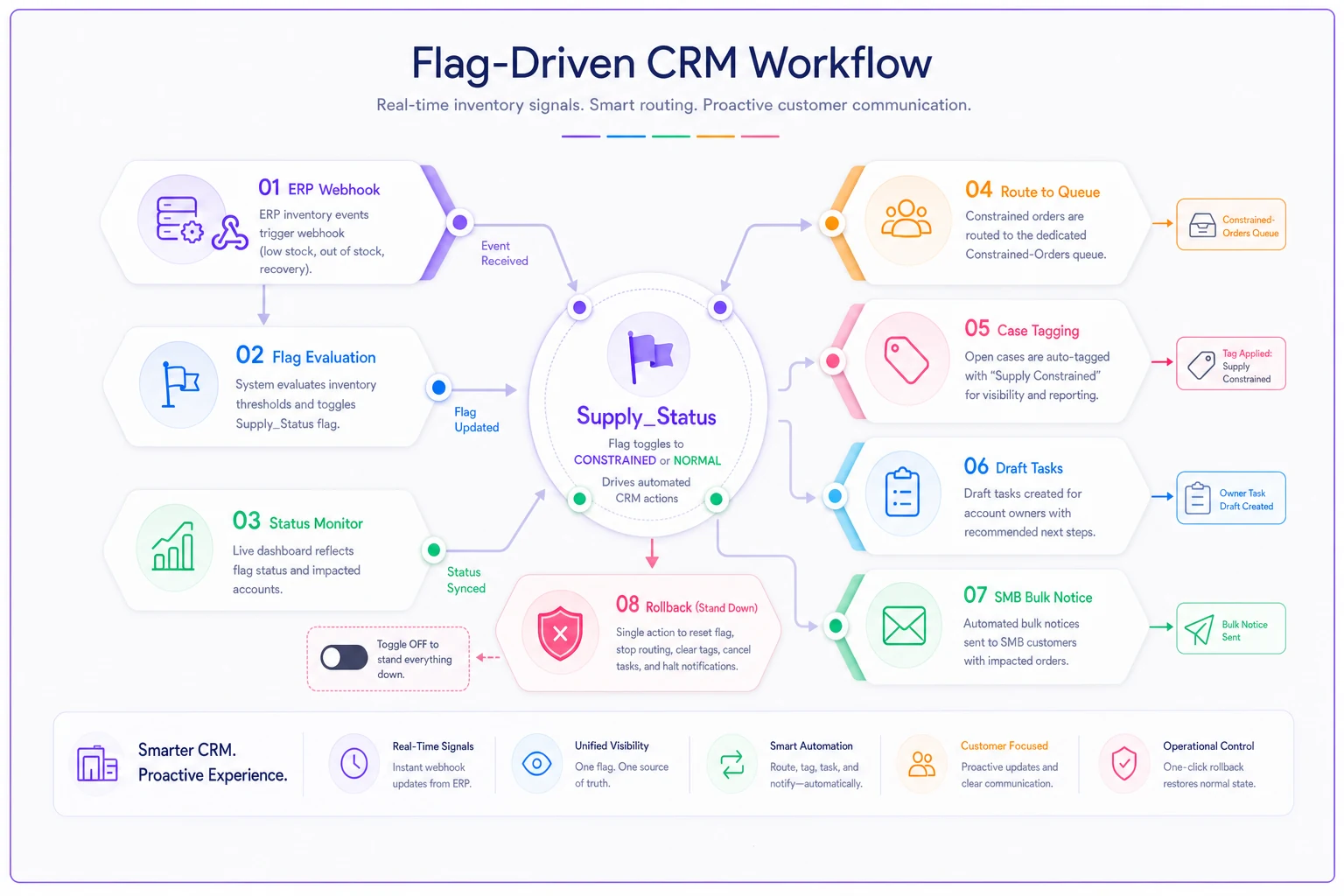
A practical setup looks like this:
-
Supply_Status(picklist)Normal / Constrained / Halted
-
AffectedProductFamilies(multi-select) -
RevisedLeadTime_Days(number) -
ShockStartDate(date) -
CustomerNoticeSent(checkbox, per account/order)
That last field matters more than it looks. Without a "notice sent" flag, your automations will re-notify the same customer every time a related ticket updates, and nothing torches goodwill faster than four identical delay emails in one afternoon.
The flag-driven architecture also makes it easier to layer in AI-powered workflow tools later. Operational software that monitors queue volume, flags sentiment shifts, or drafts outreach tasks can key off this same Supply_Status field — so when you're ready to add automation, the foundation is already there.
Concrete trigger rules
Now the logic. These are the rules that actually earn their keep during a constrained period. Written in plain if/then so you can port them to whatever platform you run.
Rule 1 — Auto-tag inbound cases tied to affected products
> IF a new case is created
> AND the associated order/product is in AffectedProductFamilies
> AND Supply_Status ≠ Normal
> THEN apply tag supply-shock, set priority based on account tier, and route to the constrained-orders queue.
Rule 2 — Proactive notice on open orders
> IF an open order contains an affected SKU
> AND CustomerNoticeSent = false
> AND account tier ∈ {Enterprise, Key}
> THEN create a task for the account owner (not an auto-email) with the notice template attached.
Rule 3 — Bulk notice for smaller accounts
> IF an open order contains an affected SKU
> AND CustomerNoticeSent = false
> AND account tier ∈ {SMB, Self-serve}
> THEN send templated delay notice, set CustomerNoticeSent = true, log activity.
Rule 4 — Escalation trigger on repeat contact
> IF a supply-shock case receives a 3rd customer reply within 72 hours
> OR sentiment/keyword flag ("cancel", "refund", "legal")
> THEN escalate to team lead, notify account owner, set priority High.
Rule 5 — Auto-stand-down
> IF SupplyStatus changes to Normal
> THEN close the constrained queue routing, send an "all clear / updated timeline" template to accounts with CustomerNotice_Sent = true, and clear the shock tag from resolved cases.
Rule 5 is the one everyone forgets to build until they're manually un-doing everything by hand a week later.
Template copy you can paste and edit
Templates during a shock need to do three things: acknowledge the situation, give a real revised date (or an honest "we don't have one yet"), and tell the customer exactly what happens next. Vague reassurance makes things worse, not better.
Proactive delay notice (SMB/bulk): > Subject: Update on your order #{{orderid}} — revised timeline > > Hi {{firstname}}, > We want to get ahead of something. A supply constraint affecting {{productfamily}} is impacting delivery timelines, and your order is affected. Current revised estimate: {{reviseddate}}. > You don't need to do anything — your order is still active and prioritized in the order it was placed. We'll email you the moment it ships. If this timing creates a problem on your end, reply here and we'll work through options with you.
Account-owner outreach draft (Enterprise/Key): > Hi {{firstname}}, wanted to reach out personally before you heard it elsewhere. We're seeing a constraint on {{component}} that affects {{theirspecificorders}}. Here's where things stand: {{status}}. Revised target: {{reviseddate}}. I've already flagged your account for priority allocation as inventory frees up. Do you have a hard deadline on your side I should be planning around? Happy to jump on a quick call.
Repeat-contact / escalation reply: > Hi {{firstname}}, I see you've reached out a few times and I don't blame you — the uncertainty is frustrating. Let me give you the straight version: {{honeststatus}}. Here's what I can commit to right now: {{concretecommitment}}. I've escalated your order internally and {{ownername}} is now personally tracking it.
None of these over-promise. The fastest way to turn a supply problem into a churn problem is quoting a revised date you then miss a second time.
Integration checklist: ERP, inventory, webhooks
The automations above are only as good as the data feeding them. If inventory lives in the ERP and never reaches the CRM, none of your triggers fire. This is where most rollouts quietly fail.
-
[ ] ERP → CRM inventory sync for affected SKUs, refreshed at least hourly during a shock (real-time if the platform allows)
-
[ ] Webhook from inventory system that flips
SupplyStatusor updatesRevisedLeadTimeDaysautomatically when stock crosses a threshold -
[ ] Order object mapping so every CRM order record ties to a live ERP line item (you can't notify on orders the CRM can't see)
-
[ ] Bi-directional lead-time field — when ops updates the revised date once, it should propagate to every affected order, not require manual edits
-
[ ] Field validation so a blank
RevisedLeadTimeDayscan't send a template with{{reviseddate}}rendering as empty -
[ ] Fallback logic for when the ERP sync fails — cases should still tag correctly off the last-known product status, not silently stop routing
-
[ ] Audit log capturing every auto-sent notice, so when an exec asks "who did we tell what," you have an answer in thirty seconds
The webhook piece is worth the extra day of setup. The difference between a CRM admin manually flipping a flag when someone remembers to tell them, versus the inventory system flipping it automatically, is the difference between reacting in hours versus reacting in days.
Teams running AI-assisted operational platforms get a real advantage here. When the data pipeline between ERP and CRM is clean and structured, AI-powered workflow tools can monitor status changes, surface at-risk accounts proactively, and draft communications without waiting for someone to notice the queue climbing. The integration work pays off either way — but it pays off faster if that layer is already in place.
SLAs and KPIs that actually reflect a shock
Your normal SLAs will break during a constrained period, and pretending otherwise just makes the team look like it's failing. Set shock-mode SLAs that activate with the flag.
| Metric | Normal target | Shock-mode target | Why it shifts |
|---|---|---|---|
| First response on tagged case | 4 hrs | 2 hrs | Anxiety is higher; fast ack reduces repeat contacts |
| Proactive notice on open orders | n/a | Within 24 hrs of flag | Beat the customer to the bad news |
| Enterprise owner outreach | n/a | Within 8 hrs | Relationship accounts need a human, fast |
| Revised-date accuracy | n/a | 90%+ dates held | Missing a revised date twice is what causes churn |
| Escalation resolution | 48 hrs | 24 hrs | High-tension accounts can't wait |
The KPI most teams miss is revised-date accuracy. Response time gets all the attention, but during a shock the number that actually predicts whether an account stays is whether you hit the second date you gave them. Track it from day one.
Also watch repeat-contact rate on tagged cases. If it's climbing, your proactive notices aren't landing — either too vague or not going out fast enough. Both are fixable, but only if you're looking at the right number.
A short real scenario
A mid-sized industrial parts distributor — around 40 people, roughly 1,200 active B2B accounts — hit a component shortage when one of their two suppliers halted shipments. Before any of this config existed, their support queue went from a normal roughly 60 open cases to over 300 in four days. Three reps were quoting three different ship dates to the same purchasing manager at a key account. That account opened a contract review.
After building the flag-driven setup — one Supply_Status field, tiered notice rules, and an hourly ERP inventory sync — the next disruption looked completely different. Proactive notices went out to affected SMB accounts within the first day. Enterprise owners got draft outreach tasks and made calls before customers noticed. The tagged queue peaked around 130 instead of 300-plus, and repeat "where's my order" contacts dropped by roughly half because people had already been told. No formal contract reviews that round.
The revenue impact is hard to pin to a clean number. But the account that nearly walked the first time renewed, and that's kind of the whole point.
When this setup makes sense — and when it doesn't
Worth building if you carry physical inventory, quote lead times, and have suppliers that can genuinely leave you short. Distributors, manufacturers, hardware companies, anyone reselling constrained goods.
When it's overkill: pure software or services businesses with no physical fulfillment. You don't have supply shocks in the same sense, and this whole apparatus is solving a problem you don't have.
Who should not rush this: teams whose ERP and CRM aren't integrated at all yet. If order and inventory data don't flow between systems, none of these triggers can fire on real conditions, and you'll end up with automations firing on stale data — which is worse than nothing, because now the wrong notices go out automatically. Fix the data connection first, then build the logic on top.
Rollout and rollback checklist
Ship this in a controlled way. The last thing you want is an untested automation blasting delay notices to your entire book on day one.
-
Build the
Supply_Statusfield and affected-products relationship first, with no automations attached. -
Load templates and test-render them with real merge fields — check for empty
{{revised_date}}cases. -
Turn on tagging and routing rules only (Rules 1 & 4). Watch for a day. These are read-and-organize actions, low risk.
-
Enable the enterprise draft task rule (Rule 2). Still no auto-sends. Confirm tasks land with the right owners.
-
Enable bulk auto-notice (Rule 3) on a small SKU subset first. Verify
CustomerNoticeSentflips correctly and nobody gets double-notified. -
Expand to full affected-product list once the sample looks clean.
Rollback (keep this visible during the whole event):
-
Flip
Supply_Statusback to Normal — this stands down routing and triggers the all-clear (Rule 5). -
Confirm no notices are queued to send after the flag flips.
-
Clear the
supply-shocktag from resolved cases so reporting resets. -
Review the audit log to confirm what went out, and reconcile against accounts still expecting an update.
The reason the rollback lives on a single field is speed. When operations tells you supply is back, you don't want to be hunting through fifteen separate automation rules trying to remember which ones to disable. One flag, everything stands down.
Closing thought
The teams that handle supply shocks well aren't the ones with the most heroic reps — they're the ones whose CRM already knew what to do before the tickets arrived.
This config won't make a parts shortage disappear, but it will keep your team giving one consistent, honest story to every customer instead of scrambling ticket by ticket. Build the flag, wire the ERP, draft the templates now, while things are calm. The next disruption will decide whether that prep hour was worth it, and it almost always is.
Build the flag, wire the ERP, draft the templates now, while things are calm. The next disruption will decide whether that prep hour was worth it, and it almost always is.
Ready to transform your customer relationships?
Join 2,000+ businesses using Rellyly to increase sales, improve client retention, and simplify CRM workflows.