


If you've already defined the five activation milestones and a 21‑day dashboard from the trial-to-paid activation sequence, you've done the hard conceptual work. The problem now is the gap between a milestone drawn on a whiteboard and a milestone that fires a webhook, lands in your warehouse, and nudges a CSM at 9am the right morning.
That gap is where most trial activation instrumentation falls apart. The milestones are technically "defined" — but nobody can tell you, on a Tuesday, which trial accounts hit milestone three yesterday. The dashboard pulls from a spreadsheet someone updates when they remember. Sales says activation is up, CS says it's flat, and both are technically correct because they're counting different things.
This blueprint fixes that specific problem: making your five milestones measurable, queryable, and automatable with concrete event names, payloads, SQL and stack mappings. No theory. Just the plumbing.
The one decision that breaks everything downstream: event granularity
Before a single event name gets written, there's a fork in the road that teams blow past and regret for months. You either instrument state‑transition events (milestone reached, once) or activity events (user did thing, many times) — and most teams accidentally do a messy blend of both.
Here's how it goes wrong. A team names an event projectcreated and assumes that is the activation milestone. But a user creates three projects, deletes two, and creates a fourth. Now your "milestone one reached" count is 4 for a single account, your time‑to‑milestone math is garbage because you don't know which projectcreated actually counts, and your automation fires four onboarding emails.
-
Activity events capture raw behavior. Fire as often as it happens.
projectcreated,reportexported,teammate_invited. -
Milestone events are derived, fire exactly once per account, and carry the account's activation state.
milestone_reached.
You compute milestone events from activity events — usually in the warehouse or a lightweight server‑side function — so the "did they activate" logic lives in one place instead of being reimplemented in your email tool, your dashboard, and your CRM.
Teams that skip this always end up with three different activation numbers and a standing argument about which one is real.
Event naming: the product‑agnostic spec
Keep names objectaction, past tense, snakecase. The discipline matters more than whatever convention you pick, because inconsistent naming is what forces analysts to write 40‑line CASE statements six months later.
Never miss a customer touchpoint again.
Rellyly helps you manage contacts, tasks, and sales efficiently in one platform.
- Unified customer profiles
- Automated follow-ups
- Sales pipeline tracking
No credit card required
| Milestone (generic) | Underlying activity event(s) | Fires milestone event with `milestone_key` |
|---|---|---|
| 1. Core object created | project_created | activationcorecreated |
| 2. Data connected / imported | integrationconnected, dataimported | activationdataconnected |
| 3. First value action | reportgenerated, workflowrun | activationfirstvalue |
| 4. Collaboration / invite | teammateinvited, inviteaccepted | activationteamexpanded |
| 5. Habit / repeat usage | 3+ workflow_run in 7 days | activationhabitformed |
Notice milestone 5 isn't a single action — it's a pattern over time. That's exactly why it must be derived, not fired client‑side. Your frontend has no idea whether this is the third run this week.
Sample payloads for Segment / Mixpanel
Here's an activity event. Keep properties flat where you can, and always carry the identifiers you'll need to join later.
{ "event": "reportgenerated", "userId": "u8842", "properties": { "accountid": "acct301", "trialid": "trial9f22", "reporttype": "cohort", "reportid": "rpt55210", "trialday": 4, "plantier": "protrial", "source": "web_app" }, "timestamp": "2025-06-04T14:22:09Z" }
And the derived milestone event. The key thing: it carries the activation state the rest of your stack reads from.
{ "event": "activationfirstvalue", "userId": "u8842", "properties": { "accountid": "acct301", "trialid": "trial9f22", "milestonekey": "firstvalue", "milestonenumber": 3, "triggeringeventid": "rpt55210", "trialday": 4, "hourssincetrialstart": 91, "milestonesreachedcount": 3, "activationscore": 60 }, "timestamp": "2025-06-04T14:22:11Z" }
-
trial_day— the integer day of trial (0–21). Analysts shouldn't have to recompute this from timestamps on every query. -
hourssincetrial_start— your real time‑to‑milestone input. Days round away too much signal; a milestone at hour 2 versus hour 20 is a meaningfully different trial. -
triggeringeventid— the activity event that caused the milestone. This is your audit trail when someone asks "why did this account activate?" -
milestonesreachedcountandactivation_score— carried on every milestone event so your email tool and CRM never have to compute activation themselves.
One common mistake: putting PII like email directly in event properties. Keep the join key (account_id, userId) in events and let the warehouse or reverse‑ETL layer attach email at send time. Keeps your analytics store cleaner and makes deletion requests much easier to handle.
SQL: milestone attainment and time‑to‑milestone
Assume your events land in a warehouse table events with columns accountid, event, trialday, hourssincetrialstart, timestamp, and a trials table with accountid, trialstart, trialend.
select t.accountid, t.trialstart, max(case when e.event = 'activationcorecreated' then 1 else 0 end) as m1core, max(case when e.event = 'activationdataconnected' then 1 else 0 end) as m2data, max(case when e.event = 'activationfirstvalue' then 1 else 0 end) as m3value, max(case when e.event = 'activationteamexpanded' then 1 else 0 end) as m4team, max(case when e.event = 'activationhabitformed' then 1 else 0 end) as m5habit from trials t left join events e on e.accountid = t.accountid and e.event like 'activation%' group by 1, 2;
select milestonekey, count(*) as accountsreached, percentilecont(0.5) within group (order by hourssincetrialstart) as medianhours, percentilecont(0.9) within group (order by hourssincetrialstart) as p90hours from events where event like 'activation%' group by milestonekey order by median_hours;
with reached as ( select accountid, milestonekey, min(timestamp) as reachedat from events where event like 'activation%' group by 1, 2 ) select r2.accountid, r2.reachedat as dataconnectedat, extract(epoch from (now() - r2.reachedat))/3600 as hoursstuck from reached r2 left join reached r3 on r2.accountid = r3.accountid and r3.milestonekey = 'firstvalue' join trials t on t.accountid = r2.accountid where r2.milestonekey = 'dataconnected' and r3.accountid is null and r2.reachedat < now() - interval '48 hours' and t.trialend > now() order by hoursstuck desc;
That last query is the one that actually drives revenue. It's a prioritized list of accounts that proved intent (connected data) but haven't felt value yet — the exact window where a CSM touch has the highest conversion impact.
Automation triggers: from milestone event to action
Two patterns cover almost everything, and mixing them up is the usual cause of annoying over‑messaging.
Pattern A — positive milestone reached. Fire on the milestone event itself. Celebratory/educational, low intervention.
Pattern B — expected milestone missing. Fire on a scheduled check (the stuck‑accounts query), because "absence of an event" can't be a real‑time trigger.
{ "trigger": "milestonestalled", "accountid": "acct301", "stalledatmilestone": "dataconnected", "missingmilestone": "firstvalue", "hoursstuck": 61, "trialday": 9, "suggestedowner": "csmregionwest", "suggestedaction": "nudgefirstvalue" }
Here's a simple diagram of how milestone events and scheduled checks drive automations.
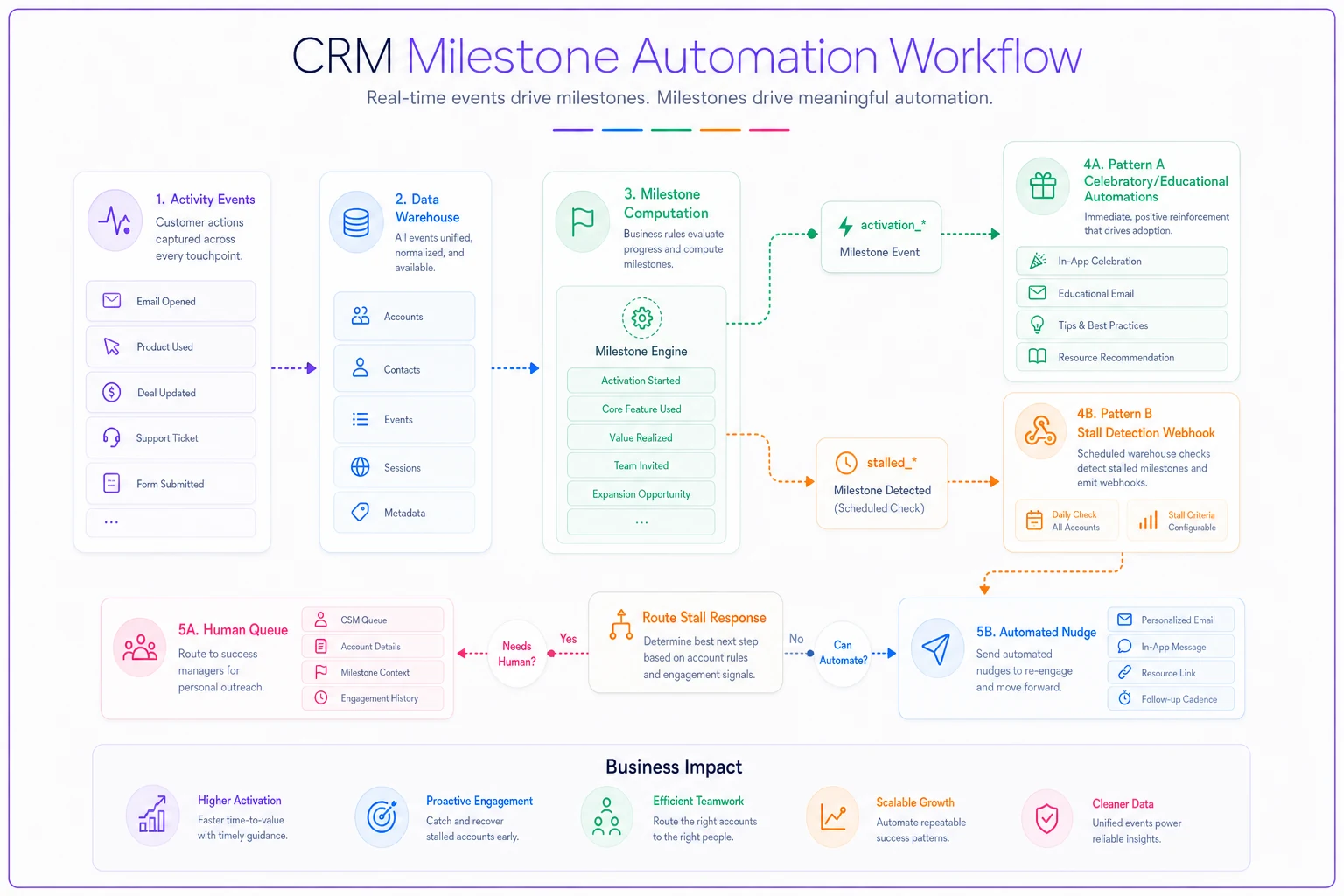
What teams consistently forget: route Pattern B to a human queue when the account is high‑value and to an automated nudge when it's self‑serve. Blasting the same automated email to a $40k‑ACV trial and a $29/month trial is how you lose the big one. The suggested_owner field exists so routing logic lives in the data, not buried somewhere in the email tool's settings.
QA and instrumentation checklist
Run this before you trust a single number. Most activation dashboards are wrong for weeks because nobody validated the events feeding them.
-
Every activity event carries
accountid,trialid, andtrial_day— no nulls in a 24‑hour sample. -
hourssincetrial_startis never negative (clock‑skew and backfill bugs produce these constantly). -
Each
activationmilestone event fires exactly once per account — run acount() group by accountid having count(*) > 1check. -
Milestone 5 (derived/pattern) is computed server‑side, not client‑side.
-
milestonesreachedcounton the latest milestone event matches the attainment SQL count. -
A test trial you run end‑to‑end produces all five milestone events in the right order with sane timestamps.
-
Deleted/reactivated trial accounts don't double‑count (watch soft‑deletes).
-
PII is absent from event properties; joins to email happen downstream.
-
Automation suppression works
completing a milestone cancels its pending "stalled" nudge.
Test scheduled-nudge cancellation end-to-end so completed milestones reliably suppress pending nudges.
That last one deserves emphasis. The nastiest instrumentation bug isn't a missing event — it's a milestone that fires correctly but doesn't cancel the scheduled nudge warning that the milestone was missed. The user converts, then gets an email asking why they haven't tried the feature they just used.
Reverse‑ETL / export schema for the dashboard
Your 21‑day dashboard shouldn't query raw events live — it should read from one clean modeled table, refreshed on a schedule, that reverse‑ETL also pushes back into your CRM and email tool. One source, three destinations.
| Column | Type | Notes |
|---|---|---|
account_id | string | Join key everywhere |
trialstart / trialend | timestamp | Defines the 21‑day window |
trial_day | int | Current day, 0–21 |
m1–m5 | boolean | Milestone attainment flags |
milestones_reached | int | 0–5 |
activation_score | int | 0–100, weighted |
current_stall | string | e.g. dataconnected→firstvalue, null if on track |
hoursinstall | int | Drives CS prioritization |
owner | string | CSM/AE for routing |
converted | boolean | Backfilled for cohort analysis |
Push this table to Mixpanel as user/group profiles, to your CRM as account fields, and to your email tool as computed traits. The rule: dashboards and automations read the same modeled table. The moment your email tool recomputes activation its own way, your numbers diverge and the Tuesday‑morning argument comes back.
Recommended stack mappings
The event spec stays identical across stacks — only the delivery changes.
| Stack | Events land via | Milestone computation | Automation | Reverse‑ETL |
|---|---|---|---|---|
| Mixpanel + Customer.io | Mixpanel ingestion | Warehouse job → milestone events sent back | Customer.io broadcasts on milestone traits | Warehouse → Customer.io computed attributes |
| Segment + Braze | Segment track | Segment → warehouse → Segment milestone events | Braze Canvas keyed on event + attribute | Segment Reverse ETL → Braze |
| GA4 + HubSpot | GA4 gtag events | Warehouse (GA4 BigQuery export) | HubSpot workflows on custom properties | Warehouse → HubSpot via sync tool |
One practical note for the GA4 + HubSpot combination: GA4's event model wasn't built for per‑account state, so lean harder on the BigQuery export and treat GA4 itself as a collection layer, not a source of truth. Teams that try to compute activation inside GA4's UI end up fighting sampling and cardinality limits.
A real scenario
A small B2B analytics tool — roughly 180 trials a month, self‑serve with a two‑person CS team — had the five milestones defined but instrumented only as raw activity events. Their "activation rate" was pulled by hand into a spreadsheet every Friday.
The problems were predictable. Milestone one was counting duplicate project_created events, so activation looked about 15% higher than reality. The CS team was manually scanning the trial list for accounts to call, which meant they mostly called whoever showed up first alphabetically. Nobody could say how long it actually took trials to reach "first value."
After separating activity events from a single derived activation_* milestone event, adding the stuck‑accounts query to a daily job, and wiring one modeled table into both the dashboard and their email tool, two things changed. The fake 15% inflation disappeared — uncomfortable, but honest. And the CS team stopped scanning lists. They got a ranked queue of accounts stuck between data‑connected and first‑value, sorted by hours stuck. Trial‑to‑paid moved a few points over the next couple of cohorts, mostly because the right accounts got touched inside the window instead of after it closed.
The numbers mattered less than the fact that everyone was finally arguing from the same table.
When this level of instrumentation makes sense — and when it doesn't
Do it when you have enough trial volume that manual list‑scanning breaks down (somewhere around 50+ trials a month is where it starts to hurt), multiple people act on activation data, or sales and CS keep quoting different activation numbers.
Skip it when you're pre‑product‑market‑fit with a handful of trials a month. At that volume, the founder reading every trial by hand is better instrumentation — you'll learn more from ten conversations than from a dashboard built on ten data points. Building the full pipeline at that stage is just premature optimization.
Don't attempt the derived‑milestone approach if you don't yet have a warehouse or a reliable place to compute state. Half‑instrumenting it — milestones computed inconsistently across your email tool and dashboard — is worse than clean activity events alone, because now you trust numbers that are wrong.
The whole point of this blueprint is to make activation something your team acts on, not something it debates. Define the events once, compute the milestones once, read from one table everywhere. The milestones themselves come from the 21‑day activation sequence — this is just the wiring that makes them real.
Ready to transform your customer relationships?
Join 2,000+ businesses using Rellyly to increase sales, improve client retention, and simplify CRM workflows.