


The two weeks after a rep leaves are where accounts quietly leak. Not all at once — you don't lose a renewal on day one. It's slower. The customer emails the old rep's address, gets a bounce or an autoreply, waits, follows up with support, gets bounced around, and by the time someone picks up the thread the relationship has cooled a few degrees. Multiply that across a book of 40–60 accounts and you've got a real problem that won't show up in the CRM until the forecast slips a quarter later.
Most teams treat rep departures as an HR event. It's actually an operations event, and the window to handle it well is measured in days, not weeks. What follows is a tight playbook — a checklist and a set of templates you can copy — built specifically for the handoff period. Not onboarding the replacement. Not backfilling headcount. Just preserving the context that lives inside one person's head before it evaporates.
Why context disappears faster than accounts
The account doesn't leave, the context leaves. The signed contract is in the CRM. The renewal date is in the CRM. What's not in the CRM is that the champion at the account is about to switch jobs, that they're quietly annoyed about a support ticket from March, that pricing was verbally promised to hold flat next cycle, or that the real decision-maker is the ops director who never shows up on calls.
Reps carry a working memory of their accounts they never bother writing down — they don't need to, they talk to these people every week. The system of record captures what happened, but the departing rep is the only one who knows what's about to happen and why. When they give two weeks' notice (or none), that layer is gone unless someone deliberately extracts it.
One pattern worth noting: the accounts most at risk aren't the biggest ones. Big accounts usually have multiple contacts and a paper trail. The dangerous ones are mid-tier accounts a single rep managed relationship-first — where the whole thing ran on trust and a couple of recurring calls. Those are the ones that churn silently, because nobody else ever had a reason to log in.
The 5-day extraction window
You want the departing rep's knowledge on paper while they still care enough to help. That cooperation window is short. Someone leaving for a competitor is mentally checked out by day three. Someone leaving on good terms will still get busy tying up their own loose ends. Move fast.
Never miss a customer touchpoint again.
Rellyly helps you manage contacts, tasks, and sales efficiently in one platform.
- Unified customer profiles
- Automated follow-ups
- Sales pipeline tracking
No credit card required
-
Day 1 — Freeze and inventory. Pull the full account list assigned to the departing rep. Rank by ARR and renewal proximity. Flag anything renewing in the next 90 days as tier-one. This is the list everything else attaches to.
-
Day 2 — Structured debrief, not a chat. Sit with the rep (or do it async if they're remote) and go account by account through the tier-one list using a fixed template. Don't let it become a hallway conversation. Written answers only.
-
Day 3 — Contact and access audit. Confirm every account has a named backup contact, that email forwarding is set, and that any shared docs, quotes, or Slack threads are transferred to a team-owned location.
-
Day 4 — Customer notifications. Send transfer emails to tier-one accounts first, timed so the customer hears it from the company — not from a bounced email.
-
Day 5 — Interim ownership assignment. Every account gets a temporary owner even if the permanent replacement isn't hired yet. No account sits unowned, not even for a week.
The mistake teams make is cramming all of this into a single "knowledge transfer meeting" scheduled for the rep's last afternoon. By then they've mentally left. You get a rushed 45 minutes and a spreadsheet with three-word notes. Spread it across the days above and you actually get usable detail.
The account status template (fill one per tier-one account)
This is the core artifact. Keep it short enough that a rep will actually complete it for 15 accounts without rebelling. Long forms get abandoned halfway.
Account: [Name]
-
Health, one word (green / watch / at-risk)
-
Renewal date & amount
-
Primary contact + role
-
Real decision-maker (if different)
-
Last meaningful conversation & date
-
Open promises or verbal commitments
-
Known landmines (unresolved tickets, pricing sensitivity, budget freezes, a champion who's leaving)
-
What I'd do next if I were staying
Make the 'What I'd do next' field required so reps can't skip it.
That last line is the most valuable one — and the one people consistently skip. It's the rep's judgment call, the thing no dashboard produces. "I'd call their new VP before the renewal quote goes out because he doesn't know us yet" is worth more than any activity log.
Priority flags: sorting the book in under an hour
Not every account deserves the same attention during a transfer. Trying to give all of them white-glove treatment is how the actually-fragile ones get the same generic email as the stable ones. A simple flag system fixes that.
| Flag | Criteria | Action within transfer window |
|---|---|---|
| 🔴 Red | Renewal <60 days OR active escalation OR champion departing | Personal call from a manager, transfer email within 48h |
| 🟡 Yellow | Renewal 60–120 days OR single-threaded relationship | Transfer email within 5 days, interim owner intro |
| 🟢 Green | Renewal >120 days, multi-threaded, no open issues | Standard notification, batch-handled |
The value isn't the color coding — it's the forcing function. When you make someone assign a flag, they have to actually think about each account instead of treating the whole book as one undifferentiated pile. A rep who was going to write "all fine" on their exit doc suddenly has to justify why the account renewing in 40 days with an open escalation is green.
Teams consistently under-flag the yellow tier. Single-threaded accounts feel safe because nothing's on fire. But a single-threaded account during a rep transition is exactly the setup for silent churn — the one relationship holding it together just walked out.
Ready-to-send templates
Write these before you need them. The moment a rep gives notice you're moving fast, and nobody has time to draft careful customer emails from scratch.
Template 1 — Customer transfer notice (red/yellow accounts) > Subject: A quick introduction from [Company] > > Hi [Name], > > I wanted to reach out directly. [Departing rep] has moved on from [Company], and I'll personally make sure your account doesn't miss a beat during the transition. I've reviewed your history with us — including [specific detail: your upcoming renewal / the integration work / the recent support items] — so you won't have to re-explain anything. > > I'd like to grab 20 minutes this week to introduce myself and go over what's ahead. Does [day] or [day] work? > > [Interim owner name, title, direct line]
Template 2 — Internal interim ownership handoff > Account: [Name] | ARR: [amount] | Renewal: [date] | Flag: [color] > Interim owner: [name] until [permanent assignment / date] > Top 3 things to know: [pull from status template] > Do this first: [the rep's "what I'd do next" line]
Template 3 — The internal "do not let this slip" list A single running doc, visible to the manager and interim owners, listing every red-flag account with its next action and a date. This is the one thing that gets checked daily until the dust settles.
The transfer timeline that keeps nothing unowned
Rep gives notice on a Monday. By Tuesday, the account inventory is pulled and ranked. Wednesday and Thursday, structured debriefs happen for red and yellow accounts. Friday, contact audits and email forwarding are confirmed. The following Monday, transfer notices go out to red accounts with manager calls scheduled. Yellow accounts get their emails by Wednesday. Green accounts get a batched notification that same week. Every account has an interim owner assigned before the rep's actual last day.
Writing it out as a timeline removes the "we'll get to it" gap. Left unstructured, transfers default to whoever has bandwidth — and the accounts that most need attention wait longest because they're the ones requiring real thought. A dated sequence forces the hard ones to the front.
A quick visual of that timeline.
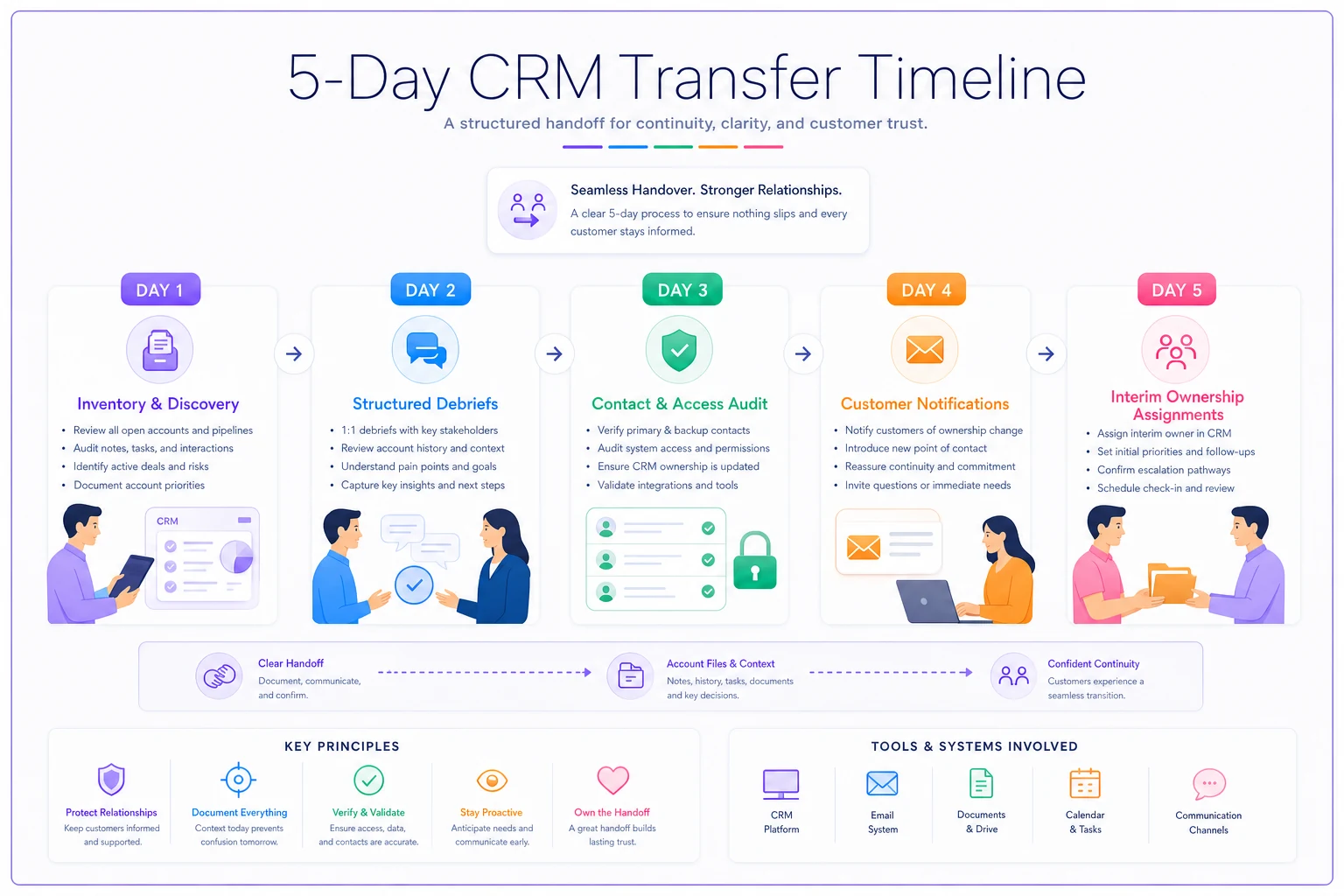
Every account has an interim owner assigned before the rep's actual last day.
Where this quietly falls apart in practice
The single biggest failure mode: the interim owner is assigned but never actually contacts the customer. On paper the account has a home. In reality nobody's called them, and when the renewal quote lands three weeks later it hits a customer who thinks they've been abandoned. Ownership without contact is just a name in a field.
The second failure mode is losing the email thread. When forwarding isn't set up, the customer's replies vanish into a departed inbox. A lot of the damage in these transitions happens in the first ten days simply because the customer reached out and got silence. They read silence as being dropped — and they start taking competitor calls they'd have otherwise ignored.
This is also where a decent CRM earns its keep — not the tool itself, but whether ownership reassignment actually re-routes activity, tasks, and notifications to the new owner instead of leaving them pointed at a dead account. If your system lets an account sit assigned to someone who no longer exists, that account is invisible during exactly the period it's most fragile. Teams that handle transfers well tend to have their records structured so a reassignment automatically pulls the new owner into open threads, renewal tasks, and active tickets, rather than requiring someone to manually chase all of it down. That's less about fancy automation and more about the data being clean enough that a handoff is one action instead of twenty.
A real scenario
A regional B2B software team — roughly 15 people — lost a senior AE managing about 45 accounts. Mix of new and renewal business, somewhere around $600k in book value. He gave notice on a Friday, last day two weeks out. The team had no transfer process; the plan was a knowledge-transfer meeting on his final afternoon.
They changed course and ran a version of the timeline above instead. The debrief surfaced two things that would never have shown up otherwise: one account's champion had already resigned, and the renewal — about $40k, due in five weeks — was now sitting with a VP who'd never spoken to the company. A second account had been verbally promised flat pricing that wasn't documented anywhere.
Both got personal manager calls within 48 hours. The at-risk renewal closed — not because of anything clever, but because someone reached the new VP before the quote arrived instead of after. The pricing promise got honored, which avoided a fight that would've soured the relationship for good. Based on how a previous departure had gone, the team figured they'd have lost two or three accounts to the transition. This time they lost one small one, and it was already trending out before the rep left.
The difference wasn't heroics. It was extracting the context while the rep still had it in his head, and making sure no account sat silent while a customer was waiting on a reply.
When to run the full playbook — and when not to
The full five-day version makes sense when the departing rep owns a meaningful book with near-term renewals, single-threaded relationships, or any active escalations. That covers most sales and CS departures.
It's overkill when the rep is brand new and their accounts are early-stage with no renewals in sight, or when their entire book is already co-owned and multi-threaded. In those cases a lightweight inventory and a couple of notifications are enough.
Where teams get it wrong is assuming a friendly departure — plenty of notice, no bad blood — means they can ease up on the structure. Amicable exits produce the same silent churn as messy ones if nobody extracts the context. The goodwill just means the rep will fill out your templates without complaint. Use it.
The whole thing comes down to one uncomfortable fact: your best rep's account knowledge is completely undocumented until the moment you force it out of them. The transfer window is the one chance you get. Run it deliberately, and the accounts stay. Wing it, and you find out which relationships were really just one person the hard way — a quarter later, in a forecast that no longer adds up.
Ready to transform your customer relationships?
Join 2,000+ businesses using Rellyly to increase sales, improve client retention, and simplify CRM workflows.