


Your sales manager just called an emergency pipeline review. The forecast you submitted three days ago? Off by 40%. Two enterprise deals marked "verbal commit" last quarter ghosted completely. The new SDR accidentally created duplicate accounts for your biggest prospect, and now three reps are calling the same contact.
This isn't a people problem. It's a data hygiene problem that compounds daily until your CRM becomes a liability instead of an asset.
The Real Cost of Bad CRM Data
Most SMB sales teams treat CRM data quality like dental floss—everyone knows they should care about it, but nobody does until something hurts. By then, you're looking at months of accumulated damage.
Bad data doesn't announce itself. It builds quietly through normal operations. A rep forgets to update a deal stage. Someone creates a contact with the wrong email domain. The marketing team imports a list without checking for duplicates. Each small error seems harmless until you realize your entire revenue operation is built on quicksand.
The damage shows up in three places at once: forecast accuracy drops below 70%, making it impossible to plan hiring or set realistic targets; reps waste somewhere between 8 and 12 hours a week on administrative cleanup instead of selling; and real opportunities slip through the cracks because nobody owns them or knows their actual status.
A 50-person B2B software company lost a $240k deal because three different reps had been working the same account through duplicate records. The prospect got confused by conflicting messages, assumed the company was disorganized, and went with a competitor. Their CRM showed the deal as "80% likely to close" right up until the prospect signed elsewhere.
Why Traditional Data Cleanup Fails
Every sales team tries the same fixes, and they all fail for predictable reasons.
Never miss a customer touchpoint again.
Rellyly helps you manage contacts, tasks, and sales efficiently in one platform.
- Unified customer profiles
- Automated follow-ups
- Sales pipeline tracking
No credit card required
The quarterly cleanup sprint sounds logical—block off a Friday, order pizza, make everyone update their records. Except this creates a massive bottleneck where nobody can work deals while the system gets cleaned. And without ongoing maintenance, the data degrades again within weeks.
Some teams try assigning a data quality owner, usually an ops person or junior admin. One person can't police an entire sales team's data entry habits. They become a bottleneck, constantly chasing reps for updates while real problems go unnoticed.
The most dangerous approach is implementing complex validation rules and mandatory fields. This seems smart until reps start entering garbage data just to save records. Now you have data that looks clean but is actually worse than having obvious gaps.
Building a Sustainable Data Hygiene System
A working CRM data hygiene playbook for SMB teams needs four components: daily habits, weekly processes, safe automation, and rollback controls. Miss any one of these and the system breaks down.
Daily Runnable Tasks
Instead of massive cleanup projects, implement micro-tasks that take under five minutes. Every morning, each rep checks three things:
-
Any contact without an email address in their assigned accounts
-
Deals in their pipeline that haven't been updated in 7+ days
-
Tasks due today that lack clear next steps
This takes roughly four minutes per rep. Over a month, these micro-cleanups prevent most data decay. The key is making it part of the morning routine, like checking email. No special tools needed—just a saved report in your CRM.
One medical device sales team dropped their bad data rate from 35% to under 8% using only this morning ritual. Forecast accuracy jumped from 65% to 82% within two quarters.
Weekly Team Processes
Every Wednesday at 2pm, run a 15-minute team dedupe session. Not an hour-long meeting—exactly 15 minutes. Here's the structure:
Minutes 1–5: Ops lead shares a duplicate suspect list (companies or contacts that might be duplicates based on similar names or domains) Minutes 5–10: Team quickly claims ownership or identifies real duplicates Minutes 10–15: Ops lead merges confirmed duplicates while the team watches
The rapid-fire format keeps engagement high and prevents the session from becoming a burden. The public nature creates light peer pressure for data quality without finger-pointing.
The Ownership Model That Actually Works
Ownership confusion kills more deals than competitors do. But complex RACI matrices don't work for small teams. Use this simple rule hierarchy instead:
Account ownership priority:
-
Whoever logged the first meaningful activity (call, email, meeting) owns it
-
If no activity, whoever created the record owns it
-
If created by marketing or automation, it goes to the territory owner
-
Conflicts get resolved by most recent activity, not seniority
For contacts within accounts, the account owner has primary rights, but other reps can engage as long as they log their activities and tag the owner. This prevents territorial disputes while ensuring coverage.
Document these rules in a one-page PDF—not a 20-page process guide. One page that fits on a screen without scrolling. Post it in Slack monthly as a reminder.
Here's the workflow:
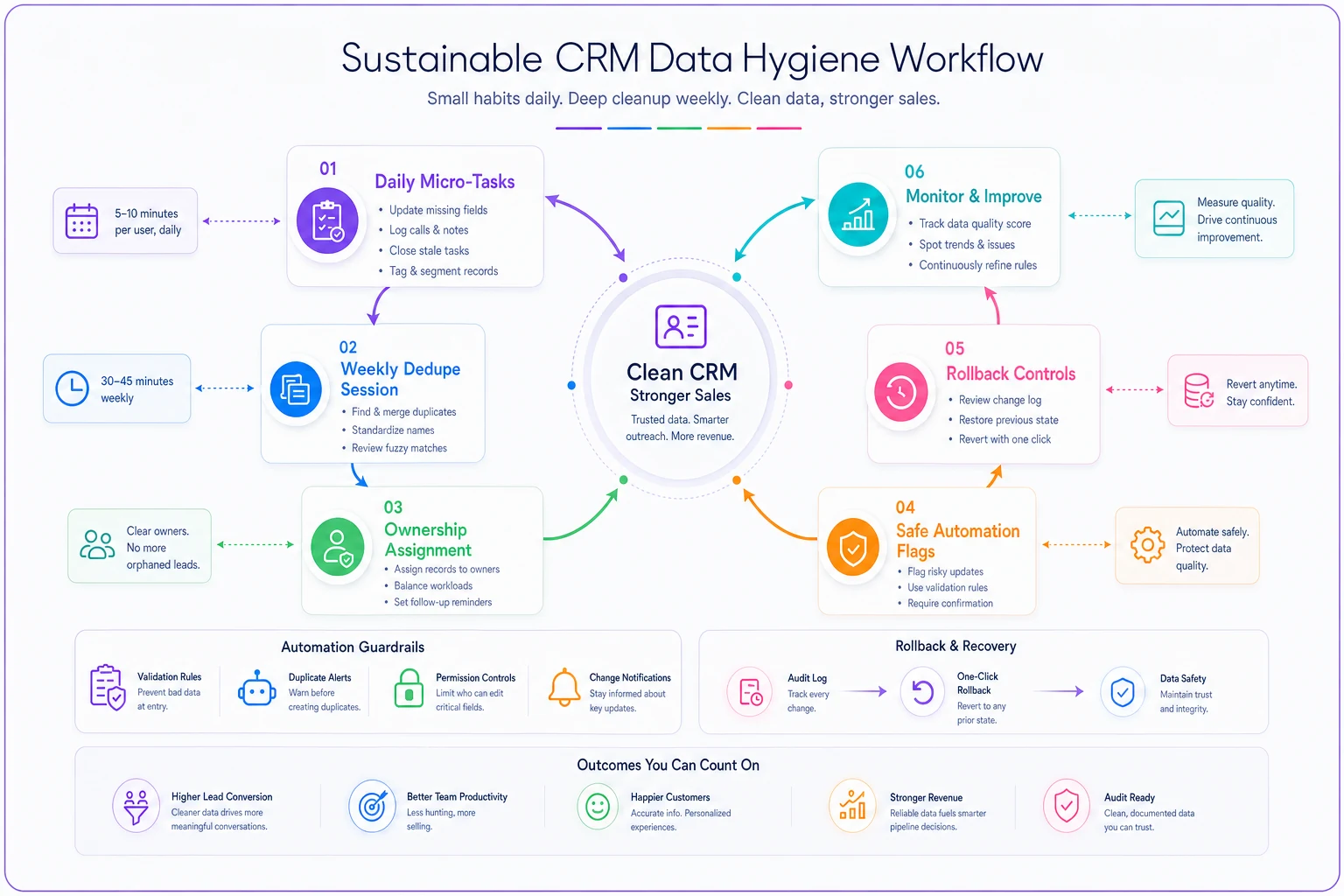
The visual maps the daily, weekly, and rollback steps into a single flow so teams can follow the routine without overthinking it.
Low-Cost Automation Without the Risks
SMB teams need automation but can't afford expensive data quality tools or the disasters that come from over-automating things. Here's what actually works without breaking anything.
Safe Deduplication Rules
Never auto-merge records. Flag potential duplicates for human review using these conservative rules:
-
Same email domain + similar first name = flag for review
-
Same phone number (last 7 digits) = flag for review
-
Same company name (normalized, ignoring Inc/LLC) + same city = flag for review
These rules catch the majority of duplicates without false positives. More aggressive matching creates merge disasters that can take weeks to untangle.
Data Enrichment on a Budget
Skip the expensive enrichment platforms. Use these free or near-free approaches instead:
-
Email validation Run new emails through a basic syntax checker (free tools exist)
-
Company standardization Use a simple lookup table to standardize company names (IBM vs International Business Machines)
-
Title normalization Map common title variations to standard roles (VP Sales = Vice President of Sales)
These three automations fix a large chunk of data quality issues for under $50 a month in tools.
Automated Flags, Not Automated Fixes
Instead of auto-correcting data, create automated flags that prompt human review:
-
Deal amount increased by >50% without a logged meeting = flag
-
Contact hasn't responded in 30 days but deal shows active = flag
-
New contact added to a late-stage deal = flag
-
Deal pushed more than twice = flag
These flags surface problems while they're still fixable, not after they've already corrupted your forecast.
Rollback Controls and Damage Prevention
Every data hygiene system needs an undo button. Without rollback controls, one bad import or merge can wipe out months of work.
The Three-Layer Backup System
Layer 1: Daily exports Every morning at 2am, export all CRM data to CSV. Keep 30 days of backups. This costs nothing and saves everything.
Layer 2: Change logs Track who changed what field and when. Most CRMs have this built-in but turned off. Turn it on for critical fields: deal amount, close date, stage, and account owner.
Layer 3: Pre-merge snapshots Before any bulk operation—import, mass update, deduplication—export the affected records. Name the file with the date and operation type. Takes 30 seconds, prevents hours of cleanup.
The Rollback Decision Matrix
Not every mistake needs a rollback. Use this to decide:
| Impact | Records Affected | Action |
|---|---|---|
| Critical field (owner, amount) | <10 | Manual fix |
| Critical field | 10–100 | Partial rollback |
| Critical field | >100 | Full rollback |
| Non-critical field | <100 | Manual fix |
| Non-critical field | >100 | Evaluate impact, usually ignore |
This prevents both over-reaction and under-reaction to data issues.
Always test bulk operations on a small sample first.
Every data hygiene system needs an undo button. Without rollback controls, one bad import or merge can wipe out months of work.
Implementation Timeline for Resource-Constrained Teams
Don't try implementing everything at once. Here's a realistic 30-day rollout for teams with limited bandwidth:
Week 1: Stop the bleeding
-
Implement daily exports
-
Create duplicate flag reports
-
Document ownership rules
Week 2: Build habits
-
Start morning data review ritual
-
Run first team dedupe session
-
Set up change tracking
Week 3: Add automation
-
Implement email validation
-
Create automated flag rules
-
Build company name standardization
Week 4: Optimize and maintain
-
Review what's working
-
Adjust flag thresholds
-
Create an ongoing maintenance schedule
Each week builds on the previous one. If you get stuck, pause and solidify what's working before adding more.
Measuring Success Without Complex Metrics
Forget complicated data quality scores. Track three numbers:
-
Forecast accuracy (Actual closed revenue / Forecasted revenue) x 100
-
Duplicate rate (Duplicate records identified / Total records) x 100
-
Time to first activity Average days from lead creation to first logged activity
If forecast accuracy stays above 75%, duplicate rate stays below 5%, and time to first activity stays under 2 days, your data hygiene is working. Don't overthink it.
The Weekly Maintenance Cadence
Monday: Check weekend data imports for issues (5 minutes) Wednesday: Run team dedupe session (15 minutes) Thursday: Review automated flags from the week (10 minutes) Friday: Export weekly backup and review change logs (5 minutes)
Total time investment: about 35 minutes per week to prevent hundreds of hours of cleanup and lost deals.
Common Pitfalls and How to Avoid Them
Pitfall 1: Over-engineering the solution Small teams don't need enterprise-grade data governance. A simple, consistent process beats a complex system nobody follows.
Pitfall 2: Punishment-based enforcement Shaming reps for bad data entry makes them hide problems, not fix them. Focus on making good data hygiene easier than bad habits.
Pitfall 3: Ignoring root causes If reps consistently enter bad data, ask why. Usually it's because the CRM requires too many fields or the process is too complicated.
Pitfall 4: Fixing symptoms, not systems Cleaning duplicate records without preventing new ones is like mopping with the faucet still running. Fix the source, not just the mess.
Building Your Playbook Document
Create a single source of truth for your CRM data hygiene process. Keep it as a living document that includes:
-
Ownership rules (1 page)
-
Daily/weekly task checklists (1 page)
-
Deduplication process (1 page)
-
Rollback procedures (1 page)
-
Emergency contacts (ops lead, CRM admin, backup owner)
Keep it under five pages total. Longer documents don't get read. Store it somewhere everyone can access—Google Docs, Notion, your wiki. Review and update it quarterly.
When AI-Powered Operational Software Makes Sense
Once basic data hygiene processes are running, AI automation can multiply their effectiveness without adding complexity. The key is starting with clean data and clear processes—AI can't fix fundamental data problems, but it can help prevent them from recurring.
Modern operational platforms use automation to catch data issues before they compound. Instead of manually checking for duplicates, these tools flag them instantly as records are created. Rather than hoping reps update deal stages, they can suggest updates based on email patterns and activity data. It's not about replacing human judgment—it's about surfacing issues while they're still easy to fix.
The better platforms for SMB teams combine simple workflows with intelligent automation. They'll automatically standardize company names, validate contact information, and flag unusual patterns without requiring complex setup. Think of it as having a data quality assistant who never misses a Monday morning but also never makes changes without permission.
Starting Tomorrow
Your CRM data won't fix itself, but it doesn't need to stay broken either.
Start with the morning data review ritual—three checks, four minutes. Do this for one week before adding anything else. Then pick one automation, probably duplicate flagging since it tends to have the highest return. Run your first 15-minute team dedupe session. Export your data before you change anything.
Within 30 days, forecast accuracy will improve. Reps will spend less time on administrative cleanup. Deals will stop falling through the cracks. Not because you bought expensive tools or hired consultants, but because you built a simple system and stuck to it. Bad CRM data isn't inevitable—it's the result of letting small habits slide until they become big problems. Fix the habits first, and the pipeline will follow.
Your CRM data won't fix itself, but it doesn't need to stay broken either.
Start with the morning data review ritual—three checks, four minutes. Do this for one week before adding anything else. Then pick one automation, probably duplicate flagging since it tends to have the highest return. Run your first 15-minute team dedupe session. Export your data before you change anything.
Ready to transform your customer relationships?
Join 2,000+ businesses using Rellyly to increase sales, improve client retention, and simplify CRM workflows.